
Digital Signage Rollout Checklist: Pilot, Waves and Sign-Off for Multi-Location Screens
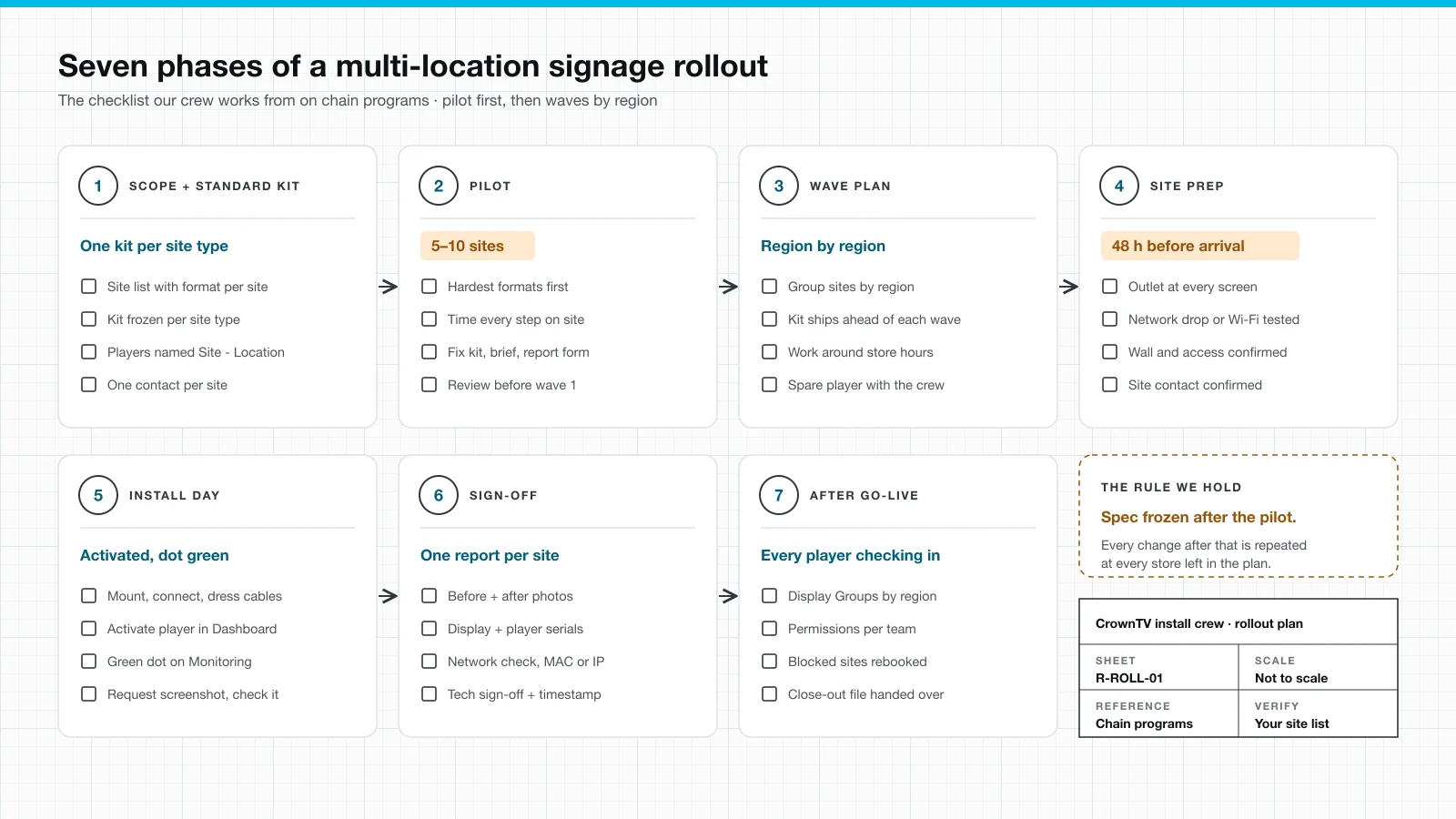
A digital signage rollout checklist for chains: one kit per site type, a 5–10 site pilot, regional waves, site prep, install day, per-site sign-off.
On this page
Reply within 2 business hours Ask a signage specialist Tap to open the quote form
Signage rollouts rarely fail at store one. They fail deep into the list, when a pilot mount meets a storefront nobody measured and the fix gets improvised at every store after it. This digital signage rollout checklist is how we prevent that: seven phases, a pilot that freezes the spec, and waves that put the kit on site before the crew.
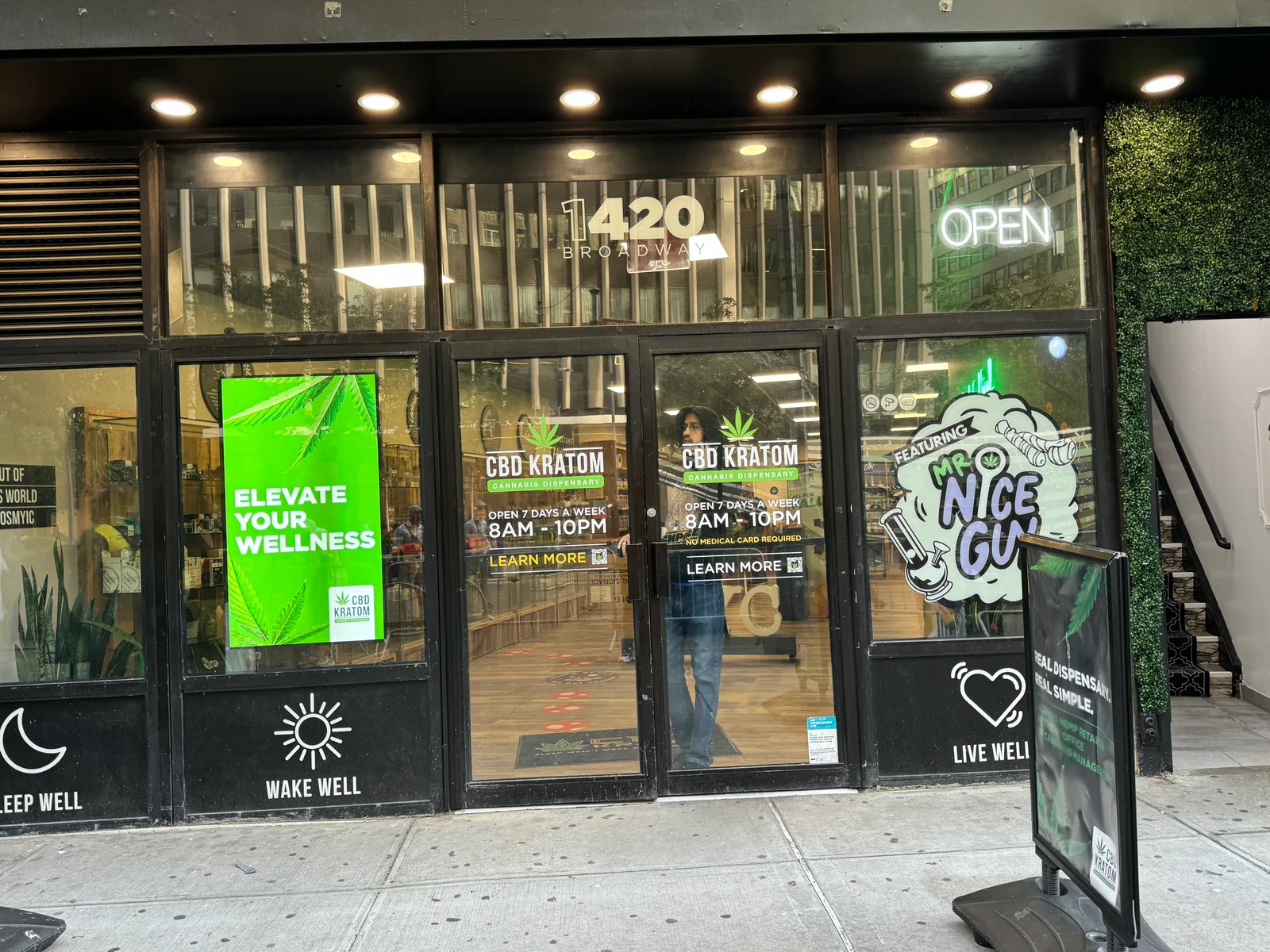
It comes from programs we run. CrownTV has deployed signage across 150+ L'Occitane boutiques in the US and Canada, 115+ Janie and Jack stores plus the London flagship, and 55+ CBD Kratom storefronts installed in under 10 days. Since 2012 we have deployed 10,000+ screens. If you want one contract for hardware, install and software across every site, that is our multi-location digital signage program. If you want to run it yourself, copy the checkboxes below.
The rollout checklist at a glance
| Phase | What gets decided | What you hold at the end |
|---|---|---|
| 1. Scope and standard kit | Store formats, one kit per format, player names, who approves content | A site list and a kit list |
| 2. Pilot | 5–10 of your hardest sites | A frozen spec, a crew brief, a report form |
| 3. Wave plan | Regions, order, install windows around store hours | A wave schedule with kit staged per wave |
| 4. Site prep | Go or no-go per site, 48 hours out | Confirmed contact, power, network and access |
| 5. Install day | Nothing new: the crew follows the brief | Player activated, green dot, screenshot checked |
| 6. Sign-off | Complete or blocked, per site | One report per site, rolled up per wave |
| 7. After go-live | Display Groups, permission tiers | A display list reconciled against the site list |
Phase 1: Scope and the standard kit
Start with the site list, not the screen. For each location, record the format (mall, street, flagship, outlet), the screen positions and who can let a crew in. Then design one kit per site type and stop there. Every extra kit is another chance for the wrong box to reach the wrong store.
L'Occitane runs three formats: flagships with 3×3 video walls, boutiques with 2×2 walls, and smaller stores with a single window or cash-wrap screen. That is three kits, not 150 custom designs. Janie and Jack runs up to six screens per store, two in the window and four inside, all fed by one CrownTV media player through an HDMI splitter. One player per store means one device to configure, ship and troubleshoot.
- ☐ Site list with address, format, screen positions and an on-site contact
- ☐ One standard kit per site type: display, mount, media player, cabling
- ☐ A power outlet at every screen position (we connect to it; we do not do high-voltage electrical work)
- ☐ Network plan per site: wired drop or Wi-Fi, and who owns it
- ☐ A naming rule for players before they ship, such as
Site - Location - ☐ Who approves content, and at which level: corporate, region or store
The naming rule matters because the Dashboard's display list filters by name and exports to CSV. Miami Store - SW Window tells you where a red screen is without a spreadsheet.
Phase 2: Pilot 5–10 sites before anything else
On programs of 20 sites or more, we pilot 5–10 first. Pick the hardest ones: the shallowest storefront, the oddest wall, the store with the weakest network. A pilot full of easy stores proves nothing.
The pilot exists to change things. On Janie and Jack, different mall storefront depths needed field adjustments in the first wave. Once we settled on three standard window-stand depths that covered every window we had seen, install time dropped. On CBD Kratom, we assembled mounts on site for the early stores. Pre-assembling the kit before it shipped cut on-site time per store. Both lessons are cheap at store five and expensive at store fifty.
- ☐ 5–10 sites, chosen for difficulty, not convenience
- ☐ Each step timed on site: unbox, mount, connect, activate, test
- ☐ Every improvised part written down
- ☐ Kit, crew brief and report form fixed
- ☐ Pilot review held, then the spec frozen
Phase 3: The wave plan
After the pilot, we group the remaining sites into waves by region. Each wave's kit is staged and shipped ahead, so it is on site before the crew arrives. The next wave's kit ships while the current wave installs. Sites that come back blocked go into a return-visit slot at the end instead of stalling a wave.
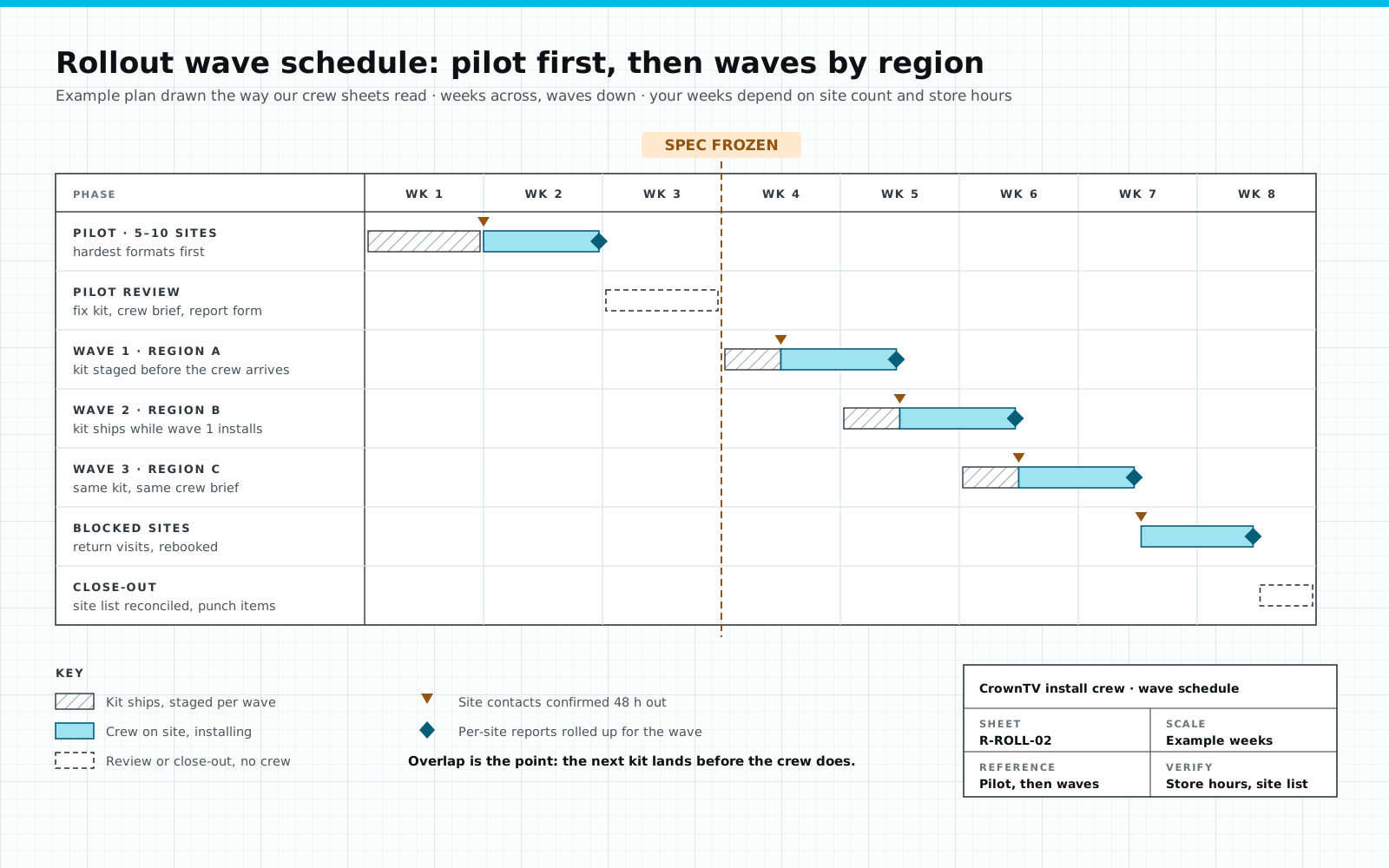
How long is a wave? That depends on uniformity more than headcount. CBD Kratom's 55+ stores were installed in under 10 days because every store took the same panel, mount, back cover and cabling, with no pre-install site survey. A fleet with three formats and mixed walls needs a pilot and more time per wave.
- ☐ Sites grouped by region, wave by wave
- ☐ Kit staged per wave and shipped ahead of the crew
- ☐ Install windows set around store hours: before open or after close
- ☐ A return-visit slot for blocked sites
- ☐ One point of contact on our side and one on yours
How this looks on a clinic network: Upperline Health
Upperline Health runs waiting-room screens across a multi-site clinic program, and we roll it out exactly this way: pilot clinics first, then one state at a time (Georgia was the first full wave, in September 2026). A few rules from that program carry over to any chain:
- One site code per clinic, on everything.
GA-03goes on the tracker row, the player name in the Dashboard, the label on the player and the box, the photo folder, the work order and the invoice line. Nobody ever has to match a street address to a box. - The survey decides the kit, clinic by clinic. A clinic with a working TV gets a media player only; a clinic without one gets a new 32″ or 43″ screen package. Anything ambiguous gets confirmed with the client before hardware is ordered.
- No outlet, no install. The outlet within about 5 feet of the screen is confirmed before a crew is booked. A clinic without one is held out of the wave instead of becoming a wasted truck roll.
- Routes, not one-offs. Installers get clinics grouped by drive time, two to four per tech per day, so every crew day covers several clinics instead of one.
- Close-out is photos plus playing content. Seven photos per clinic, never with patients in frame, and content has to be playing before the tech leaves.
Phase 4: Site prep, confirmed 48 hours out
Where store formats vary, we survey before kit ships, by walkthrough or photo survey: walls, electrical, network and viewing angles. Then we confirm each site contact 48 hours before arrival. If any line below is a no, the site moves to the return-visit slot now, not at 6 a.m. on install day.
- ☐ Site contact confirmed, with access instructions and a phone that answers
- ☐ A working outlet at every screen position (no outlet: your electrician adds one first)
- ☐ Network drop live, or Wi-Fi details ready for the player
- ☐ Wall as surveyed, with nothing new built in front of it
- ☐ Kit delivered and matched to the site list
Phase 5: Install day
Our digital signage installation process runs a standard single-screen site as survey day 1, kit day 3, install and sign-off day 5. On the day, the crew mounts, connects and dresses cables, then activates the player. A new player sits in the Dashboard as Deactivated until it is paired, so activation is part of the install, not a follow-up.
A screen showing a picture is not the same as a screen on the network. Before the crew leaves, someone checks the Monitoring page for a green dot on that display. Then they use Request screenshot to confirm the right content is playing.
- ☐ Mounted at the surveyed spot, cables dressed
- ☐ Player activated in the Dashboard
- ☐ Green dot on the Monitoring page
- ☐ Screenshot requested and checked against the planned content
- ☐ Site left clean, staff shown where the player sits
Phase 6: Sign-off per site
Every site closes with a report, not a text message. Each report carries before and after photos of the mounting location, display and player serial numbers, a network check (SSID or VLAN, IP or MAC), the technician's sign-off and a timestamp. Reports roll up per wave with one status column: scheduled, complete or blocked.
A blocked site gets a reason and a rebook date. If you own the screens and only need crews, our installation partner program runs the same pilot, wave and report loop.
- ☐ Before and after photos
- ☐ Display and player serial numbers
- ☐ Network check recorded
- ☐ Technician sign-off and timestamp
- ☐ Status set: scheduled, complete or blocked
Phase 7: After go-live
The rollout is done when every player checks in, not when the last crew drives away. In the CrownTV Dashboard we build Display Groups two ways: by location (city, region, building) and by role (window, cash wrap, lobby). A display can sit in several groups. A campaign can then go to every window screen, or every screen in one region, without picking displays one at a time.
Set permissions next. L'Occitane splits control three ways: IT owns infrastructure, central marketing owns brand campaigns, and store managers run local promotions on their own screens. Decide your tiers before go-live, not after the first wrong post.
Then close out: reconcile the site list against scope, clear punch items, and export the Dashboard's display list as CSV to check against what is on the walls.
- ☐ Display Groups built by location and by role
- ☐ Permission tiers set per team
- ☐ Display list exported and reconciled against the site list
- ☐ Blocked sites rebooked with dates
- ☐ A named person owns the daily Monitoring check
FAQ
How many sites should a digital signage pilot include?
On programs of 20 sites or more we pilot 5–10 sites first, chosen for difficulty: the shallowest storefront, the oddest wall, the weakest network. The pilot sets the kit, the crew brief and the report form that every later wave inherits. On Janie and Jack, first-wave storefront depths needed field adjustments until we settled on three standard window-stand depths.
How long does a multi-location digital signage rollout take?
It depends on how uniform the fleet is. CBD Kratom's 55+ stores were installed in under 10 days on one identical kit; mixed formats need a pilot and more time per wave. A single turnkey order is typically installed within 5–7 business days of the paid invoice.
Do we need a site survey at every location?
Not always. Where store formats vary, we survey before kit ships, by walkthrough or photo survey covering walls, electrical, network and viewing angles. Where every store takes the same kit and the mount flexes across the variations, the survey can be skipped. CBD Kratom ran with no pre-install site survey for that reason.
What should the installer hand back for each site?
A per-site report: before and after photos of the mounting location, display and player serial numbers, a network check (SSID or VLAN, IP or MAC), the technician's sign-off and a timestamp. Reports roll up per wave with one status column: scheduled, complete or blocked.
Who handles electrical work at each store?
A power outlet is required at each screen position. Our crew makes the clean connection to that outlet, but we do not do high-voltage electrical work. If a wall has no outlet, your electrician adds it before that site's wave, and the site stays off the schedule until it is done.
Can we include stores that already have screens?
Often, yes. A working commercial display gets a pre-configured CrownTV media player that plugs in and joins the same Dashboard as the new screens. A consumer-grade or failing screen should be replaced with a commercial panel rated for all-day use.
What results look like
Retail
L'Occitane en Provence
150+boutiques
L'Occitane needed one content platform across its entire North American footprint — 150+ boutiques in the United States and Canada — with control split between IT, central marketing, and…
Read the case study →Retail
Janie and Jack
Janie and Jack runs 115+ US stores plus a London flagship and wanted every store to open on the same synchronized moment. CrownTV installed up to six screens per store — two Samsung…
Read the case study →Retail
Victoria's Secret & PINK — Fifth Avenue
15screens
For the 24,000 sq ft Victoria's Secret + PINK flagship at 640 Fifth Avenue, CrownTV designed and installed 15 Samsung commercial displays — 98-inch QM98 panels paired with 85-inch QM85C…
Read the case study →Keep reading
More guides like this
Operator-grade playbooks, weekly.
Proof, not pitches
See real installs
Live deployments across hospitality, retail, and offices.
Ready to deploy?
Get a quote in 2 business hours
Reply within two business hours. No call required.