
Digital Signage Site Survey: What Our Crew Checks Before Install Day
A digital signage site survey checks sightlines, light, wall type, mount height, power, network and glass. Here is the sheet our crew fills in.
On this page
Reply within 2 business hours Ask a signage specialist Tap to open the quote form
A digital signage site survey answers one question before any hardware ships: will this screen work on this wall, in this light, with this power and this network? At CrownTV it is step one of five. On a standard single-screen job, the survey is day 1, the kit ships day 3, and install and sign-off happen day 5. Below is the sheet our crew fills in, line by line, with the rules behind each line.
Why the survey comes first
We have inherited dozens of half-finished installs from other vendors. The same five failures keep showing up: no survey, consumer TVs running 24/7, screens too dim for a sunny window, players on the guest Wi-Fi VLAN, and nobody owning the screens after launch. The survey alone catches the first three.
It also decides the parts list. A metal-stud wall needs different anchors from brick. A missing outlet means an electrician, booked before our crew arrives. Find either on install day and you lose the day.
What we check on survey day
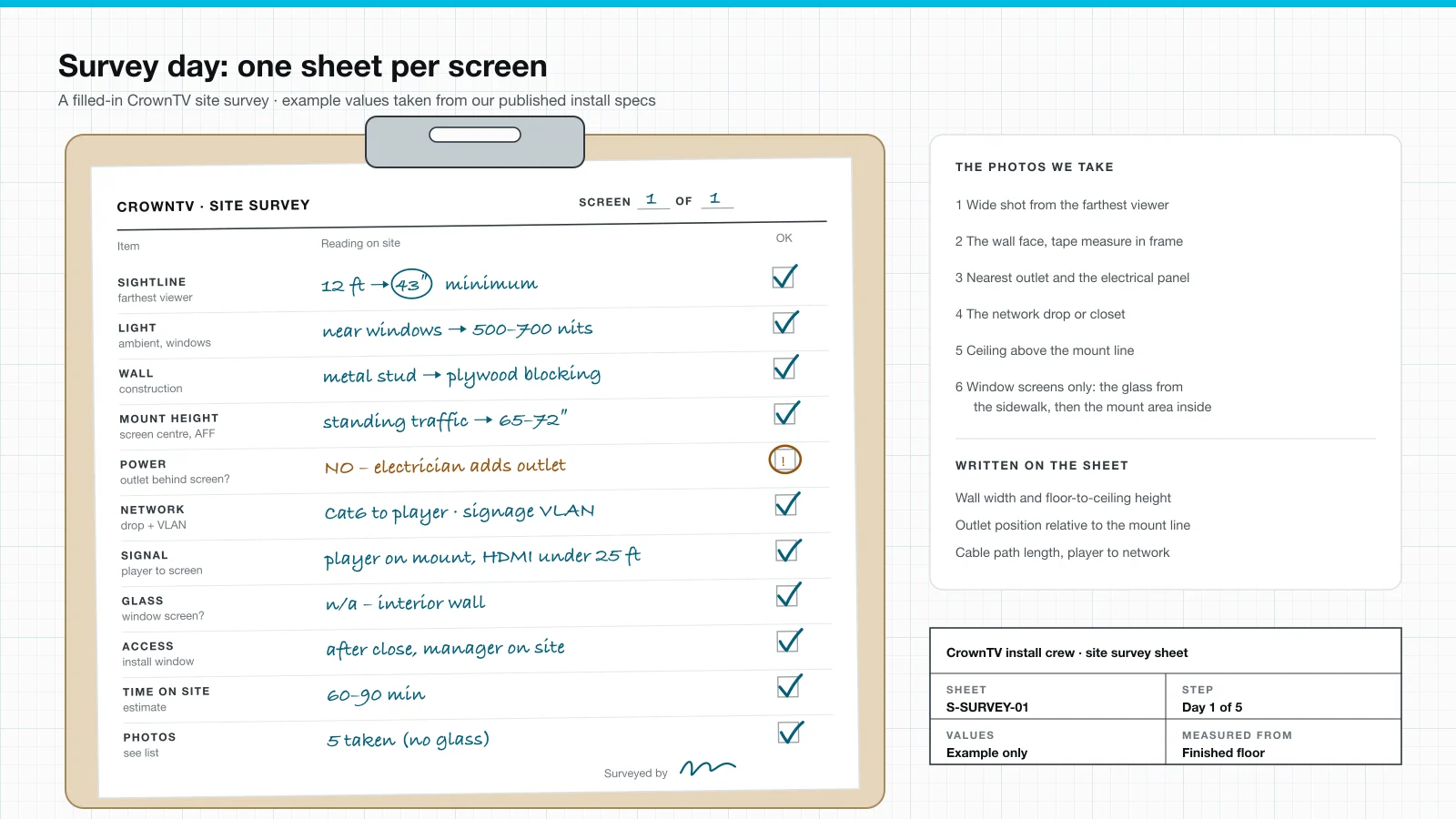
Every row on the sheet maps to a published spec. These are the same numbers on our digital signage installation page, so the survey and the install never disagree.
| Item | What we measure | The rule we apply |
|---|---|---|
| Sightline | Distance from the screen to the farthest viewer | A 12-foot sightline wants at least 43″; a 25-foot lobby wants 65″ or larger |
| Light | Room light and any window glare at screen height | 300–400 nits for normal indoor light, 500–700 near windows or in bright atriums, 2,500+ facing a window or outdoors |
| Wall | Construction behind the mount line | Wood stud: lag into the stud. Metal stud: rated snap-toggles or plywood blocking. Masonry: sleeve anchors. Glass: never |
| Mount height | Who looks at it, seated or walking | Screen center 60–65″ for seated viewers, 65–72″ for standing and walking traffic; anything higher gets a 5–10° downward tilt |
| Power | Outlet behind the screen, yes or no | A dedicated outlet behind the screen, added by a licensed electrician when missing |
| Network | Where the nearest drop is, and which VLAN | Wired Ethernet to the player whenever we can pull Cat6; never the guest Wi-Fi VLAN |
| Signal | Distance from player to screen | HDMI up to ~25 feet, HDMI-over-Cat6 beyond, fiber HDMI past 100 feet |
| Glass | Window screens only: tint, glare, sun, cavity depth | Floor stand or ceiling mount behind the glass |
| Access | Hours, building rules, who lets us in | Install scheduled around your operating hours |
| Time on site | Screens, wall type, player count | 60–90 minutes per screen on clean drywall; masonry adds 30–60 minutes per panel |
Sightlines and size
We stand where the farthest viewer stands and measure back to the wall. That one number picks the minimum size: 12 feet wants at least a 43″ screen, 25 feet wants 65″ or larger. Bigger is fine. Smaller means people squint, then stop looking.
Light and brightness
A screen that looks great at 9 a.m. can wash out at noon. We note every window that hits the screen face and pick the nit class from it. Our packages use 500-nit commercial displays, which cover normal rooms and spots near windows. A screen that faces out through glass is a different product.
Wall type and blocking
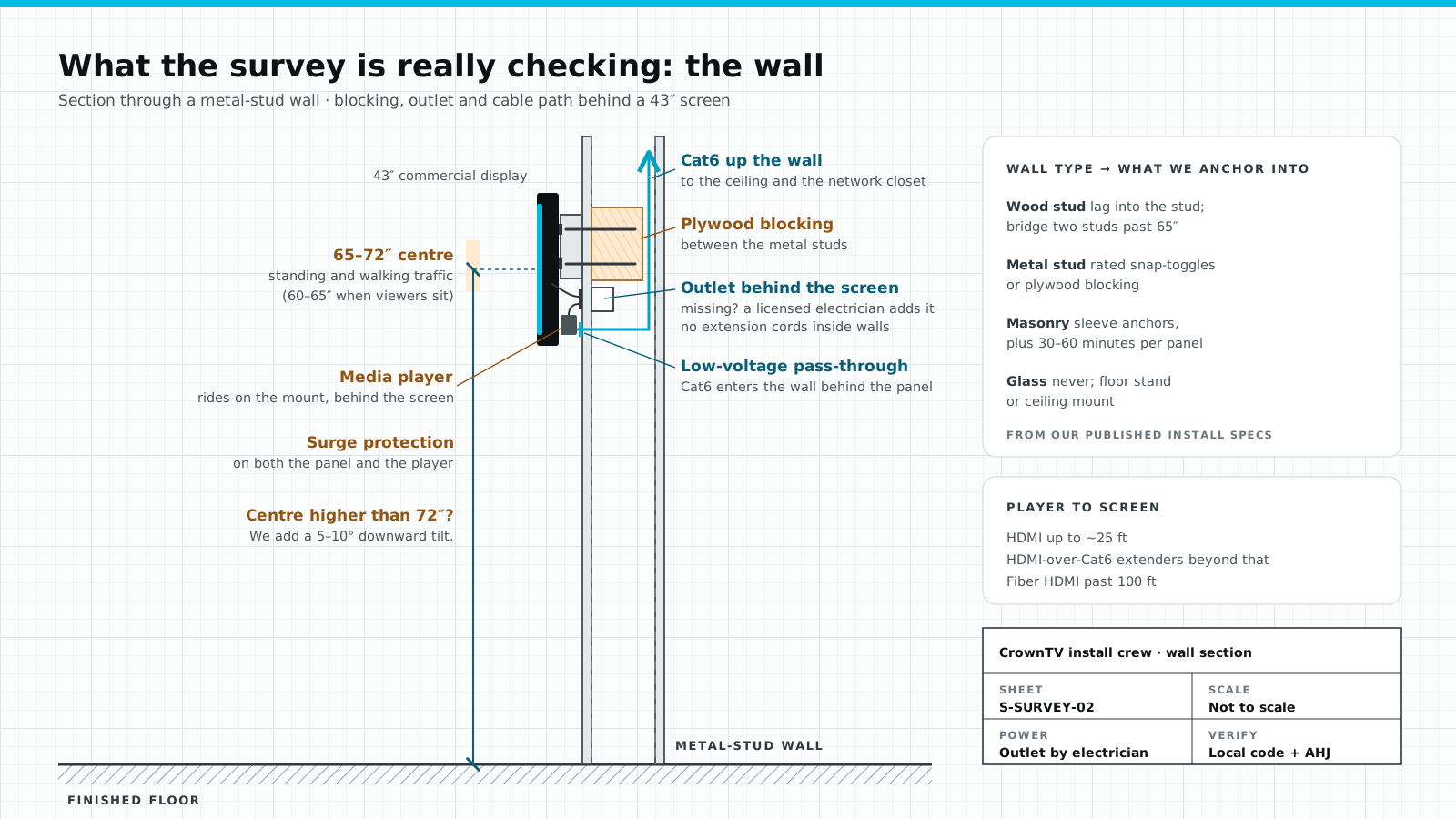
This is the line that changes the install the most, so we confirm what is behind the mount line before anything else. Wood studs take lags, and we bridge two studs past 65″. Metal studs need rated snap-toggles or plywood blocking between the studs. Masonry takes sleeve anchors and adds 30–60 minutes per panel. Glass never gets drilled.
Power: the outlet behind the screen
A power outlet is required at each screen, and we do not do high-voltage electrical work. If there is no outlet behind the screen, the survey sheet flags it, and a licensed electrician adds a dedicated one first. No extension cords inside walls. Surge protection goes on both the panel and the player.
Network: the drop and the VLAN
The player wants wired Ethernet, so we look for the nearest drop and ask IT two questions. Can we pull Cat6 to the screen? Which VLAN does signage live on? It should not be the guest Wi-Fi. We also capture the player's MAC address for IT, so the network is ready when we arrive.
Window screens: the glass survey
Storefront screens get extra lines on the sheet. Glass turns the window bay into a greenhouse, and reflections only lose to brightness. In-window screens in direct sun want 3,000 nits, which is why most of our storefront quotes land on the Samsung OM55B. We note the tint, which hours the sun hits, and how deep the cavity is between the glass and the floor display.
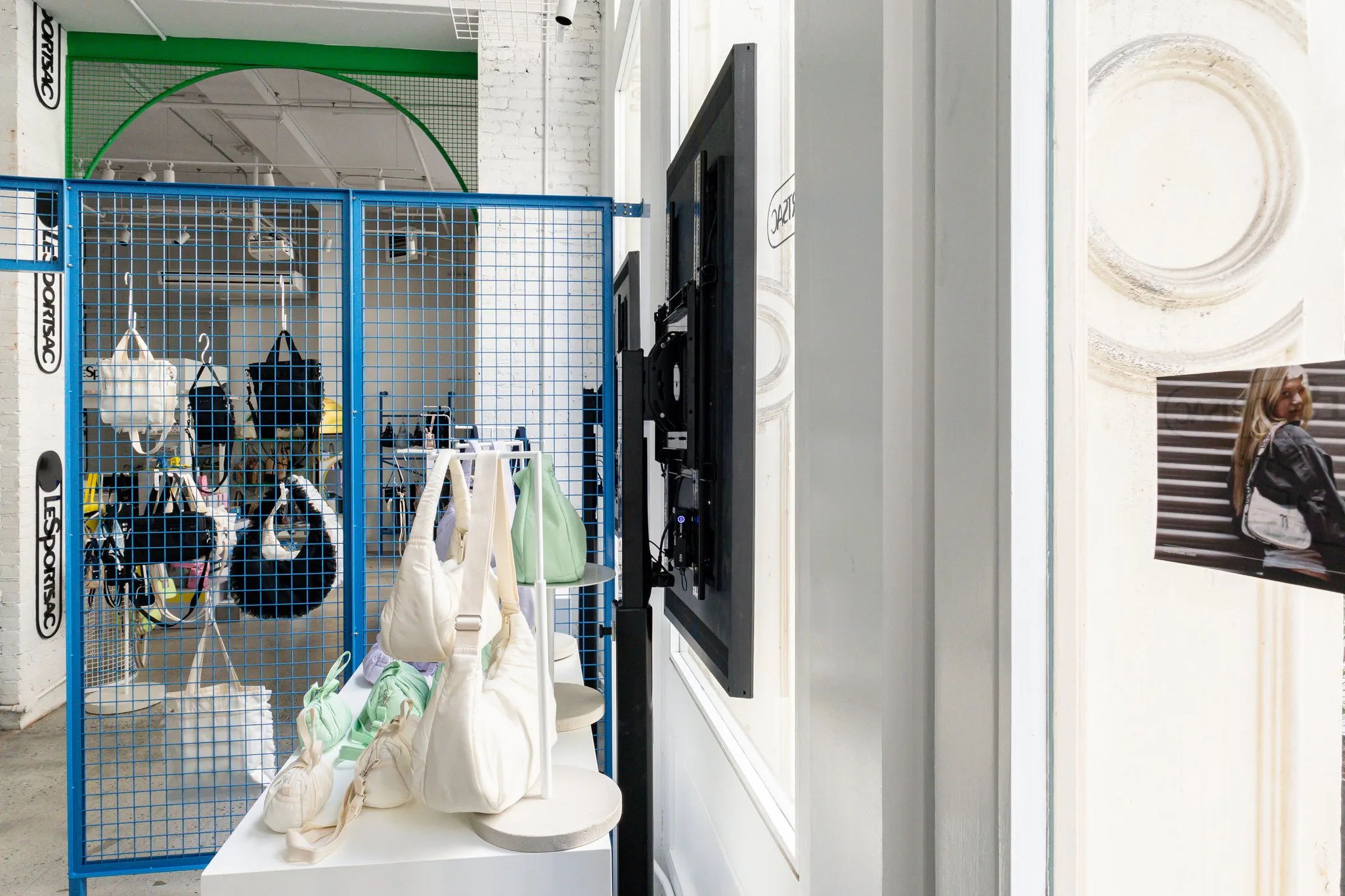
At LeSportsac on Greene Street, the two 3,000-nit Samsung OM55B window displays and the 98″ interior screen went in during a single after-hours session, so the store never closed. That schedule was decided on the survey, not on the day. See our storefront window displays for the package.

The photos and measurements we take
Every survey leaves with photos, so the person kitting the install never has to guess:
- A wide shot from the farthest viewer.
- The wall face, with a tape measure in frame.
- The nearest outlet and the electrical panel.
- The network drop or closet.
- The ceiling above the mount line.
- Window screens only: the glass from the sidewalk, then the mount area inside.
On the sheet itself we write the wall width and floor-to-ceiling height, where the outlet sits against the mount line, and the cable length from player to network. Want to speed things up? Send the same photos with your request on our quote form. Photos help us price faster.
From survey to sign-off
The survey is step one of five: survey, hardware, mounting, configuration, sign-off. Before the crew leaves, every screen passes the same check. The panel powers on from the wall outlet. The player restarts content after a power cycle. Content renders at native resolution. The Dashboard can reach the player, the schedule plays the right content, and your team can push an update alone.
On our installed packages, hardware ships and is installed within 5–7 business days of the paid invoice. Samsung's 3-year commercial warranty covers every display.
Survey at scale: the clinic version
On a multi-site program the survey is often a short form each site fills in, then checked by us. For Upperline Health's clinic rollout, every clinic's answers sort it into one of two kits before anything ships: a media player only, when there is a working TV with a free HDMI input, or a new 32″ or 43″ screen package when there isn't. The same form flags the blockers early (no outlet within about 5 feet, an old TV that has to come down, dates that have already passed) so they are fixed or held out of the wave instead of discovered by the installer.
When we skip the survey
Sometimes the right survey is none. CBD Kratom wanted the same storefront screen in 55+ stores. We built one standard kit and mount that fit every store layout, and the full fleet was installed in under 10 days with no per-store pre-install survey. Rollouts like that run through our installation partner program for multi-site rollouts: survey and pilot the first wave, lock the kit, then repeat it.
One-off rooms are the opposite. A lobby with a curved wall, a clinic with metal studs, a window that faces south: those get a survey every time.
FAQ
What is a digital signage site survey?
It is the check that happens before any hardware ships: a walkthrough or a photo survey of the walls, power, network and viewing angles at each screen location. It sets the screen size, brightness class, mount and anchors, and it tells us whether an electrician or IT needs to do anything first. At CrownTV it is step one of five.
How soon after the survey is the screen installed?
On a standard single-screen job the survey is day 1, the kit ships day 3, and install and sign-off happen day 5. Multi-location rollouts get the same five steps, staged across the fleet. If an electrician has to add an outlet, that work is booked before install day.
Do I need a site survey for every location?
Not always. When every store has the same window and the same mount, a standard kit can skip per-store surveys: CBD Kratom's 55-store storefront program was installed in under 10 days with no pre-install site survey. One-off rooms, unusual walls and anything near glass still get one.
Does CrownTV add power outlets?
No. A power outlet is required at each screen location, and we do not do high-voltage electrical work. If the survey finds no outlet behind the screen, a licensed electrician adds one before install day. We never run extension cords inside walls.
What should I send before the survey?
A wide photo of each wall from where viewers stand, a close photo of the mount area, the nearest outlet, and the network drop or closet. For window screens, add an outside photo looking at the window, an inside photo of the mount area, and notes on direct sun. Include your city and the number of locations.
Book a survey
Tell us how many screens, where they go, and what the walls are made of. A project lead replies within two business hours with a per-screen price. Request a site survey and quote.
Keep reading
More guides like this
Operator-grade playbooks, weekly.
Proof, not pitches
See real installs
Live deployments across hospitality, retail, and offices.
Ready to deploy?
Get a quote in 2 business hours
Reply within two business hours. No call required.