Banks & credit unions

Bank & credit union digital signage, installed branch by branch.

Rate board, teller line, window, drive-up. We survey it, supply it, hang it and run it. One company.

  • APY-ready rate boards
  • Pilot branch, then waves
  • 4.9★ on Google (267+ reviews)
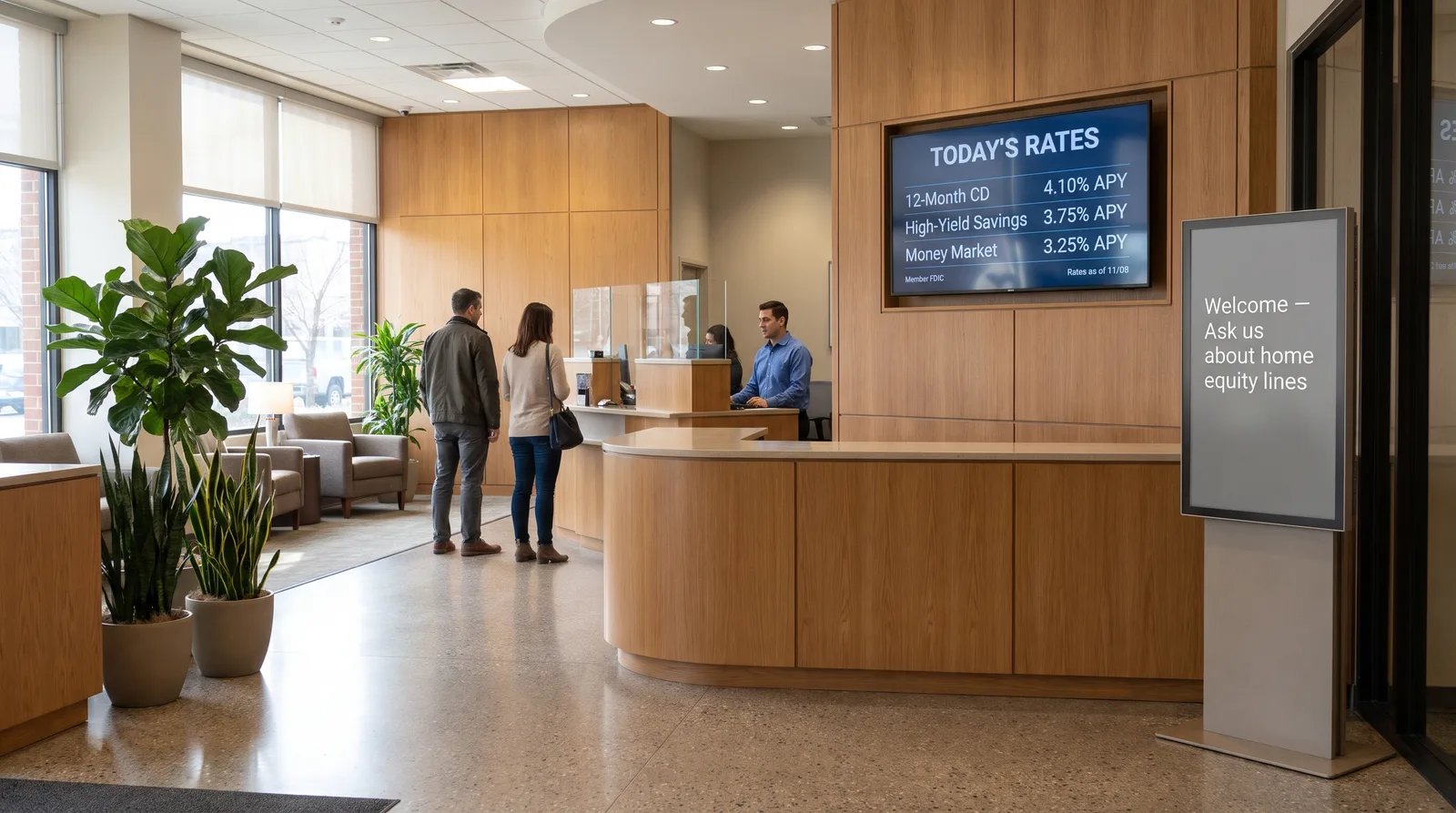
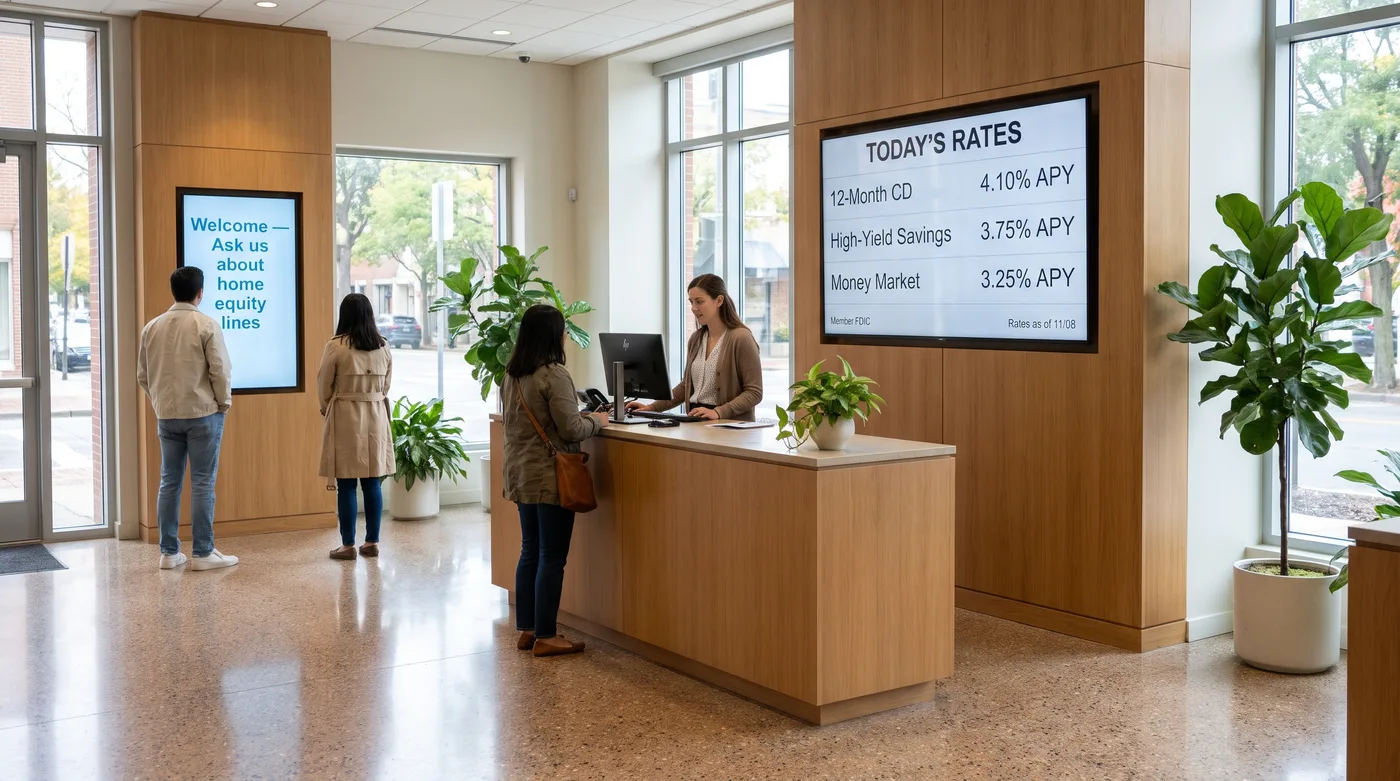
Illustration of a bank branch lobby with a landscape rate board above the teller counter and a portrait welcome screen near the door
Illustration, not a client photo: a typical branch lobby with a rate board over the teller line and a portrait screen by the door.

What is bank digital signage?

Commercial screens in a branch, each on its own media player, all run from one content platform: a rate board in the lobby, now-serving and product screens at the teller line, explainers in the offices, and sometimes a window or drive-up screen. Most vendors sell one layer of that. CrownTV does all of it, branch by branch.

  • 10,000+screens installed since 2012
  • 16,000+running on our Dashboard
  • 4.9★267+ Google reviews
A walk through the branch

Digital signage for banks, screen by screen.

Our survey sketch of a typical branch. Five spots, five jobs. Most branches use three or four. Tap a spot on the plan.

Installer plan view of a bank branch with five screen positions: 1 window screen behind the storefront glass, 2 rate board behind the teller line, 3 teller-line screen over the queue, 4 office-wall screen facing the waiting seats, 5 optional drive-up lane screen SHEET B-BR-01 · NOT TO SCALE STOREFRONT GLASS ENTRY SIDEWALK STAFF SIDE TELLER LINE · 4 STATIONS QUEUE WAITING OFFICE OFFICE ATM DRIVE-UP teller window 1 2 3 4 5
Our survey sketch, not to scale. Your floor plan sets the real positions and sizes. Nothing is fixed to the glass, and the outlet at each screen is on your side.
  1. Window screen

    55" portrait · 3,000 nits

    On the screen

    Hours and this month's offer, for people walking past.

    Floor stand or ceiling mount behind the glass. Never on the window itself.

    What we handle

    • SurveyWindow depth and the nearest outlet
    • SourcingSamsung OM55B, bright enough for daylight
    • MountFloor stand or ceiling mount, behind the glass
    • InstallLicensed, insured tech
    • SoftwarePlaylist scheduled to branch hours

    From $3,950 per window, installed Window displays →

  2. Lobby rate board

    55" landscape · 500 nits

    On the screen

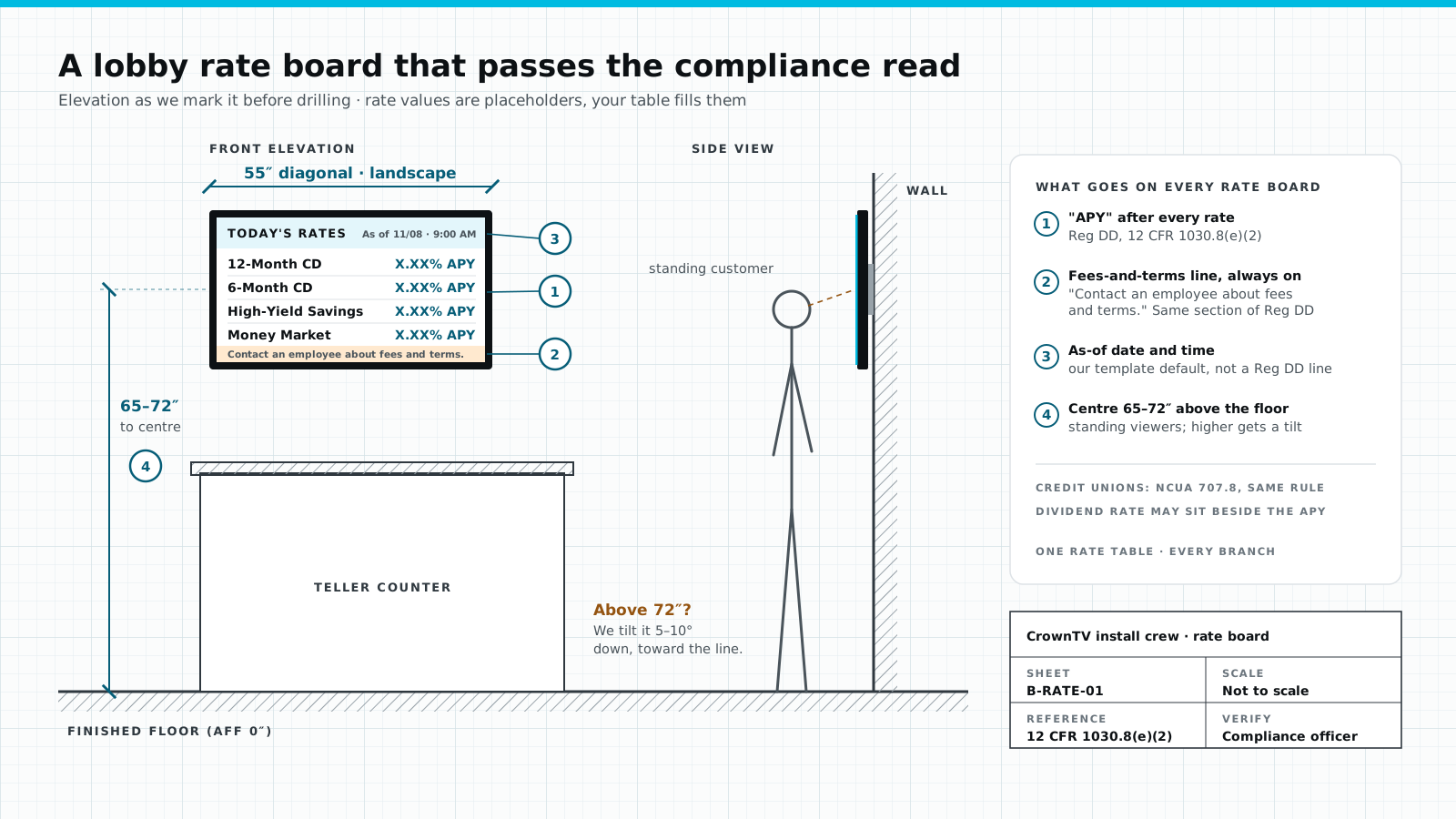
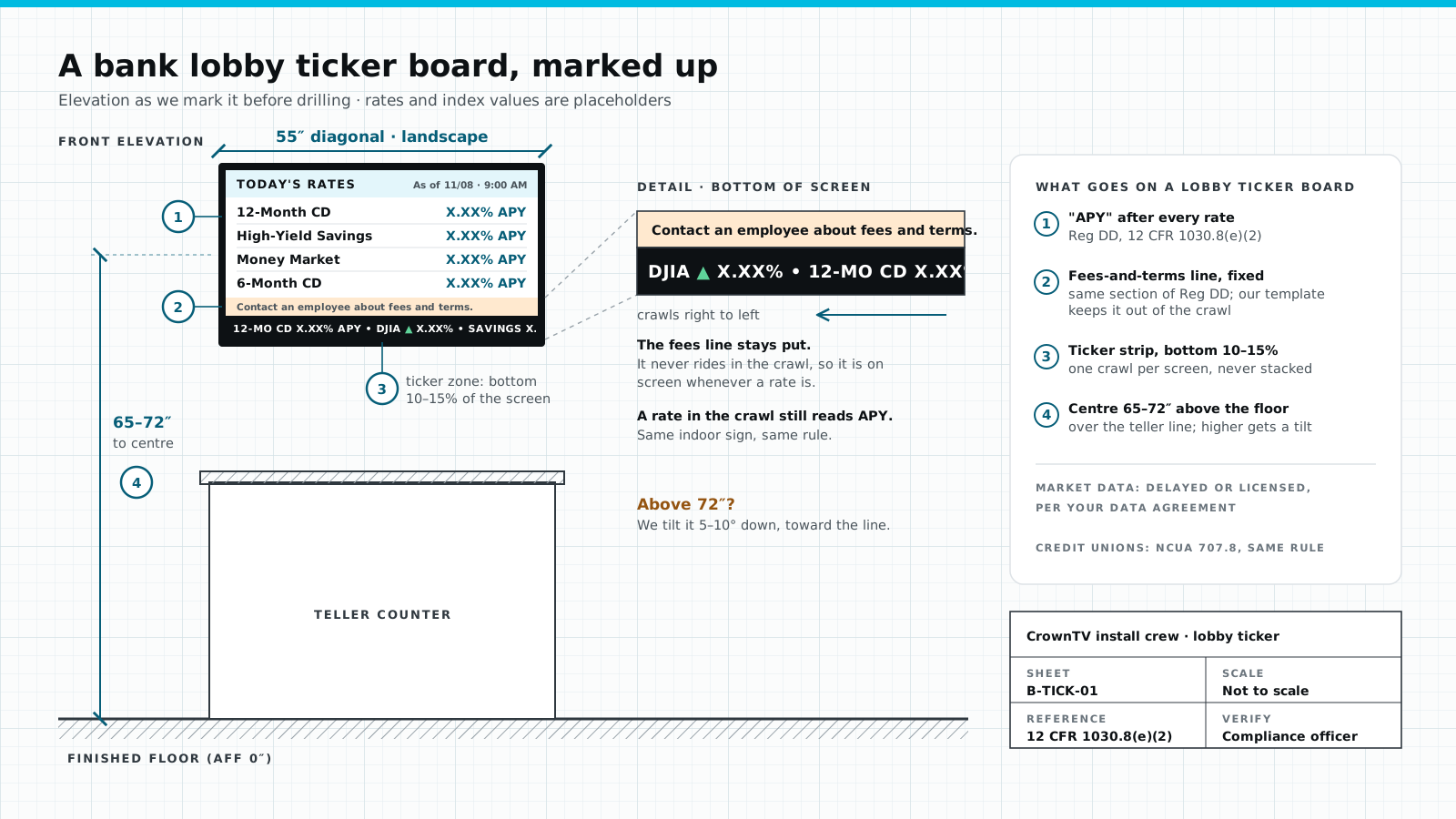
    Your rate table. APY after every rate, the fees-and-terms line, an as-of time.

    Behind the teller line, centre 65–72″ off the floor. Higher than that, we tilt it 5–10° down.

    What we handle

    • SurveyWall behind the tellers, sightline from the door
    • SourcingSamsung commercial 55″, 3-year warranty
    • MountFixed or tilt, set to the 65–72″ centre
    • InstallContent playing before the tech leaves
    • SoftwareOne rate table, pushed to every branch

    From $3,450 installed Test a rate board →

  3. Teller-line queue screen

    43" landscape · over the queue

    On the screen

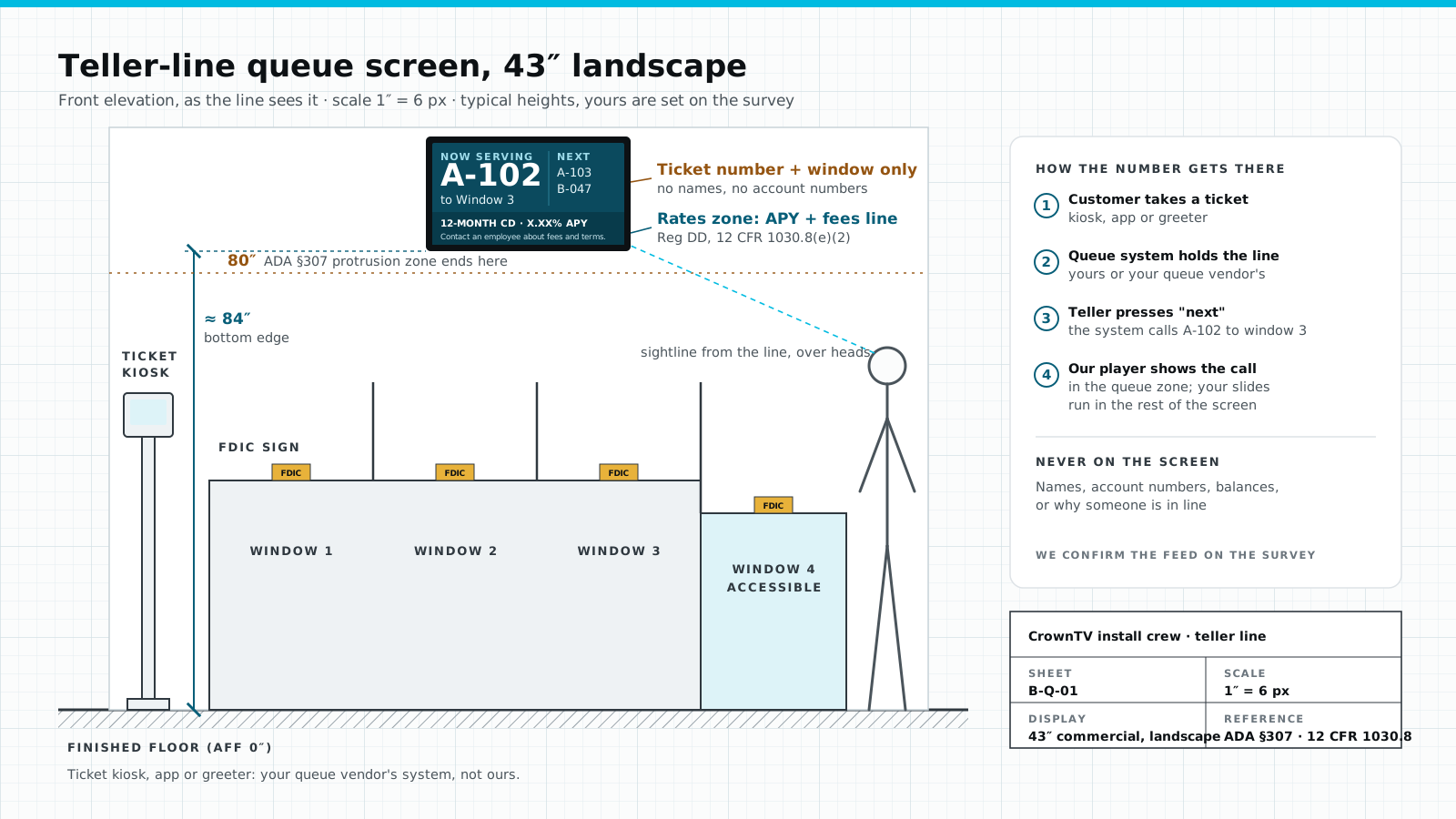
    Now-serving numbers from your queue system, plus product messages. People stand still here for a few minutes.

    On the wall the line faces. It shows the queue; your queue system runs it.

    What we handle

    • SurveyWhere the line forms and which way it faces
    • SourcingSamsung commercial 43″
    • MountFixed or tilt, sized to the panel
    • InstallLicensed, insured tech, GPS check-in
    • SoftwareProduct playlist between the numbers

    From $3,150 installed

  4. Offices & waiting

    43" landscape · seated viewers

    On the screen

    Loan and account explainers, community news, sponsorships.

    Lower than the rate board, because people are sitting down.

    What we handle

    • SurveySeat positions and wall type
    • SourcingSamsung commercial 43″
    • MountLower centre, for seated eyes
    • InstallPhoto close-out before the tech leaves
    • SoftwareLonger explainers; member news for credit unions

    From $3,150 installed

  5. Drive-up lane

    Outdoor-rated · optional

    On the screen

    Offers and hours for the lane, before the teller window.

    On a pedestal in the lane, facing the cars. Size and brightness are set on the survey.

    What we handle

    • SurveyWe see the lane before we quote
    • SourcingOutdoor-rated display, picked for the lane
    • MountPedestal, sized on the survey
    • InstallScheduled around lane hours
    • SoftwareSame Dashboard as the lobby screens

    Quoted per site, after the survey

Digital rate boards

Will this rate board pass?

A bank lobby display that shows a rate is a regulated sign. Two lines decide it. Flip the switches and watch the checklist.

Today's rates As of 11/08 · 9:00 AM
  • 12-Month CD X.XX% APY
  • 6-Month CD X.XX% APY
  • High-Yield Savings Dividend X.XX% · X.XX% APY
  • Money Market Dividend X.XX% · X.XX% APY

Contact an employee about fees and terms.

Sample board · X.XX% values are placeholders

Build the board

Both Reg DD lines are on this board. Send it to compliance.

  • Every rate stated as APYPresent.12 CFR 1030.8(e)(2)
  • "Contact an employee about fees and terms"Present.12 CFR 1030.8(e)(2)
  • As-of timeCrownTV template default, not a Reg DD line
Installer elevation of a 55 inch rate board above a teller counter: APY after every rate, a contact an employee about fees and terms line along the bottom, an as-of date and time in the header, and the screen centre 65 to 72 inches above the floor
How the same board is marked on the wall: centre 65–72″ off the floor, tilted 5–10° if it has to go higher.
  • One table, every branch. Edit the rate table once in the Dashboard and it goes to every branch.
  • Credit unions: same rule under NCUA 707.8. The dividend rate may sit beside the APY.
  • Want a crawl under the rates? The fees line stays fixed; the ticker moves. Bank lobby ticker board
What we do best

One company, the whole branch job.

Seven stages from the first visit to the next branch. Most banking digital signage vendors sell one of them.

0 of 7 stages left to your team

  1. 01

    Survey

    CrownTV

    We walk each branch, or work from photos. The survey decides the kit.

    On your team

    Not offered. Your facilities team measures every wall.

    Sheet B-BR-01 ↗
  2. 02

    Screen sourced

    CrownTV

    Samsung commercial display, 3-year commercial warranty, labelled with the branch code.

    On your team

    You buy the screens and check they are commercial-rated.

  3. 03

    Mount fit

    CrownTV

    Wall type, height and tilt checked. Window screens stand behind the glass, never on it.

    On your team

    You pick mounts and match them to each wall.

    Sheet B-RATE-01 ↗
  4. 04

    Install

    CrownTV

    Licensed, insured technicians on clustered routes. GPS check-in on arrival.

    On your team

    You hire and schedule installers, branch by branch.

  5. 05

    Player + software

    CrownTV

    Player set up in our Dashboard before it ships. Software, plus content design on request.

    Partly on you

    Software, yes. The player is often yours to buy and set up.

  6. 06

    Monitoring

    CrownTV

    Offline alerts, a reply within 2 business hours, 48-hour media-player swaps.

    Partly on you

    Alerts, but nobody to send to the branch.

  7. 07

    Next branch in the wave

    CrownTV

    Pilot first, then regional waves. Photo close-out on every branch.

    On your team

    You coordinate each branch yourself.

    Sheet B-ROLL-01 ↗

One invoice, one contact. "Software-only vendor" is a general category; individual vendors vary. Comparing named providers? Read our shortlist of the best digital signage for banks and credit unions.

Branch-network rollout

Credit union and bank signage across every branch.

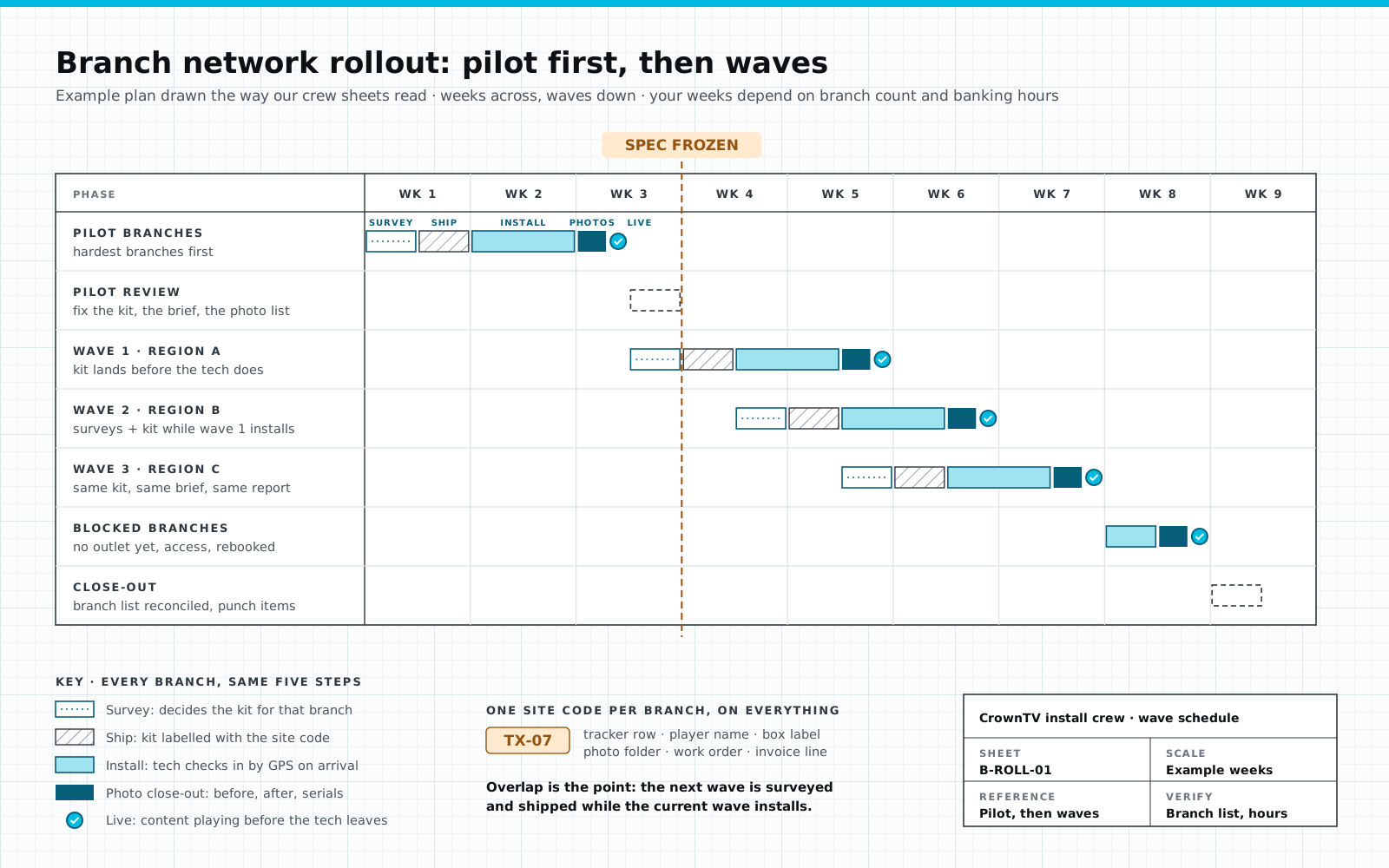
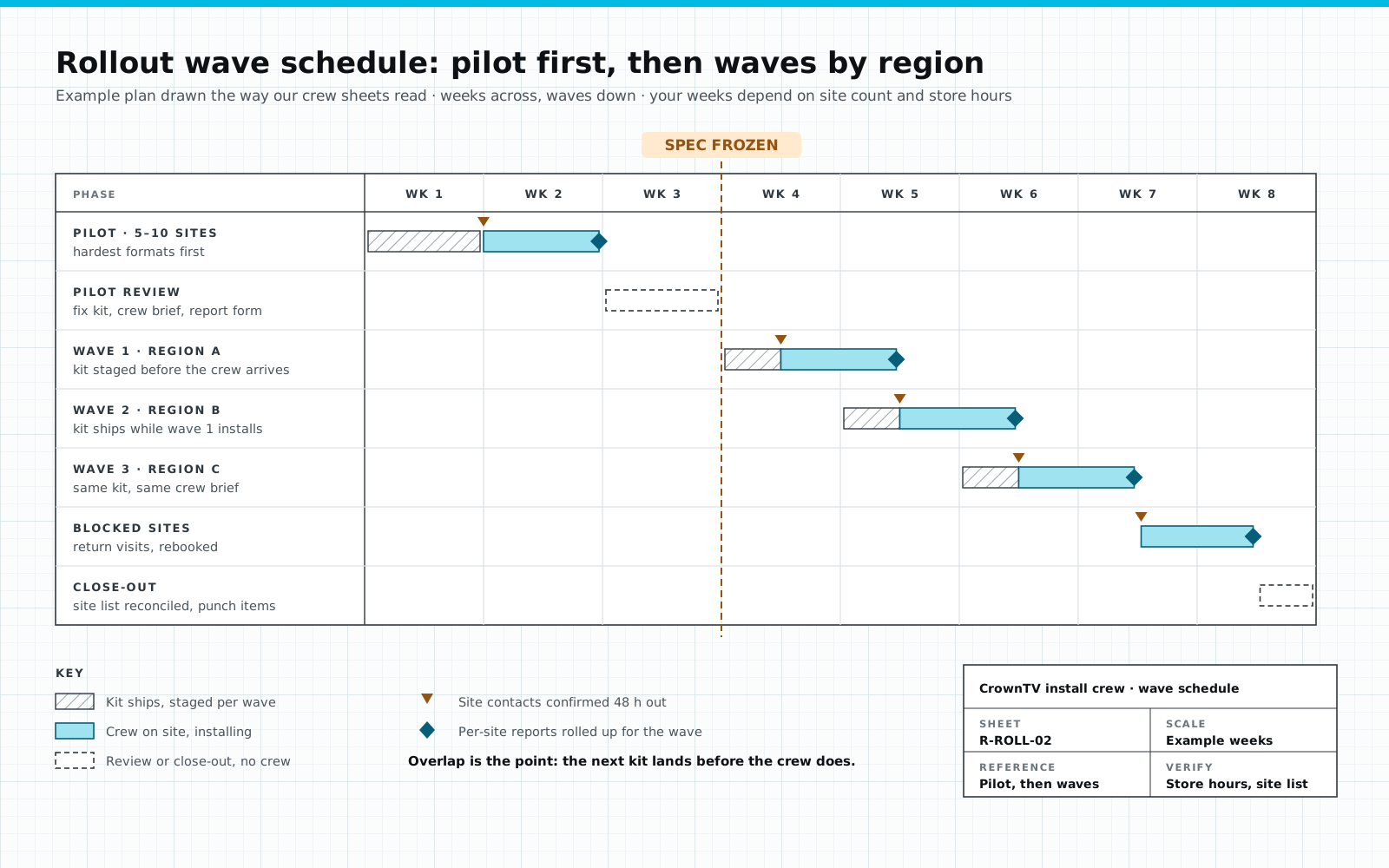
Pilot the hardest branches, freeze the spec, then go region by region. On 20+ branches, the pilot is 5–10 of them.

Installer Gantt sheet for a bank branch rollout: pilot branches go through survey, ship, install, photo close-out and live in weeks 1 to 3, a pilot review freezes the spec, then three regional waves overlap so the next wave is surveyed and shipped while the current one installs, followed by blocked-branch return visits and close-out
An example schedule, drawn the way our crew sheets read. Your weeks depend on branch count and banking hours.

One code per branch

SiteTX-07

  • Tracker row
  • Player name
  • Box label
  • Photo folder
  • Work order
  • Invoice line

Same code on all six. Anyone can find any branch's kit, photos or invoice in seconds.

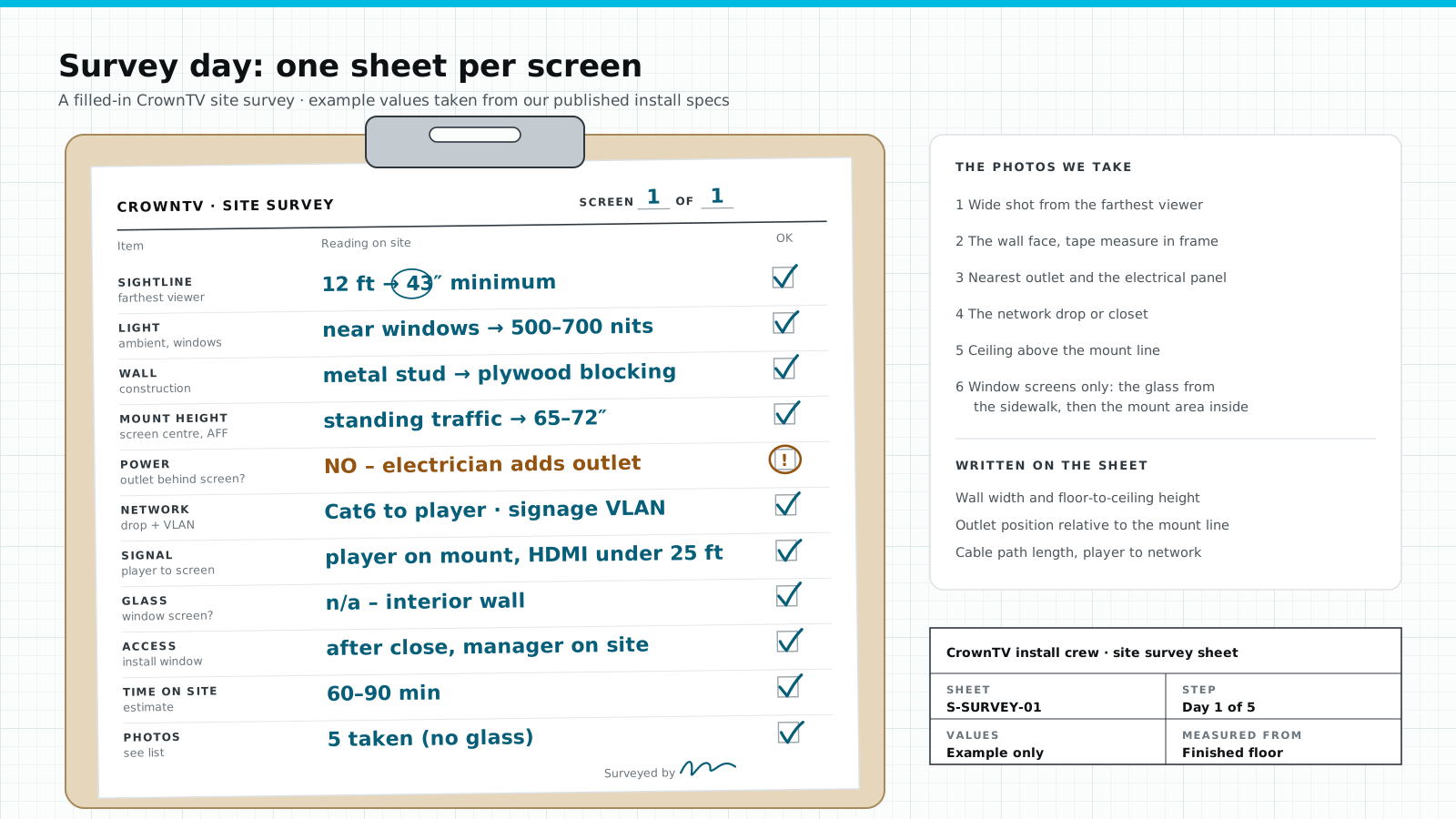
  1. Survey decides the kit

    A working screen with a free HDMI input gets a media player only. Anything else gets a new commercial display package.

  2. Players set up, kit shipped

    Provisioned in our Dashboard before install day, then shipped per branch under its code.

  3. Techs on clustered routes

    Branches grouped by drive time, GPS check-in on arrival. Outlets are your side: no outlet, no booking.

  4. Photo close-out

    Before and after photos, serial numbers, a network check. Content is playing before the tech leaves.

It is the playbook we run for Upperline Health's clinics: pilot first, then state-by-state waves. More in our rollout checklist. Already own the screens and just need crews? See the installation partner program.

Pricing

Bank digital signage pricing, per screen, installed.

One number per screen: display, mount, player, install and year one of the software.

$3,150
43"
Teller line, offices
$3,450
55"
Lobby rate board
$4,550
65"
25-ft lobby sightline
$4,950
75"
Large lobby wall

Window screen (Samsung OM55B 3,000-nit storefront package): from $3,950 per window. Drive-up screens are quoted after the survey. Full ladder on our pricing page.

Example branch

  • 1 × 55" rate board$3,450
  • 2 × 43" teller-line screens$6,300
  • 1 × 43" office / waiting screen$3,150

4 screens, installed$12,900

Software from year two: $80/month for the branch. List prices; multi-branch programs are quoted with volume pricing.

In every screen price

  • Commercial 4K UHD display — 500-nit, anti-glare, no buttons or branding, rated to run 24/7
  • Wall, menu or tilt mount
  • CrownTV media player
  • Professional installation by our licensed and insured team
  • First year of content software

Typically installed within 5–7 business days of the paid invoice; sooner is available on request. A power outlet is required at each display location; we handle the clean connection, not high-voltage electrical work. Samsung 3-year commercial warranty on all displays. Software after year one: $20/screen/month.

Custom quote

Send us your branch list.

We'll mark where each screen goes and price every branch, installed.

Frequently asked

Bank & credit union digital signage FAQ

What does bank digital signage include?
It is a set of commercial screens in a branch: a lobby rate board, teller-line and queue screens, office and waiting-area screens, and sometimes a window or drive-up screen. Each runs on its own media player and all of them are managed from one Dashboard. CrownTV supplies the screens, mounts, players, installation and software as one job.
What does a bank lobby rate board have to show?
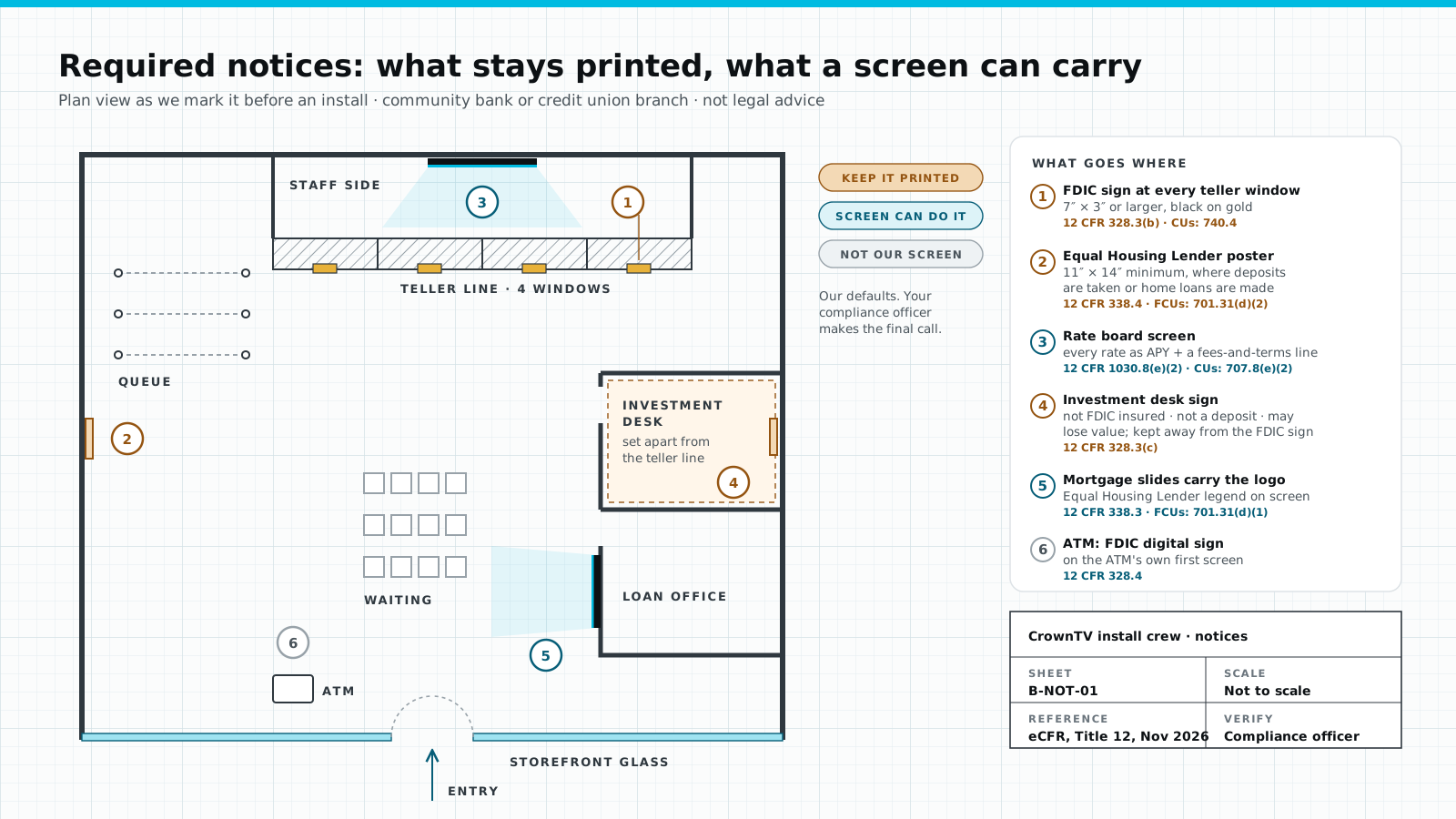
Under Regulation DD (12 CFR 1030.8(e)(2)), a sign inside the branch that states a rate must show it as the annual percentage yield (APY) and must tell customers to contact an employee about fees and terms. Credit unions follow the same rule in NCUA Part 707.8, with the dividend rate allowed next to the APY. Your compliance officer signs off the final wording.
How much does digital signage cost for a bank branch?
CrownTV prices per screen, installed: $3,150 for a 43-inch teller-line screen and $3,450 for a 55-inch rate board, including the commercial display, mount, media player, installation and the first year of software. Software after year one is $20 per screen per month. A branch with one rate board and three 43-inch screens comes to $12,900 at list price.
Can we keep the TVs we already have in our branches?
Often, yes. The site survey checks each screen: a working display with a free HDMI input gets a CrownTV media player only, and anything else gets a new commercial display package. You get one plan that says which branch gets which kit.
How do you roll signage out across many branches?
We start with a pilot on your hardest branches, fix the kit and the crew brief, then install the rest in regional waves. Every branch has one site code, technicians check in by GPS, and each branch closes with photos, serial numbers and content playing on screen.
Who handles the electrical work?
You do. A power outlet is needed at each screen position. Our technicians make the clean connection to it, but we do not do high-voltage electrical work, so a branch without an outlet waits until your electrician adds one.
Do you mount screens on the branch window?
Never. Window screens stand on a floor stand or hang from a ceiling mount behind the glass. For screens that face out through a window we use a 3,000-nit display so the content stays readable in daylight.
Is digital signage for credit unions any different?
The hardware and software are the same. Credit unions usually run more member and community content, and their rate disclosure rules sit in NCUA Part 707 instead of Regulation DD.

Ready when you are

One rate table. Every branch.

Tell us how many branches and where the screens should go. We reply within 2 business hours.

No commitment. No hard sell.

Get a price for a setup like this