
Bank Queue Screens: Teller-Line Displays That Cut Perceived Wait
How a bank queue management display works at the teller line: ticket numbers only, where it hangs, what to show between calls, which size to buy.

On this page
Reply within 2 business hours Ask a signage specialist Tap to open the quote form
A bank queue management display does one job well: it tells the person at the back of the line exactly where they stand. Ticket A-102, window 3. Nothing about who they are. The rest of the screen sells your rates and products to people who are standing still with nothing else to look at.
One thing up front, because it saves a wasted call: we don't sell queue-ticketing software. The ticket kiosk and the queue system are yours or your queue vendor's. We put up the screen, the mount and the media player, run the software for everything else on it, and make sure it all reads from the back of the line.
How a teller-line queue screen works
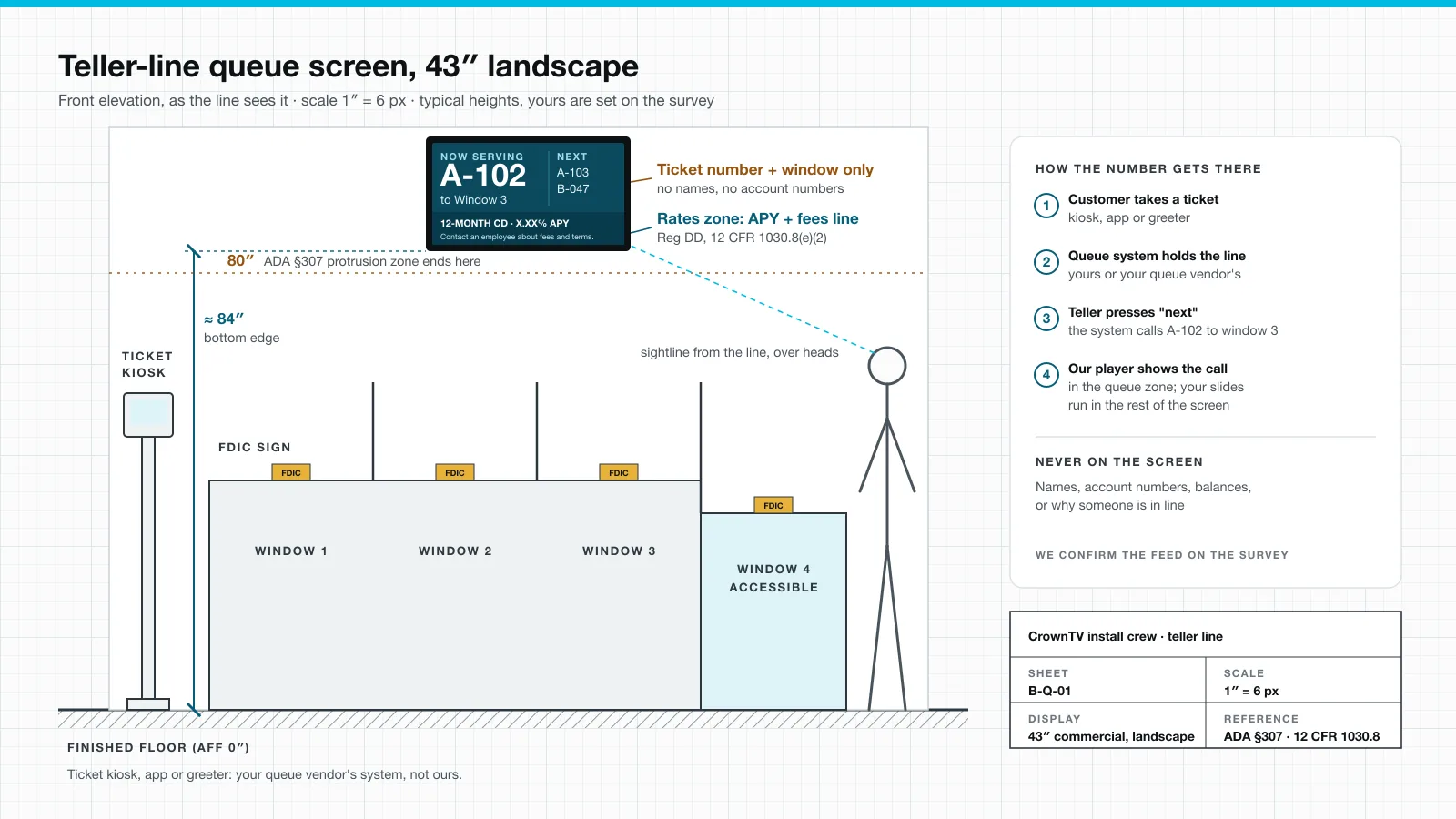
Four steps, and only the last one is ours. The drawing at the top of this page shows the same thing from the line's point of view.
| Step | What happens | Whose system |
|---|---|---|
| 1. Ticket | The customer takes a ticket at a kiosk, in your app or from a greeter. The letter can mark the service, say A for tellers and B for loans. | Your queue vendor |
| 2. Line | The queue system holds the order and the service letters. | Your queue vendor |
| 3. Call | A teller presses "next". The system calls A-102 to window 3. | Your queue vendor |
| 4. Screen | The media player shows the call in the queue zone. Your slides run in the rest of the screen. | CrownTV |
Before we quote, we ask how your queue system delivers its now-serving display and check it works with our player. If your vendor's system can only drive its own screen, that screen stays theirs, and ours goes beside it with rates and products. Either way you know before anything ships.
The rule we never bend: ticket number and window only. No names, no account numbers, no balances, no "here about a mortgage". Everyone in the lobby can read that screen.
Why a screen makes the wait feel shorter
The line doesn't move faster because there's a screen over it. It feels faster. David Maister's 1985 essay The Psychology of Waiting Lines is still the plainest explanation of why. Three of his eight propositions map straight onto a teller-line screen:
| Maister's proposition | What the screen does about it |
|---|---|
| Occupied time feels shorter than unoccupied time | Short slides give people something to read while they stand: a rate, a scam warning, a local event. |
| Uncertain waits are longer than known, finite waits | A visible "now serving" number plus the next few tickets lets people count down instead of guessing. |
| Unfair waits are longer than equitable waits | Numbers called in order, on a screen everyone can see, end the "she was after me" moment. |
We won't give you a percentage. Nobody we know of publishes a solid bank number for how much shorter a wait feels with a screen, and we'd rather not make one up.
Where the queue screen hangs
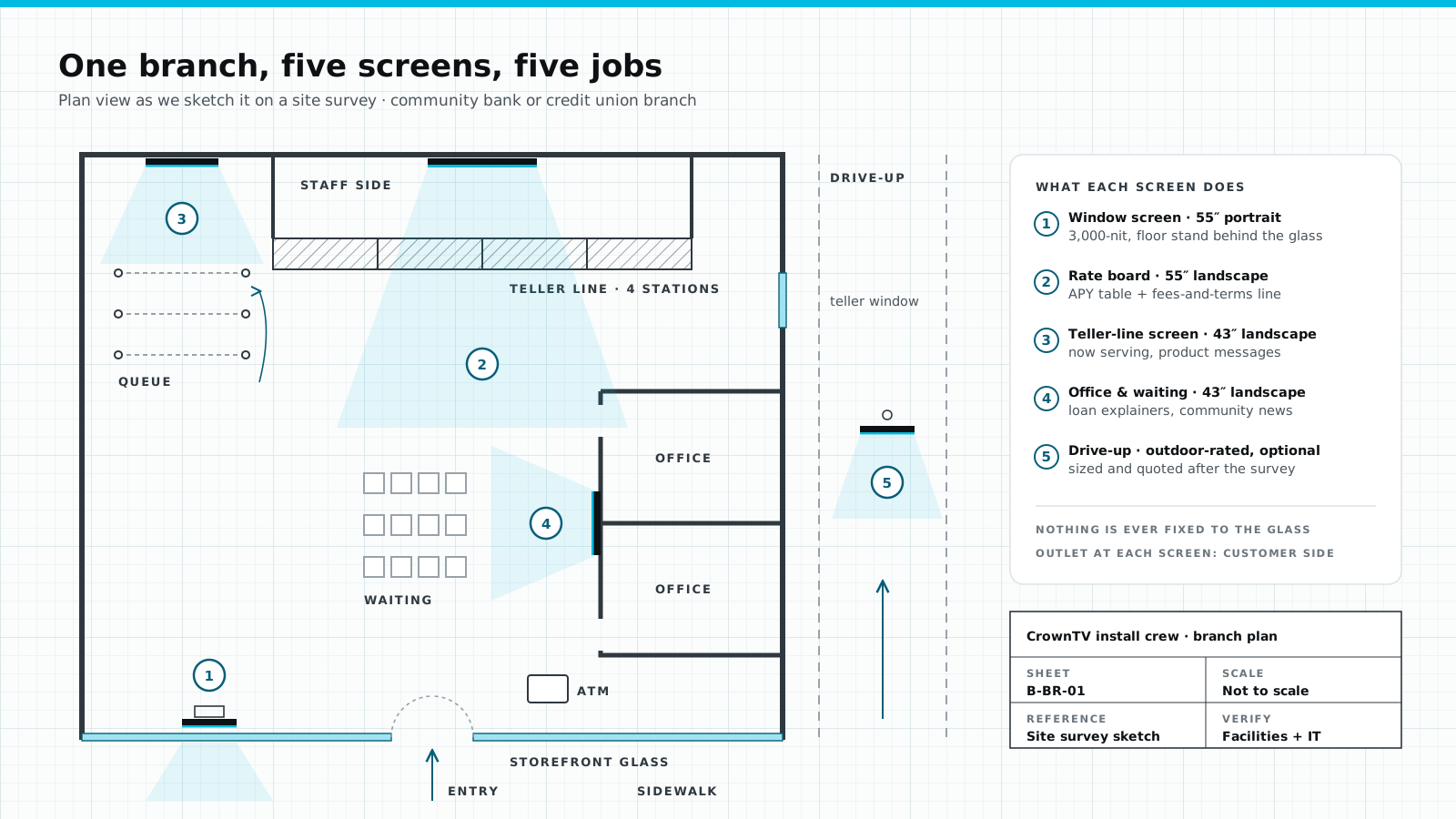
Put it on the wall the line faces, not over the tellers' heads where only the people already being served can see it. On the survey we stand at the back of the queue and check four things:
- Height. Bottom edge at about 84 inches. Above 80 inches, the 2010 ADA Standards' 4-inch limit on objects sticking out from a wall (§307.2) stops applying, and the screen clears heads.
- Readability. The ticket number has to read from the last stanchion, not just from the front.
- Blocking. Solid backing behind the mount. Bank lobbies love glass, wood panels and stone; we never mount a screen on glass.
- Power and data. An outlet at the screen. That's on your side; we don't do electrical.
What to show between calls
The queue zone takes a slice of the screen. The rest is yours, and the line is the most captive audience in the branch. A loop we'd start with:
| Slide | Seconds | What it says | The rule to watch |
|---|---|---|---|
| Rates | 10 | Two or three deposit rates, as of today's date | Every rate as APY, plus "contact an employee about fees and terms" (Reg DD) |
| Product of the quarter | 8 | One offer, one QR code to the details | Home-loan slides carry the Equal Housing Lender logo |
| Scam warning | 8 | "We will never call and ask for your PIN." | Plain words; change it monthly |
| Community | 8 | A local sponsorship, a school drive, branch hours for the holiday | Your photos, not stock |
The rate rules come from 12 CFR 1030.8(e)(2) for banks and NCUA Part 707.8 for credit unions. We wrote them up, with the FDIC sign and Equal Housing Lender rules, in our guide to bank signage compliance. If you want rates crawling along the bottom instead of a slide, that's a ticker zone; our ticker displays page has the installed package, and the same APY rule applies to every rate in the crawl.
What size, and how many
| Branch | Teller-line screen | Installed price |
|---|---|---|
| Short line, low ceiling | 43″ landscape | $3,150 |
| Long line or tall lobby | 55″ landscape | $3,450 |
| Rate board behind the tellers | Separate 55″ landscape | $3,450 |
| Software after year one | Per screen | $20 per month |
Each installed package includes the commercial Samsung display with its 3-year commercial warranty, the mount, the media player, installation by our licensed and insured technicians, and the first year of software. A single branch is usually one visit, typically 5–7 business days after the paid invoice. For a branch network we run a pilot first, then waves, with one site code per branch on everything we ship.
Who does what
| Job | Your queue vendor | CrownTV |
|---|---|---|
| Ticket kiosk, app, greeter tablet | Yes | No |
| Queue logic, service letters, wait-time reports | Yes | No |
| Site survey, screen size and height | No | Yes |
| Commercial display, mount, media player | No | Yes |
| Installation and photo close-out | No | Yes |
| Slides between calls, rate tables, scheduling | No | Yes |
| Offline alerts and media-player swaps | No | Yes, reply within 2 business hours, swaps in 48 hours |
| Outlet at the screen | Your facilities team | |
Your queue vendor's name and product, how its now-serving display is delivered, your branch floor plan, and photos of the wall the line faces. With those four we can quote the branch, installed, in one pass.
For the rest of the branch, from the rate board to the window and the drive-up, see our bank digital signage page. If you're still choosing a provider, our shortlist of the best digital signage for banks compares 14 of them.
FAQ
How does a bank queue management display work?
A customer takes a ticket at a kiosk, in an app or from a greeter. The bank's queue system holds the line. When a teller presses next, the system calls the next ticket, for example A-102 to window 3, and the screen shows that call. The rest of the screen runs the branch's own slides.
Does CrownTV sell queue management software?
No. The ticketing and queue system is yours or your queue vendor's. CrownTV supplies and installs the screen, the mount and the media player, and runs the content software for everything else on the screen. We confirm on the survey how your queue system delivers its now-serving display before we quote.
Should a bank queue screen show customer names?
No. Show the ticket number and the window only. No names, account numbers, balances, or the reason someone is waiting. A lobby screen is read by everyone in the room.
What should a teller-line screen show between calls?
Rates, the product you are pushing this quarter, a fraud or scam warning, and community news. Any slide that states a deposit rate must show it as APY and tell customers to contact an employee about fees and terms, under Regulation DD 12 CFR 1030.8(e)(2).
How high should a teller-line queue screen hang?
We usually put the bottom edge at about 84 inches. Above 80 inches, the 2010 ADA Standards' 4-inch limit on wall-mounted objects sticking into a walkway (§307.2) no longer applies, and the screen clears the heads of people in line. Your ceiling and sightlines decide the final height on the survey.
What size screen does a teller line need?
We start most teller lines at a 43-inch landscape screen. Go to 55 inches if the back of the line is far from the screen or the lobby is tall. The rate board is usually a separate 55-inch screen.
How much does a teller-line screen cost?
CrownTV installed packages are $3,150 for a 43-inch screen and $3,450 for a 55-inch screen, including the commercial display, mount, media player, installation and the first year of software. After year one, software is $20 per screen per month. Installation is typically 5–7 business days after the paid invoice.
Get the teller line quoted, installed
Send us the floor plan and a photo of the wall your line faces. We'll mark the screen, the height and the queue zone, and price it installed. Get a quote in 2 business hours.
Keep reading
More guides like this
Operator-grade playbooks, weekly.
Proof, not pitches
See real installs
Live deployments across hospitality, retail, and offices.
Ready to deploy?
Get a quote in 2 business hours
Reply within two business hours. No call required.