
ADA Compliant Kiosk Guide: Heights, Reach Ranges and the Installer's Checklist
ADA compliant kiosk rules from the 2010 Standards: 15–48″ reach, 30×48″ clear floor, 4″ protrusion limit. The checklist our install crew uses on site.
On this page
Reply within 2 business hours Ask a signage specialist Tap to open the quote form
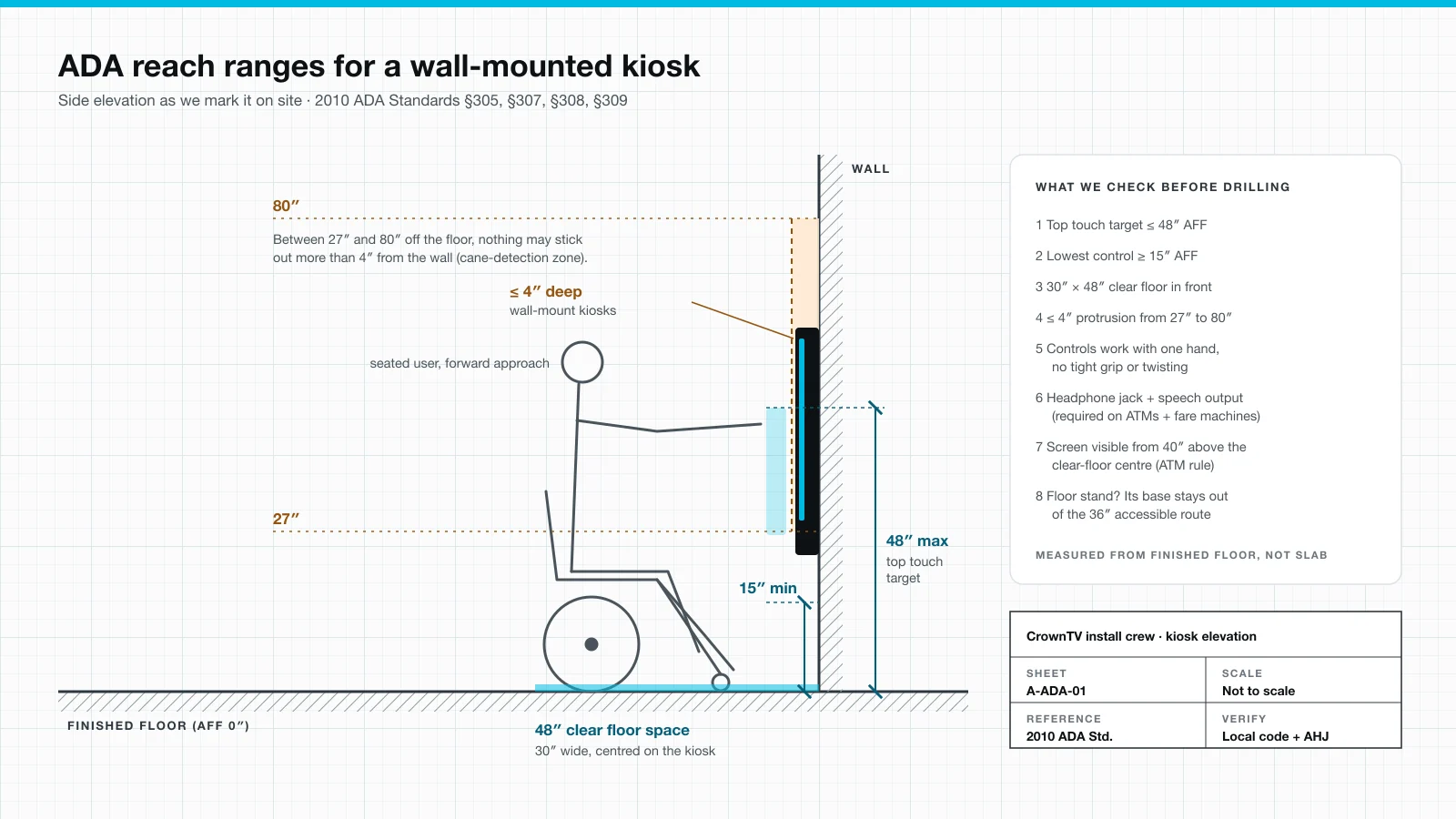
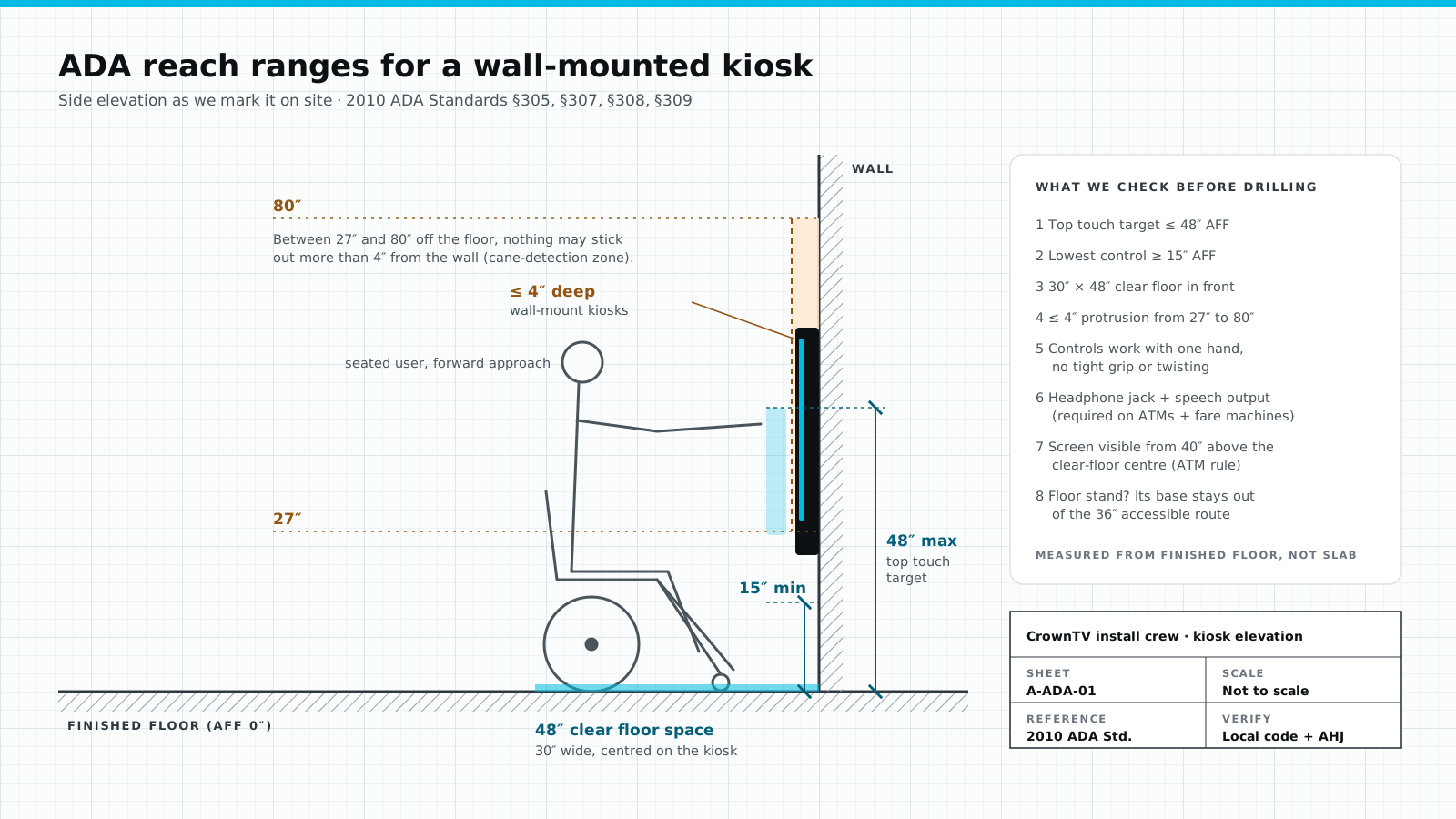
An ADA compliant kiosk comes down to four measurements and one rule about hands. Every touch target sits between 15 and 48 inches off the finished floor. A 30 by 48 inch clear floor space sits in front of it. A wall unit sticks out 4 inches or less between 27 and 80 inches. The controls work with one hand and no more than 5 pounds of force. This guide gives each rule with its section number in the 2010 ADA Standards for Accessible Design, then the checklist our crew runs before drilling.
One point up front: we are installers, not lawyers. Your accessibility consultant or the local building official (the AHJ) has the final word on your site. We can tell you where kiosk projects go wrong on install day.
What "ADA compliant" means for a kiosk
The 2010 Standards have no chapter called "kiosks." Three sections come close. ATMs and fare machines are scoped in §220 and built to §707. Vending machines are scoped in §228. And §205 says operable parts on accessible elements follow §309.
The U.S. Access Board knows about the gap. It opened rulemaking on self-service transaction machines, kiosks included, on September 21, 2022. Its rulemaking page still lists the work at the advance-notice stage. So today the working rulebook for a touchscreen kiosk is the general one: clear floor space, protruding objects, reach ranges and operable parts. That is what we install to.
The rules, with section numbers
| Rule | The number | 2010 ADA Standards |
|---|---|---|
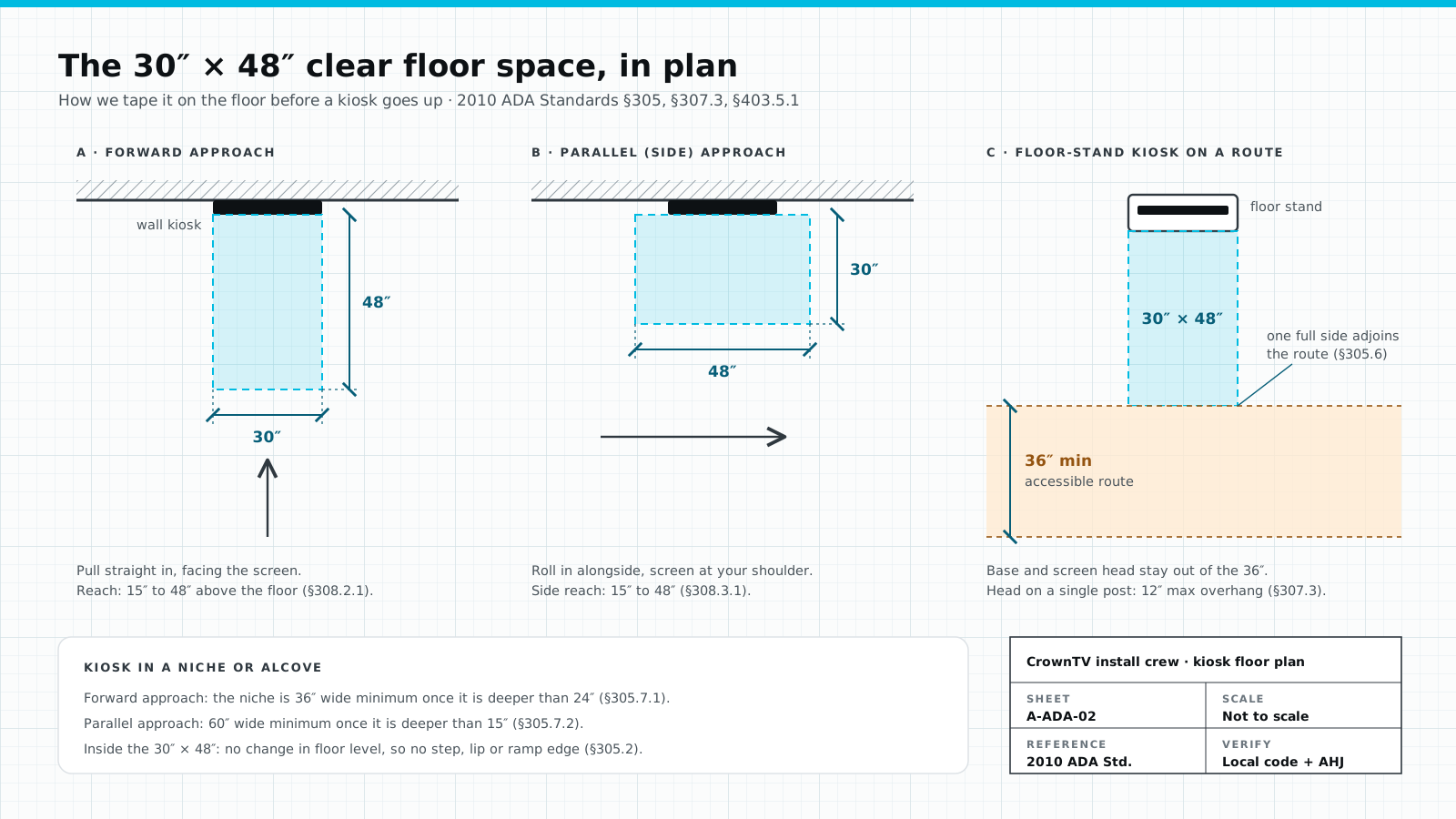
| Clear floor space in front | 30″ × 48″ minimum, level, for a forward or parallel approach | §305.3, §305.5, §305.2 |
| Reach, unobstructed (forward or side) | Highest operable part 48″; lowest 15″ | §308.2.1, §308.3.1 |
| Forward reach over an obstruction | 48″ max up to 20″ deep; 44″ max from 20″ to 25″ deep | §308.2.2 |
| Side reach over an obstruction | Obstruction 34″ high max; reach 48″ up to 10″ deep, 46″ up to 24″ deep | §308.3.2 |
| Wall-mounted protrusion | 4″ max into the path, leading edge between 27″ and 80″ | §307.2 |
| Kiosk head on a single post | 12″ max overhang between 27″ and 80″ | §307.3 |
| How controls operate | One hand; no tight grasping, pinching or wrist twisting; 5 lbf max | §309.4 |
| Accessible route past the kiosk | 36″ clear width minimum | §403.5.1, §307.5 |
48 inches is the top button, not the centerline
This is the mistake we see most. §308 limits the highest operable part. It says nothing about where the middle of the screen sits. On a touchscreen, every button is an operable part.
Spec sheets for wayfinding touchscreens often say "48″ centerline max." Read that as a ceiling on where the screen hangs, never as proof of compliance; our own spec now states the rule as "highest touch target at or below 48″." Here is why, using the active screen area of a 16:9 panel:
| Touchscreen | Active area height | Top edge at a 48″ centerline | Centerline that puts the top at 48″ |
|---|---|---|---|
| 21.5″ landscape | about 10.5″ | about 53.3″ | about 42.7″ |
| 32″ landscape | about 15.7″ | about 55.8″ | about 40.2″ |
So a screen at 48″ centerline has its top inches out of reach. There are two honest fixes. The conservative one lowers the screen until the whole touch area tops out at 48″. The practical one keeps every button below the 48″ line and uses the top band for read-only content, such as a map or a logo. Ask your accessibility consultant which reading your project follows, then tell your app designer before the layout is built.
Non-touch screens are different. Our wayfinding spec places a non-touch digital building directory at a 40–60″ centerline because nobody has to reach it. The rule that still applies is protrusion: if the screen sits in a walkway between 27″ and 80″, it can stick out 4″ at most.
Wall-mount or floor stand: what changes
Wall-mount kiosks live or die on depth. Between 27″ and 80″ a wall unit can project 4″ from the wall (§307.2), and the screen, the mount and any enclosure all count. A slim commercial panel on a low-profile mount usually makes 4″. A bulky enclosure often does not, and then it needs a recess, or a cane-detectable barrier below it.
Floor-stand kiosks trade the depth problem for a footprint problem. The base cannot narrow the 36″ accessible route (§403.5.1). The 30″ × 48″ clear floor space needs one full side touching that route (§305.6). If the screen head sits on a single post, it may overhang only 12″ between 27″ and 80″ (§307.3).
Recessed kiosks bring alcove rules. Once a niche is deeper than 24″, a forward approach needs it 36″ wide (§305.7.1). Once it is deeper than 15″, a parallel approach needs 60″ (§305.7.2).
Payment and ticket kiosks: the §707 rules
If the kiosk works like an ATM or sells fares, §707 adds hardware requirements on top of reach:
- Speech output. The machine must be speech enabled, delivered through something every user can reach, such as an industry-standard headphone connector (§707.5).
- Tactile input. At least one tactilely discernible control for each function (§707.6.1). Numeric keys follow a 12-key telephone layout with a distinct number 5 (§707.6.2).
- Display. Visible from a point 40″ above the center of the clear floor space; sans-serif characters at least 3/16″ high with strong contrast (§707.7).
- Braille instructions for starting speech mode (§707.8).
A self-order or check-in kiosk is not an ATM, so §707 does not scope it today. Plan the headphone jack and speech mode anyway if you can: both are cheap at design time and expensive to retrofit. Our interactive digital signage kiosks page lists the audio-jack output and high-contrast app themes we can spec.
The software side: WCAG
Height and clearance are half a kiosk. The other half is the screen flow: contrast, text size, timeouts, and whether a blind user can finish the task. For that half the usual reference is WCAG 2.2, the W3C's accessibility standard for web content.
W3C also publishes WCAG2ICT, guidance on applying WCAG to non-web technology, and it names kiosks and self-checkouts as examples of "closed functionality." The note is informative and sets no requirements of its own. So WCAG is the right design target for kiosk software, but we will not tell you it is legally mandated for a private kiosk. That answer depends on your sector and your counsel.
Our field checklist before drilling
The order we work in on a kiosk job. It takes minutes and catches problems while they are cheap.
- Find finished floor. Every height is measured from the finished floor, not the slab. A tile or carpet job after install moves every number.
- Snap the 48″ and 15″ lines on the wall in painter's tape. The app's top and bottom buttons must land between them.
- Tape the 30″ × 48″ rectangle on the floor for the approach the layout allows. Check that it is level and touches the accessible route.
- Measure total depth: screen, mount and enclosure together. Over 4″ between 27″ and 80″ means a recess, a barrier below, or a different mount.
- Check the route. 36″ clear past a floor stand, with the base and head out of it.
- Test operation with one hand and a loose fist: no pinch, no twist, nothing stiffer than 5 lbf.
- Confirm audio if speech output is in scope: jack position inside the reach range, and a cable path to the player.
- Photograph the marks before the screen covers them, so the sign-off file shows the heights.
On a wider rollout the same crew handles power, network and the other screens, as part of our standard digital signage installation scope, with kiosk heights on the same survey sheet. For prices, see digital signage kiosk types and costs.
FAQ
What height does an ADA compliant kiosk need to be?
Every operable part, including each on-screen button, must sit between 15 and 48 inches above the finished floor for an unobstructed forward or side reach (2010 ADA Standards §308.2.1 and §308.3.1). If the user has to reach over a counter or ledge, the limits drop: 44 inches maximum for a forward reach deeper than 20 inches, and 46 inches for a side reach deeper than 10 inches.
Does the ADA have specific rules for kiosks?
Not a kiosk chapter. The 2010 Standards scope ATMs and fare machines (§220 and §707) and vending machines (§228), and they send operable parts to §309. The U.S. Access Board opened rulemaking on self-service transaction machines, including kiosks, in September 2022, and its page still shows it at the advance-notice stage. Until a rule lands, designers and inspectors apply the general clear-floor, reach, protrusion and operation rules.
Is a 48-inch centerline the same as the 48-inch ADA reach limit?
No. The ADA limit is the highest operable part, not the middle of the screen. A 21.5-inch landscape touchscreen hung at a 48-inch centerline puts its top edge near 53 inches, so the top band is out of reach. Either lower the screen until its touch area tops out at 48 inches, or keep every button below that line.
Does WCAG apply to kiosks?
WCAG is a W3C standard written for web content, and it is the usual reference for kiosk software. W3C's WCAG2ICT note explains how to apply it to non-web technology, including kiosks, but the note itself is informative and sets no requirements. Whether WCAG is legally required for your kiosk depends on who owns it and where it sits, so check with counsel.
How far can a wall-mounted kiosk stick out from the wall?
4 inches maximum when its leading edge sits more than 27 inches and not more than 80 inches above the floor (§307.2). That band is where a cane user cannot detect the object before body contact. A kiosk head on a single post may overhang up to 12 inches (§307.3), and nothing may shrink a 36-inch accessible route.
Do touchscreen kiosks need audio output?
ATMs and fare machines must be speech enabled, with speech delivered through a standard connector such as a headphone jack (§707.5), plus tactile input for each function (§707.6). Other kiosks are not scoped by §707, but we ship audio output on customer request, and a jack is far cheaper to plan into the mount than to retrofit.
Get your kiosk heights checked before fabrication
Send us the floor plan, the kiosk model and the app mockup. We mark the reach lines, the clear floor space and the route on the survey, and flag anything that fails before an enclosure is built. Get a kiosk installation quote.
Keep reading
More guides like this
Operator-grade playbooks, weekly.
Proof, not pitches
See real installs
Live deployments across hospitality, retail, and offices.
Ready to deploy?
Get a quote in 2 business hours
Reply within two business hours. No call required.