
Dental Office TV: Setting Up the Waiting Room and Operatory Screens
Dental office TV from the screen side: commercial display vs consumer TV, ceiling mounts over the chair, playing your content service, HIPAA and cost.
On this page
Reply within 2 business hours Ask a signage specialist Tap to open the quote form
Search "dental office TV" and the first page is content subscriptions: ADA TV, Optio, Dear Doctor TV, RevenueWell's Waiting Room TV. They sell the videos. None of them hangs the screen, runs the cable or decides what happens when the front desk wants to add a slide about Saturday hours. That is the half this guide covers. Our opinion up front: choose the screen for the room and the player for your own content, then plug the subscription into it, not the other way round.
CrownTV has deployed 10,000+ commercial displays since 2012. We have not published a dental case study, so this is not a project story. It is how we would set up a dental practice: reception, operatories and consult room.
The three screens in a dental office
| Room | What it plays | Screen | Mount | Sound |
|---|---|---|---|---|
| Reception and waiting room | Patient-ed loop, your hours, team, financing | 43″ or 55″ commercial display | Wall, center at 60–65″ for seated viewers | Off; captions on video |
| Operatory | Calm video or a show for the patient in the chair | Smaller panel, sized to the room | Ceiling pole to structure, or wall at the foot of the chair | Low, or headphones |
| Consult room | Treatment explainers and procedure animations | 43″ commercial display | Wall, facing the patient's chair | On, during the consult |
Sizing follows our survey rule: a 12-foot sightline wants at least a 43″ screen; a 25-foot room wants 65″ or larger.
Chair-mounted monitors on the delivery arm are a fourth option. They attach to the chair, so they come from your chair or equipment dealer to keep that warranty clean. If one of those screens has an HDMI input and accepts a 1080p signal, the CrownTV player can drive it from the same Dashboard as your waiting room.
Commercial display or consumer TV?
A reception screen in a dental office runs the whole clinic day, every day, often with the same slides. That is commercial duty. The display in every CrownTV package is a commercial 4K panel: 500-nit, anti-glare, no buttons or branding on the bezel, rated to run 24/7, and covered by the Samsung 3-year commercial warranty.
The "no buttons" part matters more than it sounds. A consumer TV's input button can be pressed by a curious child, and then someone at the front desk goes looking for the remote mid-morning. Many consumer TV warranties also exclude commercial use. Read yours before the TV goes on a clinic wall.
Operatory ceiling screens: hang them from structure
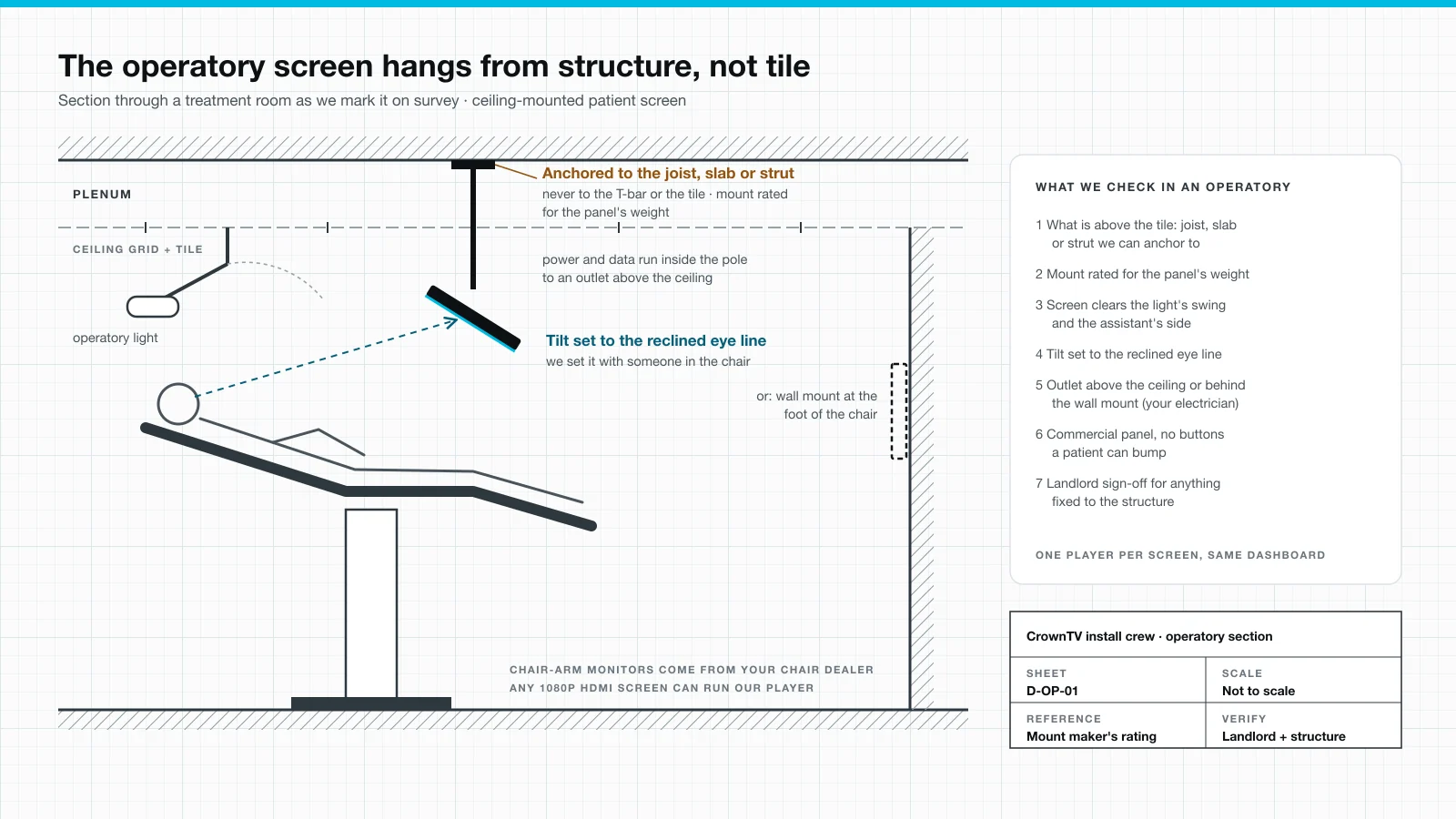
The drawing at the top of this page is the section we sketch for every operatory. A patient reclined in the chair looks at the ceiling, so that is where the screen goes. It is also where installs go wrong. Many operatories have a suspended ceiling, and the grid and tiles are not built to carry a screen.
Our rules for an operatory screen:
- Anchor to structure. The pole mount fixes to the joist, slab or strut above the ceiling, never to the T-bar grid or a tile. If there is nothing to anchor to, we add a wall mount at the foot of the chair instead.
- Mount rated for the panel. The mount's weight rating covers the screen, with the maker's rating checked on the box, not assumed.
- Clear the light and the assistant. The screen stays out of the operatory light's swing and off the assistant's side of the chair.
- Tilt with a patient in the chair. We set the angle with someone reclined, because the eye line moves when the chair goes back.
- Power above the ceiling. Power and data run inside the pole to an outlet above the tile. A power outlet is required at each screen, and we don't do high-voltage electrical work, so your electrician adds it.
Anything fixed to the building's structure also needs your landlord's sign-off if you lease the suite.
Playing your content service and your own slides
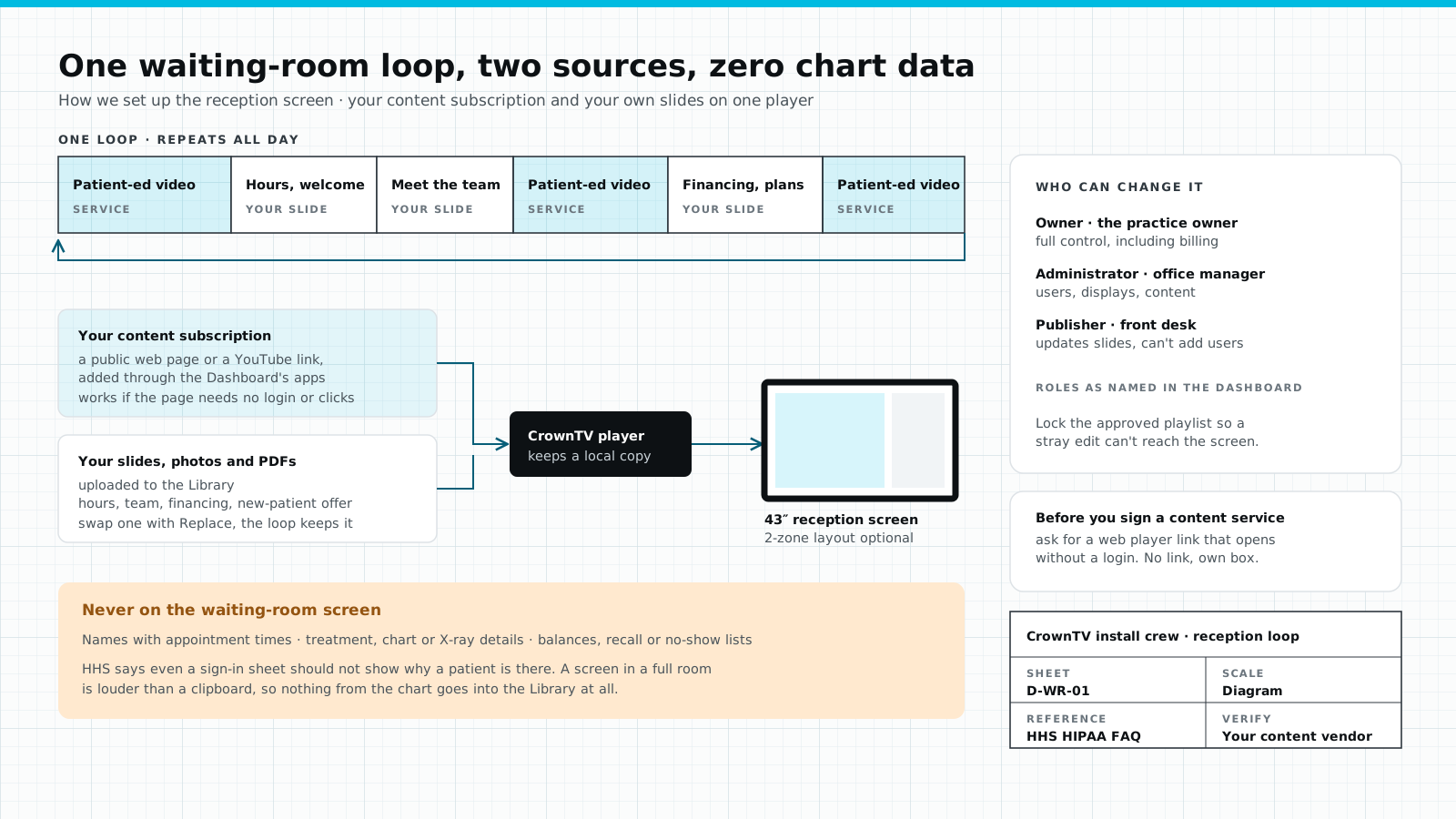
You will probably want both: the subscription's patient-education videos and their own slides about hours, the team, financing and the new-patient offer. Here is how that works on a CrownTV player.
- Web Page app. It shows any public web page full screen. If your content service gives you a web player link that opens without a login or a click, it goes straight into a playlist.
- YouTube app. If the service publishes to YouTube, paste the video or live-stream URL. It plays muted unless you turn audio on.
- Library. Your own images, videos and PDFs upload here. When a slide changes, use Replace and the new version takes its place in every playlist.
One caution before you sign a content contract. Some services only play through their own app or box. The Web Page app cannot sign in for you, so a service that needs a login runs on its own device. We can still supply and mount the screen, but you lose the mixed loop. Ask the vendor for a web player link first. For more on what to put in the loop, see what to play on a waiting room TV.
This is the same setup we run in outpatient waiting rooms across Upperline Health's multi-site clinic program: one commercial screen (or the clinic's existing TV with one of our media players), content managed centrally, and installs done while patients are in the building, so crews work clean and quiet and never photograph a patient.
Keep patient information off the screen
HHS answers the waiting-room question directly. In its HIPAA FAQ on sign-in sheets, it says offices may call out patient names or use sign-in sheets, as long as the information is appropriately limited and reasonable safeguards are in place. Its example: a sign-in sheet should not show the medical problem the patient is there for.
A screen is louder than a clipboard. It stays up longer and reads from the doorway. So our rule is stricter than the minimum: nothing from the chart goes into the Dashboard Library at all.
- No patient names, with or without appointment times.
- No treatment, chart or X-ray details.
- No balances, recall lists or no-show lists.
Access controls help. The Dashboard has Owner, Administrator, Manager and Publisher roles. Give the front desk Publisher access to update slides, keep Administrator with the office manager, and lock the approved playlist so a stray edit can't reach the screen. For the clinical side of screen programs, see our healthcare digital signage page.
What a dental office TV costs
CrownTV prices each screen as one installed package: commercial display, mount, media player, installation by our licensed and insured crew, and the first year of Dashboard software. Your content subscription is billed separately by that vendor.
| Screen | Package | Installed price |
|---|---|---|
| Reception, consult room | 43″ indoor package | $3,150 |
| Larger waiting room | 55″ indoor package | $3,450 |
| Operatory ceiling screen | Mount depends on the structure above the ceiling | Quoted per room after survey |
| Software after year one | CrownTV Dashboard | $20 per screen per month |
Per screen, installed. Samsung 3-year commercial warranty on all displays.
Screens are typically installed within 5–7 business days of the paid invoice, and we accept purchase orders. The full reception package, with sizes and what's in the box, is on our waiting room TV packages page.
FAQ
What size TV should a dental office use in the waiting room?
Size it to the farthest seat. Our survey rule is that a 12-foot sightline wants at least a 43-inch screen, and a 25-foot room wants 65 inches or larger. For a single-room reception that usually means a 43-inch or 55-inch commercial display, mounted with the screen center at 60 to 65 inches for seated viewers.
Can a dental office use a regular consumer TV?
It can, but it is the wrong tool for a full clinic day. A commercial display is built to run all day, has no buttons a patient can press, and carries a commercial warranty; the displays in our packages are 500-nit, anti-glare, rated for 24/7 use and covered by Samsung's 3-year commercial warranty. Many consumer TV warranties exclude commercial use, so read yours before it goes on the wall.
Can a TV be mounted on the ceiling above a dental chair?
Yes, if the mount is rated for the panel's weight and anchored to the building structure above the ceiling, such as a joist, slab or strut. It never hangs from the ceiling grid or a tile. We also check that it clears the operatory light's swing and set the tilt with someone reclined in the chair.
Can a CrownTV screen play ADA TV, Optio or another dental content service?
If the service gives you a web player link that opens without a login, or plays from YouTube, the CrownTV Dashboard can put it in a playlist next to your own slides. If it only runs on its own box or app, that device drives the screen instead, and we still supply and mount the display. Ask the vendor before you sign.
What should never appear on a dental waiting room TV?
Anything from the chart. No patient names with appointment times, no treatment or X-ray details, no balances or recall lists. HHS allows names to be called in a waiting room only when the information is appropriately limited and reasonable safeguards are in place; a name on a screen stays up longer and reads from the doorway, so we keep names off screens entirely.
Keep reading
More guides like this
Operator-grade playbooks, weekly.
Proof, not pitches
See real installs
Live deployments across hospitality, retail, and offices.
Ready to deploy?
Get a quote in 2 business hours
Reply within two business hours. No call required.