
Healthcare Digital Signage: 15 Use Cases for Hospitals, Clinics & Multi-Site Networks
Healthcare digital signage across 15 use cases — waiting rooms, wait-time boards, wayfinding, staff comms — with HIPAA-aware content rules and the multi-site rollout playbook.
On this page
Healthcare digital signage is every screen a health system controls from one dashboard — waiting rooms, queue boards, wayfinding, staff stations. And here's the opinion this guide is built on, after years of clinical deployments: a waiting-room TV playing cable news is not a signage strategy — content governance is. The hardware is the easy 20%. The hard 80% is deciding what runs where, who's allowed to change it, and how 130 clinics stay consistent without routing every flu-shot poster through corporate.
CrownTV deploys signage for 1,800+ businesses, and healthcare is where our largest current inquiries come from: outpatient networks with 100+ clinics seeking one partner to source, install, and centrally manage screens across every site — the exact shape of rollout this guide describes. Licensed, insured installation in all 50 states, White Glove process, one contract.
You'll get:
- The 15 healthcare use cases, organized by zone
- HIPAA-aware content rules (what may never appear on a shared screen)
- Hardware for clinical environments — and where standard panels are fine
- The multi-site rollout playbook for clinic networks
- All-in pricing per screen and per clinic
What is healthcare digital signage?
Healthcare digital signage is a network of commercial displays across a hospital, clinic, or health system — waiting rooms, check-in areas, corridors, staff spaces — managed from a single content platform. Staff publish once; every screen updates in seconds, from one facility to hundreds. Health systems use it to manage waiting experiences, guide patients through buildings, deliver health education, and reach clinical staff who never sit at a desk.
The 15 use cases, by zone
Patient-facing
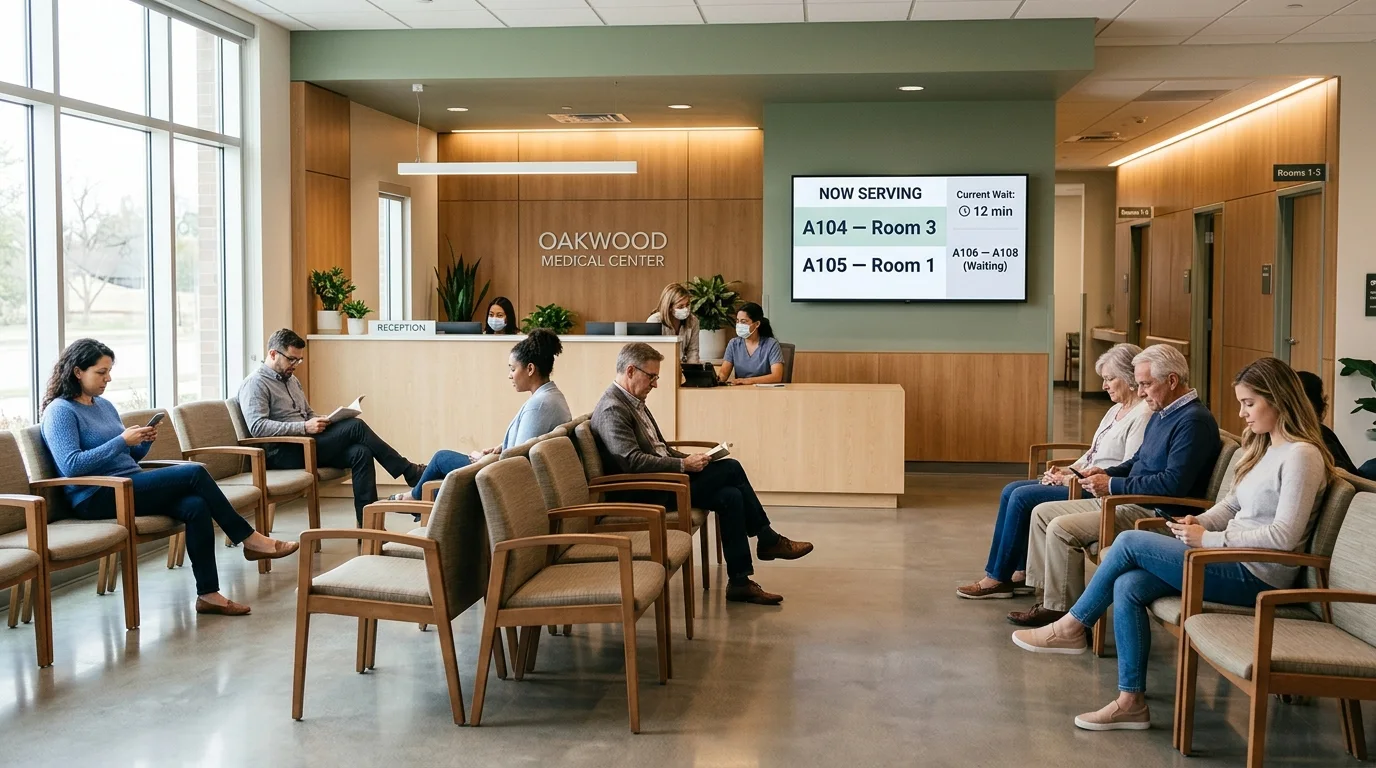
1. Check-in and queue boards. "Now serving" displays with compliant formats (first name + last initial, or ticket numbers). The screen that most reduces front-desk interruptions.
2. Wait-time displays. Honest, visible wait estimates — the single highest-impact screen in the building. Research on waiting psychology consistently shows perceived wait drops when patients know their place in line; hospitals now put ER wait times on outdoor LED signs for the same reason.
3. Health education. Specialty-matched content: pre-visit prep in imaging, vaccination schedules in pediatrics, condition management in cardiology. Swap for cable news and the room gets calmer — see the waiting room signage playbook for content mixes.
4. Service-line promotion. Flu clinics, imaging availability, telehealth, new providers — the health system's own inventory, promoted to the most relevant possible audience.
5. Provider introductions. Photos, credentials, and languages spoken for today's clinicians. Small screen, outsized effect on patient comfort.
6. Amenity and visitor information. Cafeteria hours, pharmacy location, visiting rules, Wi-Fi. Every answered question here is a question the desk didn't field.
Navigation
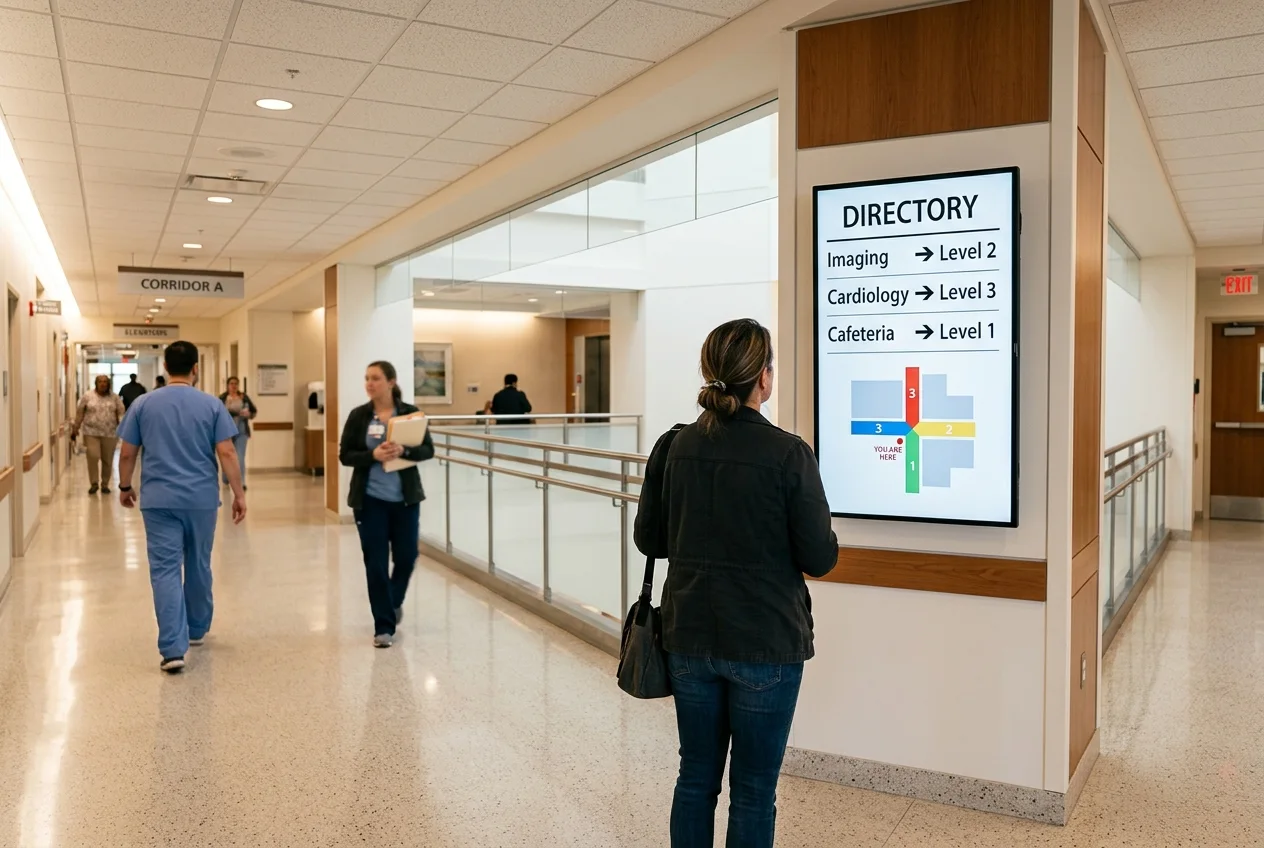
7. Wayfinding screens. Hospitals are the hardest navigation problem in commercial architecture. Digital wayfinding at decision points — elevator lobbies, corridor junctions — cuts the wandering that makes patients late for appointments. Full treatment in our digital wayfinding guide.
8. Digital directories. Building and department directories that update when a practice moves — no more engraved letter boards trailing reality by a quarter. See directory signage systems.
Staff-facing
9. Safety and quality boards. Days-since-incident, hand-hygiene compliance, falls data — live from the quality system instead of a whiteboard someone updates on Fridays.
10. Census and operational boards. Bed status, staffing levels, today's schedule load in nursing stations and back offices (staff areas only — these boards carry operational data that never belongs in patient view).
11. Staff recognition and comms. Deskless clinical staff don't read email between patients; they read the break-room screen. Recognition, policy updates, open shifts, benefits deadlines — the workplace signage playbook applies wholesale.
12. Emergency and code messaging. Network-wide takeover in seconds — weather closures, security alerts, system downtime notices — with an audit trail of what was shown where and when.
Network-level
13. System-wide campaigns. One publish puts the vaccination campaign in every clinic the same morning, correctly branded, with zero printing or shipping.
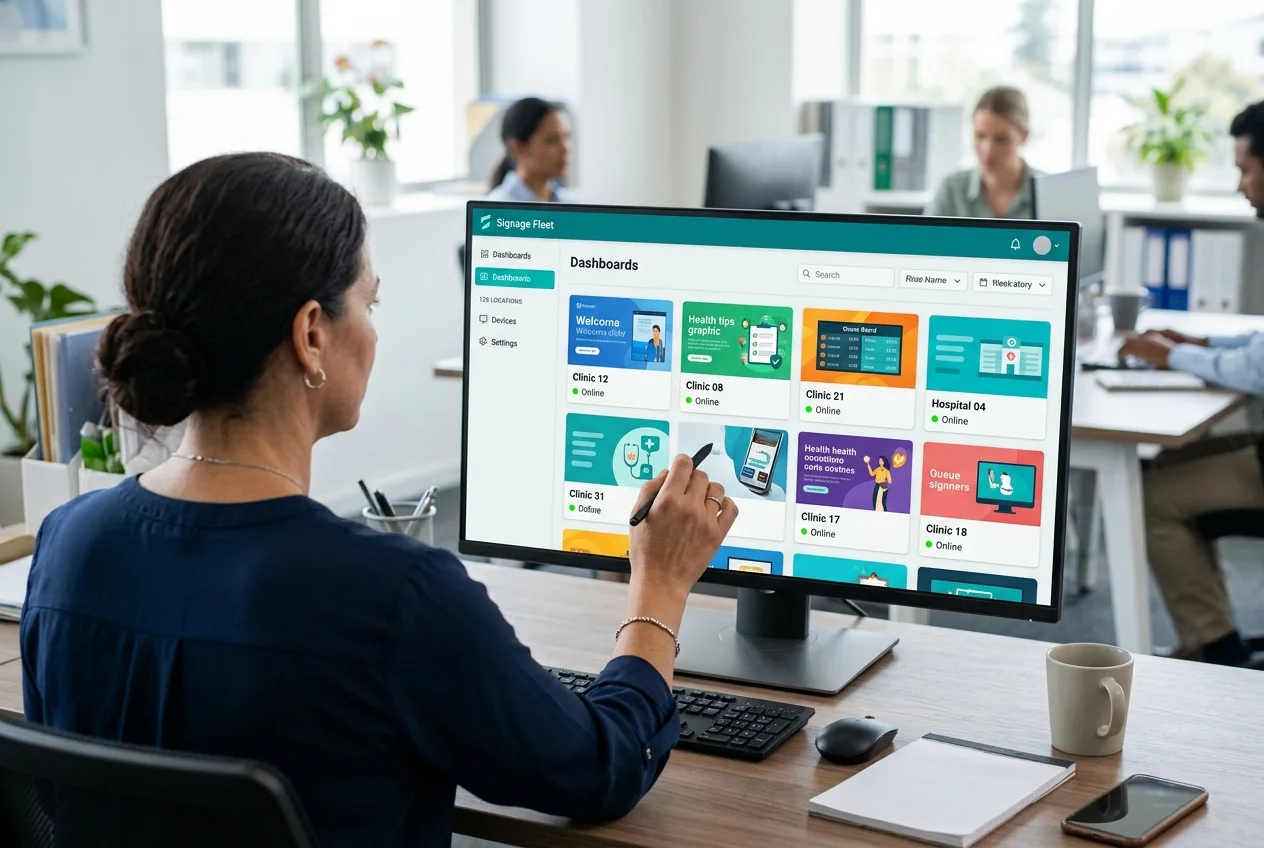
14. Brand governance across sites. Corporate locks templates, fonts, and the health-content library; each clinic publishes local hours, providers, and announcements inside those rails. The difference between a system and 130 independent waiting rooms.
15. Fleet operations. Per-site online/offline visibility, remote reboot, content verification — because nobody is driving to clinic #87 to check whether the screen is on.
Rolling out screens across clinics?
Tell us your site count and zones — we'll spec hardware, install waves, and governance in one quote. RFPs welcome.
Submit an RFP or get a quote in 2 business hours →The HIPAA-aware content rules
The screens themselves aren't regulated — what you put on them is where compliance lives. Three rules cover most of it. First: no PHI on shared screens, ever. Full names, conditions, or anything linking an identifiable person to care stays off lobby and corridor displays; queue boards use first name + last initial or ticket numbers. Second: separate staff and patient networks logically. Census and quality boards carry operational data — per-screen permissions must make it impossible to publish a staff feed to a waiting room. Third: governance beats training. Locked templates, role-based publishing, approval workflows, and audit logs mean a rushed front-desk edit physically can't put the wrong thing on screen. The platform features that make this real are the same multi-site controls covered above — this is why platform choice, not panel choice, is the healthcare decision. (For formal guidance on what constitutes PHI, HHS's HIPAA privacy resources are the primary source.)
Hardware for clinical environments
| Placement | Display | Why |
|---|---|---|
| Waiting rooms | Samsung QM43C–QM55C | 500-nit 4K, 24/7-rated, no consumer menus to fiddle with |
| Queue / wait-time boards | QM43C, landscape or portrait | Crisp text at reading distance; feeds from queue system |
| Wayfinding / directories | QMC portrait; touch optional | Vertical content; touch adds self-service lookup |
| Staff stations / break rooms | QM43C–QM50C | Readable across the room; permissioned staff feed |
| Street-facing / ER wait signs | OM/OH high-brightness series | 2,500–3,000+ nits; standard panels vanish in daylight |
Clinical notes that matter: closed, fanless media players where infection control frowns on dust-movers; panels with wipeable bezels rated for hospital-grade cleaners; and every screen on a dedicated media player so content survives network hiccups — a frozen "now serving" board is worse than none. Full panel comparisons in best digital signage displays.
The multi-site rollout playbook
The 100-clinic rollout fails or succeeds before the first screen hangs. The structure that works: standardize a per-clinic kit (screen count, sizes, mounts) so every site installs identically; stage and pre-configure hardware centrally so devices arrive enrolled and tested; install in scheduled waves around clinic hours with a per-site verification report — photos, network check, content live; and run governance from day one, with templates locked and local publishing rights assigned before launch, not after the first off-brand flyer. Our AV installation guide covers the fleet mechanics in depth; the short version is that one accountable partner with per-site pricing beats 130 local installers every time a screen goes dark.
How much does healthcare digital signage cost?
CrownTV pricing is all-in and one-time per screen — commercial display, mount, media player, licensed-insured installation, setup, and the first year of software:
| Screen size | All-in price | Typical healthcare placement |
|---|---|---|
| 32″ | $3,250 | Exam-area queue boards, small staff screens |
| 43″ | $3,450 | Waiting room, queue boards, directories |
| 55″ | $3,850 | Larger waiting rooms, education walls |
| 65″–75″ | $4,450–$5,200 | Main lobbies, large clinics |
A 2–4 screen clinic lands around $6,900–$15,000; networks get volume pricing below per-screen rates plus wave scheduling. Street-facing and outdoor wait-time signs use high-brightness hardware, quoted separately. Wider cost math in digital signage cost.
Common healthcare deployment mistakes
- Cable news as default content. It raises room tension and wastes the one audience guaranteed to be watching. Program the screens or don't hang them.
- PHI-adjacent queue formats. Full names on a lobby board is a complaint (or worse) waiting to happen. First name + last initial, minimum.
- Consumer TVs on 14-hour clinical duty. Warranty-voided, burned out inside two years, and their remote-control menus get "adjusted" by visitors.
- No per-screen permissions. The census board must be physically unpublishable to the waiting room.
- Buying screens before governance. 130 clinics with unrestricted logins isn't a network; it's 130 liabilities with the same logo.
How CrownTV Helps
One contract for hardware + software + install + service:
- Samsung Authorized Reseller — QMC clinical-area panels, OM/OH high-brightness for street-facing signs
- All-in per-screen packages with 3-year commercial warranty; volume pricing and wave scheduling for clinic networks
- CrownTV Dashboard: locked templates, role-based per-site publishing, approval workflows, audit logs, fleet visibility
- Licensed, insured installation in all 50 states with per-site verification reports — built for the nationwide multi-clinic RFP
- 13+ years, 1,800+ businesses, ~10,000 screens live
Get a healthcare signage quote in two business hours →
Frequently asked questions
What is healthcare digital signage?
The network of commercial screens a hospital, clinic, or health system manages from one platform: waiting-room displays, queue and wait-time boards, wayfinding, health education, and staff-facing boards. Content publishes centrally and updates in seconds across one facility or hundreds of clinics.
How much does digital signage for healthcare cost?
All-in per screen: $3,250 (32″) through $5,200 (75″), including display, mount, media player, licensed-insured install, setup, and first-year software. A 2–4 screen clinic runs about $6,900–$15,000; networks get volume pricing and rollout scheduling.
Is digital signage HIPAA compliant?
Compliance lives in the content rules and platform controls, not the panel: no PHI on shared screens, compliant queue formats, role-based permissions, approval workflows, and audit logs so the wrong content physically can't reach a lobby screen.
What should be on a medical office waiting room TV?
Queue status and honest wait times, specialty-matched health education, provider introductions, service-line promotion, and visitor information — not cable news. Perceived wait drops when patients can see their place in line.
Can a healthcare network manage signage across all locations?
Yes — corporate locks templates and compliance rules while each clinic publishes local content inside those rails, with fleet visibility, per-site permissions, and instant network-wide publishing for urgent updates.
Read Next
DISPLAYDETAILS · BY CROWNTV · SHIPS NATIONWIDE
Healthcare-grade displays, direct from CrownTV
Slim 4K commercial display, 24/7 rated, Tizen built-in.
Samsung QM43C
43-inchSamsung Authorized Reseller — direct allocation, full warranty
- Price-match guarantee — find it cheaper, we'll match it.
- 3-year Samsung commercial warranty — RMAs handled by us.
- Free nationwide shipping — every panel, every order.
- FREE: 1 month CrownTV CMS + 1 media player per screen (then $29.99/mo).
Keep reading
More guides like this
Operator-grade playbooks, weekly.
Proof, not pitches
See real installs
Live deployments across hospitality, retail, and offices.
Ready to deploy?
Get a quote in 4 hours
Reply within two business hours. No call required.