
Digital Advertising Screens: 10 Rules That Actually Move Sales
Ten field-tested rules for digital advertising screens that move actual sales — from placement and content to measurement, written from 13+ years of installs.
On this page
A digital advertising screen is one of the most expensive square feet on a retail floor or in a lobby. The hardware is the smallest part of what determines whether the screen pays back. Placement, content shape, and measurement do most of the work.
CrownTV has installed advertising screens for 1,800+ operators over 13+ years, with 16,000+ screens currently live. The 10 rules below come from what we have actually seen separate winning installs from the screens that quietly get unplugged.
You'll get:
- Placement rules with specific eye-line numbers
- Content rules from real retail floor results
- Measurement rules — what to count and what to ignore
- Three install patterns drawn from our customer base
Rule 1 — Eye Line Beats Footprint
A 55" panel mounted at 60" off the floor outperforms a 75" panel mounted above shoulder height in dwell time and recall. People do not look up. Mount inside the eye line of the average viewer, and the screen earns multiples on the same content.
Rule 2 — Throughput Zones, Not Transit Zones
Mount where customers stand still for at least 20 seconds: the queue, the dressing-room hallway, the elevator landing, the fitting bench. A screen mounted in a transit corridor where people walk past at full pace gets a 1–2 second impression — not enough for any real message to land.
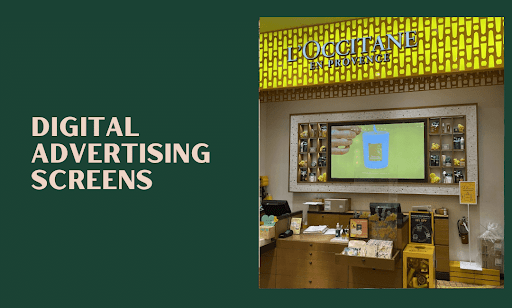
L'Occitane flagship boutiques run hybrid 98"/85" video walls in the checkout zone. Everyone in line stares at them for several minutes. That is the highest-attention zone in the store, and it is occupied by the largest screen.
Rule 3 — One Message Per Slide
Two messages in a 10-second window means zero retention. One product, one price, one CTA. Anything else gets skipped by the eye before the brain finishes parsing it.
Rule 4 — Motion in the First 2 Seconds
A static slide is invisible to peripheral vision. A short loop — a subtle camera move on a product shot, a 3-frame text reveal — pulls the eye and gives you another 2–4 seconds of attention. Motion does not have to be dramatic. It just has to exist.
Rule 5 — Show the Price
"Now $39" outperforms "Premium quality" almost every time we have measured it on retail floor screens. Brand-only slides have their place in the loop. Promotional slides without a number on them are a missed conversion.
Rule 6 — Schedule by Daypart
Lunch promos at lunch. Happy-hour at 4 p.m. New arrivals on the weekend. Same screen, different content windows. The CMS makes this a 5-minute setup. The same loop running 12 hours a day is leaving money on the table.
Rule 7 — Refresh Weekly
Returning customers stop seeing the same slide after the second or third visit. Rotate at least 20% of the loop weekly. Marketing teams that own one calendar (in-store + email + paid) refresh easily. Marketing teams that treat the screen as a separate task forget about it.
Rule 8 — Make the Software Do the Work
The CMS has to schedule by daypart and location, cache content locally so WiFi outages do not blank the screen, push remote updates without a USB stick, and report uptime so dead screens get noticed without a customer mentioning it. CrownTV Dashboard handles all four. If your CMS does not, the screen ages out faster than it should.
Software comparison: 2025 digital signage software guide.
Rule 9 — Measure Sales, Not Impressions
"Impressions" on a digital advertising screen is a vanity metric. Three numbers actually matter:
- Sales per featured SKU. Run the screen's promotional slide for 4 weeks, compare against the prior 4 weeks for the same SKU.
- QR scans. A QR code on the slide turns the impression into a click. Use a unique URL per location for attribution.
- Dwell time near the screen. If the store has people-counters, check whether the screen is pulling traffic into a previously cold zone.
Anything else is theater.
Rule 10 — Pick the Right Panel for the Light
The most common technical mistake: a 350-nit consumer TV mounted in a window-facing position. By 2 p.m. the screen looks washed out and gray.
- Indoor, normal light: 300–400 nits. Samsung QMR-T or LG UH7J.
- Brightly lit retail or near windows: 500–700 nits. Samsung QMR-T or Sony BRAVIA BZ40L.
- Window-facing: 2,000–2,500 nits. Samsung OM Series.
- Outdoor or sealed enclosure: 2,500–4,000 nits. Samsung OH Series.
Hardware comparison: Best TVs for Digital Signage in 2026.
Three Install Patterns From Our Customer Base
- L'Occitane (150+ stores since 2019). Eye-level panels inside the product fixture line. Slides showing a single product with a bilingual headline and a small QR code linking to the product page. Refreshed monthly with the email calendar.
- Pressed Juicery. Menu boards in portrait, mounted above the cashwrap. Daypart scheduling so morning juice items show before 11 a.m. and lunch bowls show midday.
- Herman Miller. Lobby and meeting-room screens running brand content in landscape. No price slides, no promotions — the screens are part of brand presentation, and the content reflects that.
How CrownTV Helps
One contract for hardware + software + install + service:
- Samsung Authorized Reseller — QMR-T, OM, OH, VM-T panels at commercial-grade pricing
- CrownTV Dashboard CMS for scheduling, content management, and remote uptime monitoring
- Site survey, mounting, cabling, commissioning, and warranty service in all 50 states
- Standard turnkey deployment under one week
- 13+ years of operating experience across retail, hospitality, healthcare, and corporate
Get a digital advertising screens quote in two business hours →
Read Next
Keep reading
More guides like this
Operator-grade playbooks, weekly.
Proof, not pitches
See real installs
Live deployments across hospitality, retail, and offices.
Ready to deploy?
Get a quote in 2 business hours
Reply within two business hours. No call required.