

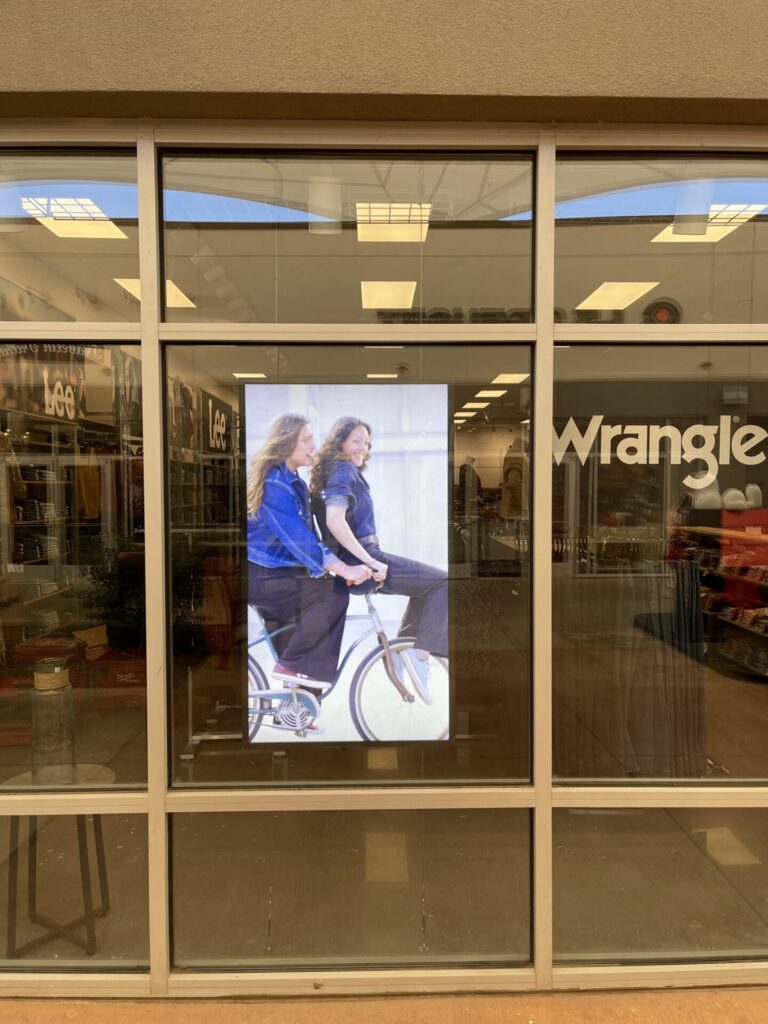
If you’ve ever walked past a storefront and noticed a brilliantly lit screen showing promotions through the glass, you already understand why high-brightness window displays have become essential for modern businesses. But here’s the thing most people don’t realize: the vast majority of those displays only face one direction. The customers walking by outside get the show, and the people inside the store? They’re staring at the back of a monitor.
The Samsung OM55N-DS changes that equation entirely. It’s a 55-inch double-sided high brightness window display built to serve two audiences at once, passersby on the street and customers already inside. One screen faces out at a sun-defeating 2,500 nits. The other faces in at a perfectly readable 1,000 nits. And both sides can run completely independent content.
At CrownTV, we’ve helped businesses across the country deploy commercial-grade digital signage in every kind of environment, from quick-service restaurants to flagship retail stores. The OM55N-DS is one of the most compelling Samsung displays we work with, and in this guide, we’re going to break down exactly why it stands apart, specs, use cases, installation tips, and how it compares to standard single-sided window displays.
What Is the Samsung OM55N-DS?
The Samsung OM55N-DS is part of Samsung’s OMN-DS series storefront window digital signage display lineup, and it’s purpose-built for one very specific scenario: mounting directly in or behind a storefront window where it needs to communicate with people on both sides of the glass.
Unlike conventional digital signs, which project content in a single direction, the OM55N-DS packs two fully independent FHD (1920×1080) panels into a single slim enclosure. It runs on Tizen OS, includes Samsung’s MagicINFO content management platform, and is rated for continuous 24/7 operation. This isn’t a consumer TV jury-rigged for commercial use. It’s a commercial display from the ground up, designed to handle the thermal and brightness demands that come with sitting in a sun-drenched window all day, every day.
Dual-Sided Display Design Explained
The core innovation here is straightforward but remarkably effective. The outward-facing screen, the one pedestrians and drivers see through your window, pumps out 2,500 nits of brightness. That’s more than enough to remain clearly visible even in direct sunlight, where a standard TV (typically 300–500 nits) would wash out completely.
The inward-facing screen delivers 1,000 nits. That’s still significantly brighter than most indoor commercial displays, ensuring your in-store messaging pops without being overpowering in a climate-controlled environment.
Critically, each side operates independently. You can show flash sale promotions to foot traffic on the outside while running employee announcements, wayfinding information, or a different promotional loop on the inside. One display, two audiences, zero compromise. The built-in media player and Samsung Smart Signage Platform (SSSP) handle content delivery for both screens without requiring external hardware, which keeps the installation clean and manageable.
Key Specifications and Performance Features
Let’s get into the numbers, because the OM55N-DS earns its place in the Samsung lineup on merit.
High-Brightness Output for Window-Facing Installations
The 2,500-nit outward-facing panel is the headline spec, and for good reason. When a display sits behind glass in a south- or west-facing window, ambient light levels can be brutal. Standard commercial displays rated at 350–700 nits simply can’t compete. The content looks faded, washed out, and eventually invisible to the people you’re trying to reach.
At 2,500 nits, the OM55N-DS cuts through that ambient light with ease. For context, if you’ve looked at Samsung’s single-sided high-brightness 55-inch window display, you’ll know how much of a difference this brightness class makes in real-world storefront conditions.
The 1,000-nit inward-facing screen is no afterthought either. It’s bright enough to stand out in a well-lit retail environment without requiring viewers to squint. And the auto brightness sensor on the OM55N-DS adjusts output dynamically based on ambient light conditions, which saves energy during darker hours and extends panel lifespan.
Other noteworthy performance specs:
- Operating hours: Rated for 24/7 continuous operation
- Orientation: Supports both landscape and portrait mounting
- Operating system: Tizen-based with SSSP 6.0
- Content management: Samsung MagicINFO built in
- Media player: Integrated, no external PC or player box needed
Resolution, Viewing Angles, and Color Accuracy
Both sides deliver Full HD 1920×1080 resolution. For a 55-inch display at typical storefront viewing distances (anywhere from 3 to 20+ feet for the outdoor side), FHD is more than sufficient, text stays sharp, images look crisp, and video content plays smoothly.
Viewing angles are wide enough that off-axis viewers still see accurate color and contrast, which matters a lot when your display is in a window that people approach from various angles on a sidewalk. Color accuracy is tuned for commercial signage rather than cinema-grade color grading, meaning vibrant, punchy visuals that grab attention.
For businesses that need even larger window coverage, Samsung offers bigger options in the high-brightness category, our guide to the Samsung OM75 high-brightness 75-inch display covers the specs and use cases for larger storefronts.
👉 Need A Samsung OM55N-DS? 🚚 Fast Shipping. Competitive Pricing. All Inquiries Answered Within 1 Business Hour.
Why a Double-Sided Window Display Matters for Storefronts
Here’s the business case in plain terms: a standard single-sided window display serves exactly half of the people who could benefit from it. You’re paying for the hardware, the content creation, the electricity, and the installation, but only one audience gets the message. The Samsung OM55N-DS doubles your return on that investment by engaging both sides of the glass.
Attracting Foot Traffic From the Outside
The primary job of any window display is stopping people in their tracks. In a busy shopping district, you’ve got maybe two to three seconds to catch someone’s eye before they walk past. A 2,500-nit screen blazing through storefront glass does that job exceptionally well, far better than printed posters, static lightboxes, or even standard-brightness screens that fade in daylight.
We’ve seen this play out across hundreds of installations. The brightness advantage isn’t subtle. A high-brightness Samsung double-sided window display in a 55-inch form factor creates a focal point that printed signage simply can’t match. You can run motion graphics, video loops, time-sensitive promotions, or even live social media feeds. The dynamic nature of the content alone is a massive attention magnet.
And because the OM55N-DS supports both portrait and landscape orientation, you can tailor the format to your window dimensions and content strategy. A tall, narrow window? Go portrait. A wide storefront bay? Landscape works beautifully.
Delivering Internal Messaging Simultaneously
This is where the OM55N-DS really separates itself from everything else on the market. That inward-facing 1,000-nit screen isn’t just a bonus feature, it’s a fully independent display surface.
Think about what you could do with it. A clothing retailer might show seasonal promotions to pedestrians on the outside while displaying a loyalty program sign-up prompt to customers already browsing inside. A bank could advertise mortgage rates to passersby and show queue management information or financial literacy content to customers in the lobby.
The content on each side is managed independently through Samsung MagicINFO, which means your marketing team can schedule, update, and swap content on either screen without affecting the other. No complicated workarounds. No dual-player setups. It’s all handled within one integrated system, and we can manage it through our cloud-based digital signage platform to make things even more seamless.
Ideal Use Cases Across Industries
The OM55N-DS isn’t a niche product looking for a problem to solve. It fits naturally into a wide range of industries, anywhere a business has a street-facing window and wants to maximize that real estate.
Retail Stores and Shopping Centers
Retail is the most obvious application. Fashion boutiques, electronics stores, sporting goods shops, cosmetics retailers, if you’ve got a window, you’ve got an opportunity. The outside screen runs eye-catching promotions, new arrivals, or brand storytelling. The inside screen reinforces those messages with additional product details, pricing, or directs customers toward specific departments.
In shopping centers, the OM55N-DS works exceptionally well for stores on exterior-facing corridors where foot traffic passes in both directions. One screen targets mall-goers walking by, the other serves customers approaching from inside the store.
Car dealerships are another standout use case. A dealership’s showroom window is prime advertising territory. The outward screen can showcase the latest models and financing offers to drivers and pedestrians passing on the road, while the inward screen displays service department specials or trade-in valuations to customers already in the showroom.
Restaurants, Real Estate Agencies, and Service Businesses
Restaurants benefit enormously from dual-sided signage. Picture this: the outward-facing screen shows the daily menu, happy hour specials, or mouth-watering food photography that pulls hungry passersby through the door. Meanwhile, the inward-facing screen displays today’s specials, upcoming events, or even serves as a supplemental digital menu board for seated guests near the window.
Real estate agencies are a near-perfect fit. Agencies have been putting property listings in their windows for decades, it’s one of the oldest marketing tactics in the business. The OM55N-DS modernizes this entirely. Outside, it cycles through featured listings with photos, pricing, and open house dates. Inside, it shows internal team updates, market data, or different listing sets for agents and walk-in clients.
Banks and financial service providers use the outside screen for product marketing, credit cards, loan rates, investment services, while the inside screen handles customer experience messaging, wait time updates, or compliance-related information.
Service businesses like salons, fitness studios, and medical offices can advertise services and promotions externally while managing appointment information or wellness tips internally. The versatility is genuinely broad.
👉 Need A Samsung OM55N-DS? 🚚 Fast Shipping. Competitive Pricing. All Inquiries Answered Within 1 Business Hour.
Installation Considerations and Best Practices
Getting the most out of the OM55N-DS requires thoughtful installation. This isn’t a hang-it-and-forget-it product, window environments present unique challenges.
Mounting, Ventilation, and Sunlight Exposure
The OM55N-DS features a slim profile designed for window mounting, but you still need to address a few critical factors.
Mounting position: The display can be ceiling-mounted, suspended by cables, or placed on a floor stand depending on your window configuration. Portrait and landscape orientations are both supported. We generally recommend keeping the display as close to the glass as possible for maximum outdoor visibility, while maintaining a small air gap for ventilation.
Ventilation is non-negotiable. A display producing 2,500 nits of brightness in a sun-facing window generates significant heat. Samsung engineered the OM55N-DS with internal cooling systems rated for these conditions, but restricting airflow around the unit can still cause thermal issues. Make sure there’s adequate clearance on all sides, and avoid recessing the display into a tight enclosure without ventilation pathways.
Sunlight exposure: The auto brightness sensor adjusts output based on ambient conditions, which is key for both energy efficiency and panel longevity. Direct sun exposure on the screen surface can still cause localized hotspots, so consider your window’s orientation and whether any UV-filtering film is applied to the glass. Samsung rates the panel for these conditions, but smart placement maximizes its operational lifespan. For businesses that need a display for fully outdoor, exposed installations rather than behind glass, the Samsung OH55A-S outdoor commercial display is worth evaluating.
Content Management and Remote Control
The built-in Tizen OS and Samsung MagicINFO platform handle content scheduling and playback for both screens. You can upload content remotely, set dayparting schedules (different content at different times of day), and monitor display health, all without physically touching the unit.
The SSSP (Samsung Smart Signage Platform) eliminates the need for an external media player, which simplifies installation and reduces points of failure. For multi-location businesses, MagicINFO scales well, you can manage dozens or hundreds of displays from a single dashboard.
At CrownTV, we pair Samsung’s built-in tools with our own cloud-based management platform, giving our clients an even more streamlined way to control content across their entire signage network. It’s especially useful for chains and franchises that need consistent branding across multiple storefronts.
One practical tip: design your content with both audiences in mind from the start. The outside screen should prioritize large text, bold imagery, and concise messaging that reads in seconds. The inside screen can afford more detail since viewers are stationary and closer. Modern web technologies, including frameworks referenced in resources like the MDN Web Docs, power many of the browser-based content management tools that make creating and deploying this kind of dual-screen content straightforward.
How the Samsung OM55N-DS Compares to Single-Sided Displays
The obvious question: is a double-sided display worth the premium over a standard single-sided window display?
Let’s break it down. A typical single-sided high-brightness window display (like Samsung’s OM55B) gives you one outward-facing screen at around 2,500 nits. It does that job very well. But the back of the display faces your store interior, completely wasted.
With the OM55N-DS, you’re essentially getting two commercial displays in one housing. If you were to buy a separate high-brightness window display AND a standard indoor commercial display, like the Samsung QM55C for indoor signage, you’d need two power connections, two mounting solutions, and two content management setups. The OM55N-DS consolidates all of that.
Here’s a quick comparison:
| Feature | Single-Sided (e.g., OM55B) | Double-Sided (OM55N-DS) |
|---|---|---|
| Outward brightness | 2,500 nits | 2,500 nits |
| Inward screen | None | 1,000 nits |
| Independent content per side | N/A | Yes |
| Mounting complexity | Single display | Single display (same footprint) |
| 24/7 rated | Yes | Yes |
| Content management | MagicINFO | MagicINFO (both sides) |
The total cost of ownership often favors the OM55N-DS when you factor in what it would cost to achieve the same dual-audience effect with two separate displays. You save on mounting hardware, cabling, and ongoing management overhead. And the slim, integrated design looks far more professional than two displays rigged back-to-back.
Getting the Most Out of Your Storefront Window Digital Signage
Owning the hardware is only half the equation. Here are a few practical strategies we recommend to our clients deploying the OM55N-DS:
Use dayparting aggressively. The foot traffic outside your store changes throughout the day. Morning commuters have different needs than evening shoppers. Schedule your outdoor content to match, breakfast specials in the morning, dinner promotions in the evening, weekend events on Saturday and Sunday.
Keep outdoor content simple. People walking past have seconds, not minutes. Use large fonts, high-contrast colors, and minimal text. Let the imagery do the heavy lifting. Save the detailed information for the indoor-facing screen where viewers have time to absorb it.
Refresh content regularly. A stale display is almost worse than no display at all. Even small updates, swapping out a featured product, updating a price, or adding a seasonal graphic, keep the signage feeling current and worth watching.
Leverage the auto brightness sensor. Don’t override it unless you have a specific reason. The sensor optimizes brightness for ambient conditions, which saves energy and reduces wear on the backlight array. Over the lifespan of a 24/7 display, those savings add up.
Plan your content pipeline before installation. We’ve seen businesses invest in premium displays and then scramble to create content after the fact. Have your first two to four weeks of content ready before the display goes live. It makes the launch smoother and ensures you’re delivering value from day one.
👉 Need A Samsung OM55N-DS? 🚚 Fast Shipping. Competitive Pricing. All Inquiries Answered Within 1 Business Hour.
Conclusion
The Samsung OM55N-DS solves a problem that most businesses don’t even realize they have until they see the solution in action. Every storefront window is a two-sided piece of real estate, and this display finally treats it that way. With 2,500 nits facing out, 1,000 nits facing in, independent content on each side, and 24/7 reliability baked into the hardware, it’s one of the smartest investments a business can make in storefront visibility.
At CrownTV, we handle every step of the process, sourcing the display, planning the installation, and setting up the content management system so you’re running from the moment we walk out the door. If you’re ready to turn your storefront window into your most productive marketing channel, we’re ready to make it happen.
Frequently Asked Questions
What is the Samsung OM55N-DS and how does it differ from single-sided displays?
The Samsung OM55N-DS is a 55-inch double-sided high brightness window display designed for storefronts. Unlike single-sided models like the OM55B, it features two independent screens—2,500 nits facing outward and 1,000 nits facing inward—letting businesses engage both passersby and in-store customers simultaneously with separate content.
How bright is the Samsung OM55N-DS outward-facing screen?
The outward-facing panel delivers 2,500 nits of brightness, which is powerful enough to remain clearly visible even in direct sunlight. Standard TVs typically produce only 300–500 nits, making the OM55N-DS far superior for sun-drenched storefront window installations where readability is critical.
What industries benefit most from a double-sided window display?
Retail stores, restaurants, real estate agencies, car dealerships, banks, salons, and fitness studios all benefit significantly. Any business with a street-facing window can use the Samsung OM55N-DS to advertise externally while delivering separate internal messaging—such as menus, queue updates, or loyalty prompts—on the indoor-facing screen.
Can the Samsung OM55N-DS run different content on each side?
Yes, each side operates completely independently. Using Samsung’s built-in MagicINFO content management platform, you can schedule and update unique content for the outward and inward screens separately—no external media player required. This makes managing dual-audience messaging simple and streamlined.
What are the key installation requirements for the OM55N-DS?
Proper ventilation is essential since the 2,500-nit panel generates significant heat. Mount the display close to the glass with a small air gap, ensure clearance on all sides, and avoid tight enclosures. It supports ceiling, cable, and floor-stand mounting in both portrait and landscape. For fully outdoor setups, consider the Samsung OH55A-S instead.
Is a larger double-sided high brightness display available from Samsung?
While the OM55N-DS is a 55-inch model, Samsung offers larger high-brightness options for bigger storefronts. The Samsung OM75 75-inch window display delivers even greater visual impact with 4K resolution and 4,000 nits. Modern web-based content tools also make it easy to design content for various screen sizes.
Further Reading from CrownTV
- Best High-Brightness Window Displays for Storefronts (2026)
- Best Samsung Commercial Display Resellers in the US (2026)
- Best Digital Signage for Pop-Up Shops & Temporary Retail in 2026
Related Samsung Commercial Display Guides
Explore our other in-depth Samsung commercial display guides to find the right screen for your project:
- Samsung UH55F-E: 55″ Ultra Narrow Bezel Video Wall Display
- Samsung UM55H-E: 55″ Ultra Narrow Bezel Video Wall Display
- Samsung VH55T-E: Premium 55″ Video Wall Display
- Samsung PM43H: 43″ Commercial Display for Digital Signage
- Samsung OM55B: 55″ High Brightness Display for Window-Facing Signage
👉 Need A Samsung OM55N-DS? 🚚 Fast Shipping. Competitive Pricing. All Inquiries Answered Within 1 Business Hour.
