

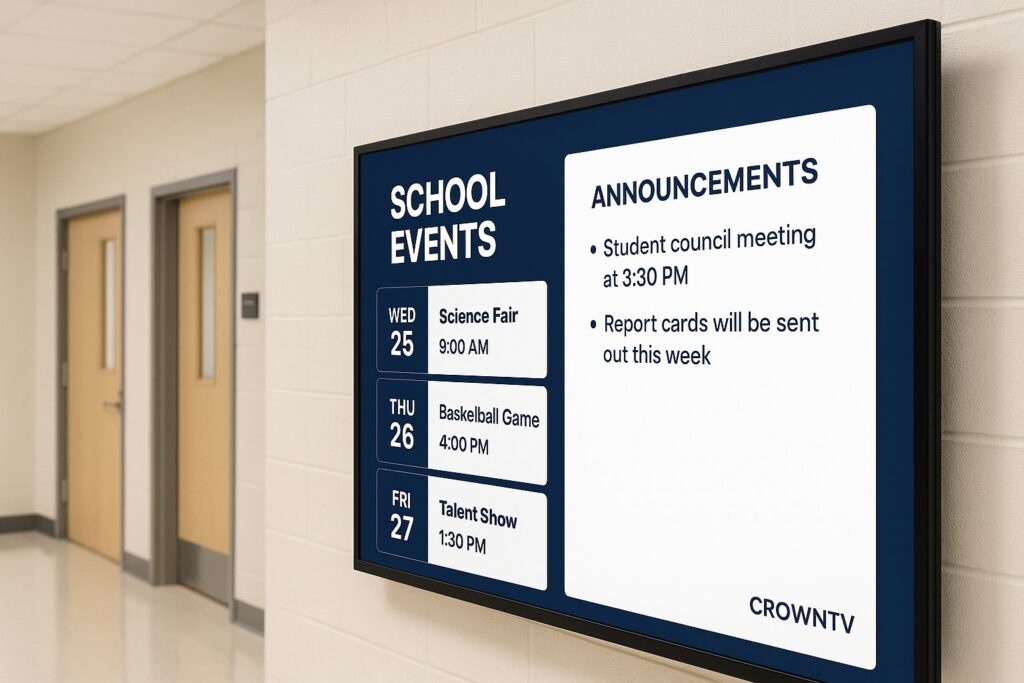
Static bulletin boards and paper flyers taped to hallway walls are quickly becoming relics of a different era. Today, digital signage for schools is transforming how K–12 campuses and universities share critical information, from emergency lockdown alerts to tomorrow’s cafeteria menu. And the shift isn’t just about looking modern. Districts managing multiple buildings need a centralized way to push real-time updates to every screen, in every hallway, across every campus. That’s exactly what school digital signage delivers.
Whether a district is exploring its first pilot program or a university is scaling screens across a sprawling campus, this guide breaks down the best solutions, must-have features, real-world use cases, and compliance considerations for digital signage in education environments in 2026.
Why Schools Are Switching to Digital Signage
The move from corkboards to digital screens isn’t happening by accident. Several converging forces are pushing schools, districts, and universities toward digital signage for education.
- Instant communication matters more than ever. In an age of active shooter drills and severe weather events, administrators can’t afford a 30-minute delay while someone prints and posts paper notices. A campus digital signage system pushes emergency alerts to every screen in seconds.
- Multi-campus management is a headache without centralization. Districts operating five, ten, or fifty buildings need a single dashboard, a centralized CMS, to manage content across all locations. Logging into separate systems per school simply doesn’t scale.
- Students and staff expect digital-first experiences. From smartphones to smart TVs at home, everyone is conditioned to consume information on screens. A school announcement display feels intuitive in a way that a printed memo never will.
- Cost savings add up over time. Printing flyers, posters, and banners for every event gets expensive fast. Digital signage eliminates recurring print costs and reduces the labor needed to physically distribute materials.
- Engagement is measurably higher. Research consistently shows that digital displays capture attention far more effectively than static signage. For schools competing for parent and student engagement, that visibility matters.
The bottom line? Schools are switching because digital signage solves real operational problems, not because it’s trendy.
Best Digital Signage Solutions for Schools in 2026
Not every digital signage platform is built with education in mind. Below are standout solutions that school districts and universities are adopting in 2026, ranked by their overall fit for education environments.
1. CrownTV
CrownTV offers a complete turnkey solution that’s particularly well-suited for multi-campus school districts. Their cloud-based dashboard lets administrators manage every screen, from a single elementary school to a 40-building district, from one centralized CMS. The platform handles everything: commercial-grade displays, media players, nationwide installation with licensed technicians, and intuitive software. Pricing is competitive for education accounts, and the all-in-one approach means schools don’t have to cobble together hardware from one vendor and software from another.
Best for: Districts and universities that want a single vendor handling hardware, software, and installation.
2. Skykit
Skykit focuses heavily on the education vertical with scheduling integrations and room-booking features that work well in university settings. Their platform supports Google Workspace and Microsoft 365 integrations, making it easy to pull in calendar data. But, schools needing full installation services will need to coordinate that separately.
Best for: Universities already embedded in the Google or Microsoft ecosystem.
3. Visix
Visix has a long track record in higher education, with digital signage for universities being a core market. Their AxisTV platform offers strong content scheduling and interactive wayfinding features. Pricing tends to land on the higher end, which can be a barrier for budget-conscious K–12 districts.
Best for: Large universities with dedicated AV teams and bigger budgets.
4. Rise Vision
Rise Vision positions itself as a budget-friendly option for schools, with a free tier that covers basic functionality. It’s a solid starting point for a single school experimenting with digital signage, though multi-campus management features are more limited compared to enterprise-grade platforms like CrownTV.
Best for: Individual schools testing digital signage on a tight budget.
5. Yodeck
Yodeck runs on Raspberry Pi hardware, keeping upfront costs low. The platform is straightforward and easy to learn, but schools managing dozens of screens across multiple buildings may outgrow its capabilities.
Best for: Small schools or single-location deployments looking for an affordable entry point.
Key Features for Education Digital Signage
When evaluating school digital signage platforms, administrators should prioritize features that directly address education-specific needs. Here’s what actually matters:
- Centralized CMS for multi-campus management. This is non-negotiable for districts. A single cloud-based dashboard should let administrators schedule, update, and monitor content across every campus without visiting each building.
- Emergency alert integration. The system must support instant override capabilities so safety messages can replace all on-screen content simultaneously across every display. Look for platforms that integrate with Common Alerting Protocol (CAP) or school safety systems.
- Content scheduling and playlists. Schools need different content at different times, morning announcements, lunch menus, after-school event reminders. Automated scheduling saves hours of manual work each week.
- Template libraries tailored for education. Pre-built templates for event calendars, cafeteria menus, bus schedules, and athletic scoreboards reduce the design burden on staff who aren’t graphic designers.
- Role-based access controls. Principals, teachers, office admins, and district IT staff all need different permission levels. A good platform lets a cafeteria manager update the lunch menu without accidentally editing the emergency alert configuration.
- Hardware durability and warranty. Commercial-grade displays last significantly longer than consumer TVs in high-traffic school environments. Ensure any solution includes displays rated for extended daily use.
- Integration with existing school systems. Calendar syncing with Google Workspace, PowerSchool, or student information systems streamlines content creation and keeps displays accurate without manual data entry.
Digital Signage Use Cases: Hallways, Cafeterias, Admin Offices
The real value of campus digital signage becomes obvious when you look at how schools actually use it day-to-day. Here are the most impactful placements and use cases.
Hallways and Common Areas
Hallway screens function as the digital backbone of school communication. They display rotating content: daily announcements, upcoming event schedules, student achievement spotlights, and club recruitment messages. During passing periods, these screens catch hundreds of eyes in minutes. Many schools also use hallway displays for wayfinding, especially helpful during open houses and parent nights when visitors aren’t familiar with the building.
Cafeterias
Cafeteria digital signage is one of the most practical deployments in any school. Screens show the day’s cafeteria menu, nutritional information, and allergen warnings. Some districts rotate motivational messages or educational content during lunch periods, turning idle screen time into something productive. Updating menus across multiple campuses takes seconds with a centralized CMS rather than printing and posting new paper menus at each location.
Admin and Front Offices
Front office screens serve a dual purpose: welcoming visitors with school branding and providing real-time information like bus arrival boards, visitor check-in instructions, or schedule changes. For admin staff, internal-facing displays can show operational dashboards, attendance data, maintenance requests, or daily staff reminders.
Athletic Facilities and Gymnasiums
Scoreboards, game schedules, team rosters, and sponsorship messages all work beautifully on gym-mounted digital displays. During assemblies, these screens double as presentation displays.
Transportation Zones
Outdoor-rated or window-facing screens near bus loops display real-time bus arrival boards and route changes. Parents and students see exactly which buses have arrived and which are delayed, reducing confusion during dismissal.
Compliance and Safety Alerts via Digital Signage
Safety isn’t optional, it’s the primary reason many districts fast-track their digital signage for schools deployments.
Emergency Alert Overrides
The most critical feature in any education signage system is the ability to instantly override all scheduled content with an emergency message. Whether it’s a lockdown, tornado warning, or evacuation notice, every screen on campus should display the alert within seconds. Leading platforms like CrownTV support one-click emergency takeover from any authorized device, including mobile phones.
Integration with Mass Notification Systems
Many school districts already use mass notification platforms (like Rave Mobile Safety or SchoolMessenger) for text and email alerts. The best digital signage solutions integrate directly with these systems, so a single alert triggers simultaneous notifications across screens, phones, and email, no duplicate effort required.
ADA and Accessibility Compliance
Schools must ensure their school announcement display content meets accessibility standards. This means high-contrast text, readable font sizes, and, where possible, audio-paired alerts for hearing-impaired individuals. Placement height and screen brightness also factor into ADA compliance.
Fire Code and Mounting Regulations
Physical installation matters too. Screens in hallways and exits must comply with local fire codes about protrusion into egress paths. Professional installation teams, like those offered through CrownTV’s nationwide installation services, ensure every display meets code requirements, which is one less thing for facilities managers to worry about.
Drill and Training Content
Beyond live emergencies, schools use digital signage to display safety drill schedules, evacuation route maps, and training reminders for staff. Keeping this content in a regular rotation normalizes safety awareness across the campus community.
CrownTV’s Education Signage Program
CrownTV has built a digital signage program specifically designed for the unique challenges schools and universities face. Here’s what sets it apart in the education space.
Turnkey Deployment Across Multiple Campuses
CrownTV handles the entire process, sourcing commercial-grade displays, configuring media players, and dispatching licensed technicians for professional installation at every location. For a school district with buildings spread across a county, this turnkey approach eliminates the logistical nightmare of coordinating multiple vendors.
Centralized Cloud Dashboard
The CrownTV dashboard serves as a single centralized CMS for multi-campus management. District administrators can push a snow day announcement to 50 schools in under a minute, schedule cafeteria menus weeks in advance, or override every screen with an emergency alert, all from one browser tab. Teachers and office staff can receive limited access to update only their designated screens.
Pricing and Budget Considerations
Education budgets are tight, and CrownTV structures its pricing to reflect that reality. Schools typically work with a per-screen monthly subscription that covers software, cloud hosting, and ongoing support. Hardware costs depend on display size and quantity, but volume discounts apply for larger district rollouts. Many districts fund their deployments through E-Rate programs, technology bonds, or Title IV grants. CrownTV’s sales team can provide customized quotes that align with specific budget cycles and procurement requirements.
Dedicated Education Support
CrownTV provides onboarding assistance tailored to school staff, not just IT departments. This includes template setup for common education use cases (event schedules, lunch menus, bus boards) and training sessions that make non-technical staff comfortable managing content.
For districts evaluating digital signage for universities or K–12 environments, CrownTV’s combination of hardware, software, installation, and education-specific support makes it a compelling all-in-one choice.
FAQ: Digital Signage for Schools
How much does digital signage for schools cost?
Costs vary widely depending on the number of screens, display sizes, and whether installation services are included. Software subscriptions typically range from $10–$30 per screen per month. Commercial-grade displays start around $400–$800 each. Turnkey providers like CrownTV bundle hardware, software, and installation into a single package, which often reduces total cost compared to sourcing each component separately.
Can one system manage digital signage across multiple school campuses?
Yes. Cloud-based platforms with a centralized CMS, such as CrownTV’s dashboard, allow district administrators to control content on screens across dozens of campuses from a single login. This is essential for pushing district-wide announcements, emergency alerts, or standardized branding.
What content works best on school digital signage?
The highest-impact content includes emergency alerts, daily announcements, cafeteria menus, event schedules, bus arrival boards, and student achievement recognitions. Rotating a mix of informational and celebratory content keeps screens fresh and engaging.
Is digital signage for education difficult to set up?
It depends on the provider. DIY solutions require schools to purchase hardware, install it, and configure software independently. Turnkey providers handle everything from mounting screens to configuring the CMS. For schools without dedicated AV staff, a turnkey approach significantly reduces the setup burden.
How does campus digital signage handle emergency situations?
Most education-focused platforms include an emergency override feature that replaces all scheduled content with a safety alert across every screen simultaneously. Some systems integrate with existing mass notification tools so that a single trigger pushes alerts to screens, phones, and email at the same time.
Can teachers update digital signage content themselves?
With role-based access controls, absolutely. Administrators can grant teachers permission to update specific screens, like a classroom display or department bulletin, without giving them access to district-wide emergency settings or other campuses’ content.
Last Updated: March 2026
Frequently Asked Questions About Digital Signage for Schools
What are the main benefits of digital signage for schools?
Digital signage for schools enables instant emergency communication, reduces printing costs, improves engagement, centralizes multi-campus management, and meets students’ expectations for digital-first information delivery. It transforms how K–12 and university campuses share critical information in real-time.
How much does digital signage for schools typically cost?
Software subscriptions range from $10–$30 per screen monthly, while commercial-grade displays cost $400–$800 each. Turnkey providers bundle hardware, software, and installation into single packages, often reducing total costs versus sourcing components separately.
Can a single digital signage system manage multiple school campuses?
Yes, cloud-based platforms with centralized CMS dashboards allow district administrators to control content across dozens of campuses from one login. This enables instant district-wide announcements, emergency alerts, and standardized branding without visiting each building.
What features are most important when choosing digital signage for education?
Prioritize centralized multi-campus management, emergency alert integration with one-click override, content scheduling capabilities, education-tailored templates, role-based access controls, hardware durability, and integration with Google Workspace or student information systems.
How does digital signage help schools communicate emergencies?
Education-focused platforms include emergency override features that instantly replace all scheduled content with safety alerts across every screen simultaneously. Many systems integrate with mass notification tools like SchoolMessenger, triggering alerts on screens, phones, and email simultaneously.
What types of content perform best on school digital signage displays?
High-impact content includes emergency alerts, daily announcements, cafeteria menus, event schedules, bus arrival boards, student achievement recognitions, and wayfinding information. Rotating informational and celebratory content keeps displays fresh and maintains engagement throughout the day.
