

Your customer orders a seasonal latte. You ring them up at $6.50. Three hours later, you realize the price changed to $7.25 last week, but your printed menu still shows the old rate. You’ve lost $0.75 on every single drink.
Multiply that across dozens of transactions daily, add the cost of reprinting menus every time prices shift or new items launch, and you’re bleeding money on something you could automate.
NYC coffee shops are swapping static menus for digital menu boards. Not because it’s trendy, but because it pays the bills better. Digital displays let you update pricing instantly, showcase high-margin items during peak hours, and cut the constant menu reprint cycle that drains your budget.
The shift is happening fast. Walk through Midtown or Williamsburg, and you’ll spot more screens than cardboard. Coffee shops that make the switch report higher average ticket sizes, faster service during rush periods, and the flexibility to test promotions without printing a single poster.
Here’s what we’ll cover:
- Why NYC coffee shops are replacing traditional menus with digital displays
- How digital menu boards boost sales through dynamic pricing and strategic product placement
- The cost breakdown of implementing digital signage in your café
- How to choose the right digital signage platform for your business
The old model doesn’t scale, but Digital menu boards do. Let’s find out how!
The Print Menu Problem NYC Coffee Shops Finally Solved
NYC coffee shops face a unique operational headache. Rent costs climb every year, labor expenses never drop, and customers expect seamless service during brutal morning rushes. The last thing you need is another recurring cost that delivers zero return.
Traditional printed menus create that exact problem. They lock you into outdated pricing, require constant reprints when items change, and can’t respond when your supplier raises costs overnight. You’re stuck choosing between absorbing margin loss and manually updating every menu board in your location.
Digital displays eliminate that friction entirely.
Operational Flexibility That Printed Menus Can’t Match
Printed menus force you to commit. Once you laminate and mount them, you’re living with those prices until the next reprint cycle. Digital menu boards let you update content from your phone while standing in line at the bank.
Here’s what that means for daily operations:
- Price adjustments happen instantly across all screens when your oat milk supplier raises rates
- Seasonal menu rollouts take minutes instead of coordinating with print shops and waiting for delivery
- Limited-time promotions launch and end on your schedule without leaving outdated posters on walls
- A/B testing different menu layouts helps you learn what drives sales before committing to a design
- Error corrections happen in seconds instead of requiring emergency reprints
The speed advantage compounds when you run multiple locations. Change something once in your content management system, and every café displays the update simultaneously.
The Hidden Costs of Maintaining Print Menus
Most coffee shop owners underestimate what they spend on traditional menus. It’s not about the initial printing cost; it’s the constant drip of expenses that add up.
Print menu expenses over 12 months:
| Expense Category | Frequency | Impact |
| Menu reprints | 4-6 times/year | Design fees, printing, shipping |
| Emergency updates | 2-3 times/year | Rush printing premiums |
| Promotional materials | Weekly/monthly | Separate print runs for specials |
| Damaged/worn replacements | Ongoing | Reprinting faded or torn menus |
| Staff time | Daily | Manually updating paper inserts |
Digital menu boards convert all of these recurring costs into a one-time investment. You pay upfront for hardware and software, then your ongoing expenses drop to nearly nothing.
Customer Experience Improvements Drive Revenue
Your customers notice outdated menus. They notice when the price on the menu doesn’t match what the register charges. They notice when your promotional poster still advertises last month’s special. These small friction points erode trust and slow down ordering. Digital displays solve both problems by keeping information current and making menus easier to read from a distance.
The visual impact matters in NYC’s competitive café market. Coffee shops using digital displays look more professional, more established, and more worth a premium price point. Customers associate digital signage with brands that invest in their experience.
Menu clarity benefits:
- Larger, backlit text improves readability across crowded spaces
- Animated transitions highlight new items or daily specials
- Color and contrast adjustments optimize visibility in different lighting conditions
- Remote content changes mean menus stay accurate 24/7
Better readability speeds up ordering. Faster ordering means shorter lines. Shorter lines mean you can serve more customers during peak morning hours when profit margins are highest.
Market Pressure From Competing NYC Cafés
NYC café owners watch what their competitors do. When the shop two blocks over installs digital menu boards and starts promoting their seasonal lineup with eye-catching animations, you feel the pressure.
Customers compare experiences. They walk into your café after visiting a competitor with sleek digital displays, and your printed menus look dated by comparison. The perception gap affects their willingness to pay premium prices for specialty drinks.
Digital menu boards have moved from novelty to expectation in NYC’s café scene. Shops that stick with traditional menus risk looking behind the curve in a market where every detail influences customer decisions.
Staff Productivity Gains Add Up Quickly
Your baristas have enough to manage during rush hours. They shouldn’t waste time fielding questions about menu items, explaining discontinued drinks still listed on old boards, or apologizing for price discrepancies.
Digital displays reduce these interruptions by keeping menu information current. Staff members can focus on making drinks and serving customers instead of explaining why the menu doesn’t match reality.
The productivity gain extends to management tasks. Instead of coordinating with designers and print shops every time you want to update your menu, you log into your dashboard and make changes yourself. No waiting, no back-and-forth emails, no shipping delays.
Training new employees gets easier, too. Digital menu boards can display the same information customers see, helping new hires learn your offerings without memorizing outdated printed materials.
Turning Your Menu Into a Revenue-Generating Machine
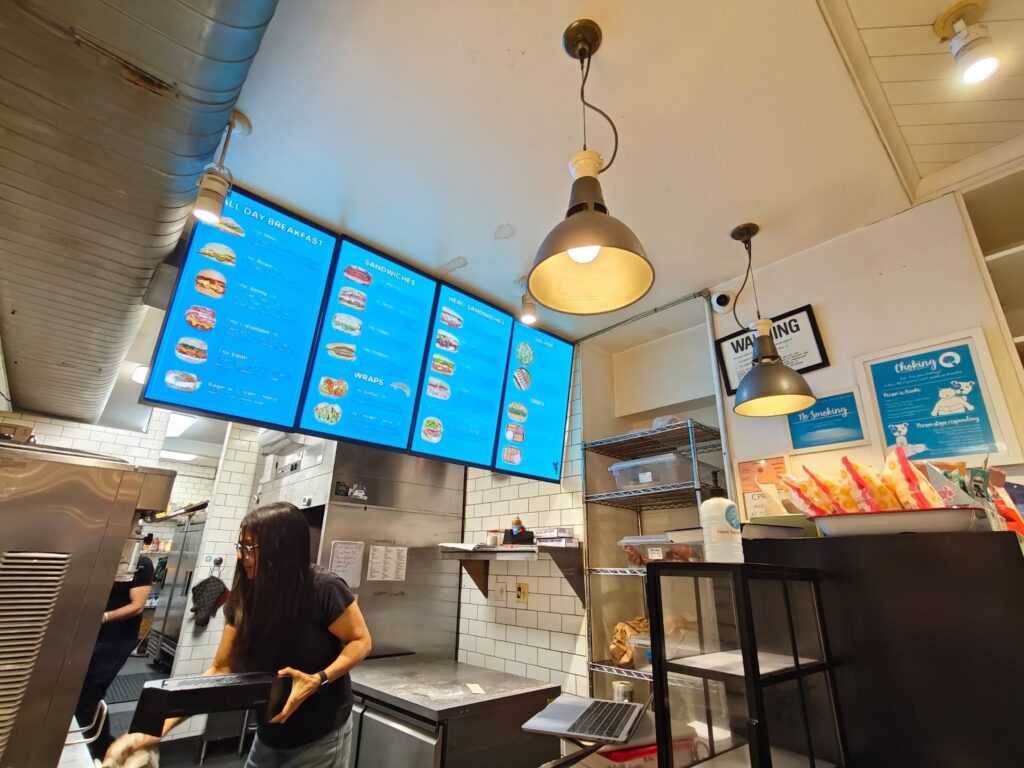
Digital menu boards don’t boost sales by accident. They give you control over two powerful levers that printed menus can’t touch: when you show products and how you price them. Coffee shops using these capabilities strategically see immediate increases in average transaction values and margin improvements on high-profit items.
The difference comes down to flexibility. Static menus show the same information at 7 AM and 7 PM. Digital displays adapt based on time, inventory levels, and business goals.
Dynamic Pricing That Responds to Demand
Your costs fluctuate. Milk prices rise, coffee beans cost more during shortages, and peak hours put strain on labor. Digital menu boards let you adjust pricing to match these realities without reprinting anything.
Daypart pricing is the most common strategy NYC coffee shops implement. Morning rush prices reflect higher demand and operational costs. Afternoon prices drop slightly to drive traffic during slower periods. Evening pricing can promote specific items you want to move before closing.
This pricing flexibility works because customers already expect price variations across different times and contexts. They pay more for the same coffee at an airport or during peak hours at popular restaurants. Coffee shops using digital displays can apply the same logic.
Time-based pricing strategies:
- Morning premium pricing during 7-9 AM when lines are longest, and customers are least price-sensitive
- Afternoon discounts on specific drinks to fill capacity gaps between 2-4 PM
- Happy hour promotions that auto-activate at designated times to drive evening traffic
- Weekend pricing adjustments that reflect different customer volumes and behavior patterns
The beauty of digital pricing is that you can test different approaches and measure results. Run higher prices on specialty drinks for two weeks, track sales volume and revenue, then adjust based on actual data instead of guessing.
Strategic Product Placement Drives Higher Margins
Print menus organize items logically but statically. Digital displays let you reorganize menu layouts based on what you want to sell at any given moment.
Eye-tracking research shows customers scan digital menus in predictable patterns. The top-right quadrant gets the most attention, followed by the center positions. Coffee shops using digital displays place their highest-margin items in these prime positions.
Menu engineering tactics that work:
| Strategy | Implementation | Revenue Impact |
| Feature rotation | Spotlight different drinks every 2-3 hours | Increases trial of premium items |
| Size emphasis | Make large sizes visually prominent | Drives upsizing behavior |
| Add-on highlighting | Display popular customizations near base drinks | Boosts average ticket with extras |
| Seasonal prioritization | Move seasonal items to top positions when launched | Accelerates new product adoption |
| Combo bundling | Group complementary items together visually | Increases multi-item purchases |
You can change these placements remotely based on performance data. If your lavender latte isn’t selling from its current position, move it to a more prominent spot and see if visibility was the problem.
Promotional Content That Adapts Throughout the Day
Digital menu boards can cycle through different promotional messages based on time and customer flow. Morning displays might emphasize speed and convenience. Afternoon screens can promote relaxation and specialty drinks.
This adaptive promotion helps you maximize revenue from different customer segments. Morning commuters respond to efficiency messaging. Afternoon laptop workers respond to ambiance and premium options. Digital displays let you speak to both without compromising your message.
Promotional rotation examples:
- Breakfast sandwich + coffee combos during morning rush
- Pastry and afternoon coffee pairings from 2-5 PM
- Happy hour specials on cold brew and iced drinks in summer evenings
- Weekend brunch drink specials that auto-activate on Saturdays and Sundays
The promotional flexibility extends to inventory management. When you’re overstocked on a particular pastry or ingredient, you can create an instant promotion to move inventory before it expires. No printing costs, no waiting for materials to arrive.
Upselling Through Visual Merchandising
Digital displays make upselling more effective by showing customers what they’re missing. Animations can demonstrate drink customizations, highlight size differences, or showcase add-ons like extra espresso shots or flavor pumps.
This visual merchandising happens automatically without requiring staff intervention. Your baristas focus on making drinks while the screens handle the suggestive selling that increases average transaction values.
Automated upsell opportunities:
- Displaying size comparison graphics when customers approach
- Showing flavor add-on options with pricing after base drink selection
- Highlighting food pairings that complement popular drinks
- Featuring loyalty program benefits that encourage repeat visits
The key advantage is consistency. Every customer sees the same professional upsell presentation regardless of which barista is working or how busy the shop gets. Your best sales tactics scale across every transaction.
Testing Menu Changes Without Risk
Print menus force you to commit before you know if something works. Digital displays let you test menu changes on a small scale before rolling them out permanently.
Want to see if customers respond better to “Cold Brew” or “Iced Coffee” descriptions? Test both and measure sales. Curious if listing calorie counts affects purchasing behavior? Try it on half your screens and compare results.
Low-risk testing capabilities:
- A/B test different menu layouts across morning and afternoon periods
- Trial new pricing structures for a week before committing
- Test promotional messaging variations to see what drives conversions
- Experiment with product descriptions and names to optimize appeal
This testing capability removes the risk from menu optimization. You’re making decisions based on actual customer behavior in your specific location rather than industry best practices that might not apply to your market.
Maximizing Revenue Per Square Foot of Screen Space
Every pixel on your digital menu board represents potential revenue. Coffee shops that optimize their screen layouts strategically see better returns than those that simply replicate their old print menu designs.
The screen real estate lets you display more information dynamically. Instead of cramming everything onto one static board, you can rotate through different content sections, giving each product category dedicated visibility time without cluttering the display.
Better screen utilization means customers see more of your menu offerings, leading to broader exploration of your product line instead of defaulting to basic drinks. This exploration drives both higher revenue and better customer satisfaction as people discover items they wouldn’t have noticed on a crowded print menu.
What You’ll Actually Pay for Digital Menu Boards in NYC
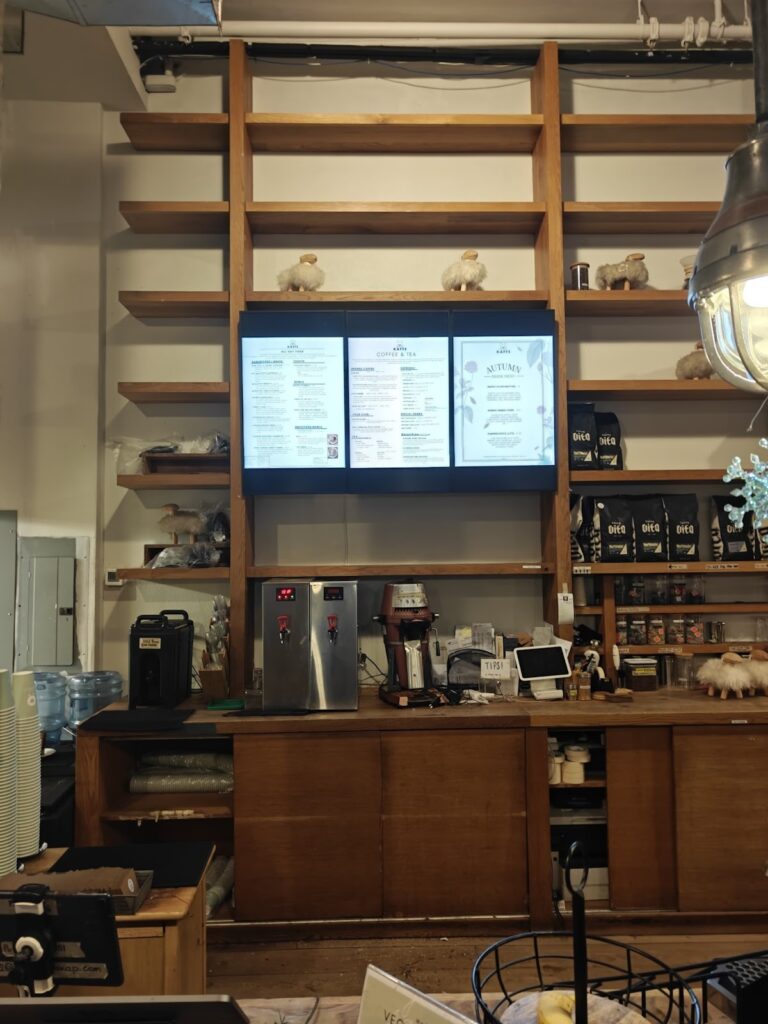
The sticker shock of digital signage solutions disappears when you break down the costs against what you’re already spending on traditional paper menus. Most NYC coffee shops spend between $2,500 and $8,000 per location for a complete digital menu board system, depending on screen size, quality, and installation complexity.
That upfront investment replaces recurring expenses that run $1,200 to $3,000 annually. The math works out in your favor within the first 18 to 24 months, and everything after that is pure savings plus the revenue benefits from dynamic content. For many café owners, embracing digital menu boards isn’t just a trend; it’s a game-changer for operational efficiency and profitability.
Hardware Investment Breakdown
Your hardware costs depend on screen size, resolution, and how many displays you need. A single-location café in Astoria typically needs 1-2 screens behind the counter, while a multi-location operation in Manhattan might install 3-4 screens per shop to cover different angles and customer flows.
Core hardware components and typical costs:
| Component | Budget Option | Mid-Range | Premium |
| Commercial display (43″-55″) | $400-$700 | $800-$1,200 | $1,500-$2,500 |
| Digital signage media player | $150-$250 | $300-$500 | $600-$900 |
| Mounting hardware | $50-$100 | $100-$200 | $200-$400 |
| Cables and connectors | $30-$60 | $60-$100 | $100-$150 |
Commercial-grade displays cost more than consumer TV screens but last longer and handle continuous operation better. Coffee shops in high-traffic areas like Union Square or Downtown Brooklyn run their screens 12-16 hours daily. Consumer displays fail under that usage pattern within 12-18 months. Commercial screens handle it for 5-7 years.
High-resolution displays deliver sharper text and more visually appealing content that customers can read easily from across your café. The visual appeal matters when you’re competing with other coffee shops for customer attention. Premium high-resolution images of your seasonal drinks and breakfast specials look stunning on quality screens and can significantly enhance perceived value.
The media player powers your content and connects to your content management platform. Budget players work fine for basic menu displays. Mid-range and premium options offer better processing power for animations, smoother transitions, and more reliable performance. Effective digital menu boards require reliable hardware that won’t crash during your morning rush when customer engagement peaks.
Software and Subscription Costs
Digital signage platforms charge monthly or annual fees for content management access. These subscriptions cover cloud storage, content scheduling, remote management tools, and software updates. The right platform becomes your centralized control system for menu management across all locations.
Monthly subscription ranges by feature set:
- Basic plans run $10-$30 per screen for simple content scheduling and basic templates
- Professional plans cost $30-$60 per screen with advanced scheduling, analytics, and custom design tools that support a data-driven approach to content optimization
- Enterprise plans start at $60-$100+ per screen for multi-location management, interactive elements, and priority support
Brooklyn coffee shops with 2-3 locations often find that mid-tier plans offer the best value. You get enough features to manage content across locations without paying for enterprise capabilities you won’t use. User-friendly interfaces make it easy to update dinner menus, seasonal specials, and limited-time offers without technical expertise.
Annual subscriptions typically offer 15-20% savings compared to monthly billing. That discount adds up when you’re running multiple screens across locations in Queens and the Bronx.
Installation and Setup Expenses
Installation costs vary wildly based on your café’s layout and existing infrastructure. A straightforward wall mount in a café with nearby power outlets costs less than running new electrical lines across a space.
Installation cost factors:
- Basic installation with existing power and simple mounting runs $200-$500 per screen
- Complex installation requiring electrical work or custom mounting hits $500-$1,200 per screen
- Network setup for WiFi connectivity adds $100-$300 if your existing network needs upgrades
- Content creation for initial menu designs with detailed descriptions and nutritional information costs $300-$800 if you hire a designer
Manhattan locations face higher installation costs due to building regulations and contractor rates. A café in the Financial District might pay 20-30% more for the same installation work compared to a shop in Staten Island.
Some coffee shops handle installation themselves to save costs. If you’re comfortable mounting a display and have reliable WiFi, this approach works. Most owners in areas like Williamsburg or Park Slope hire professionals to avoid mistakes that could damage expensive equipment. Professional installation protects your brand identity and ensures digital screens function properly from day one.
Ongoing Operational Costs
Digital menu boards need minimal ongoing maintenance, but you should budget for occasional expenses beyond your monthly software subscription.
Annual operational expenses to plan for:
| Expense Category | Annual Cost Range |
| Software subscription | $240-$1,200 per screen |
| Electricity (per screen) | $40-$80 |
| Internet connectivity | $0-$300 (if dedicated connection needed) |
| Content updates/design | $0-$1,200 (if outsourced) |
| Hardware maintenance/repairs | $100-$400 |
Electricity costs stay low because modern commercial displays use LED backlighting. A 55-inch display running 12 hours daily adds roughly $5-$7 monthly to your electric bill. Spread across multiple screens, you’re looking at less than what you’d spend on a single day’s coffee inventory. The environmental impact of digital displays is lower than constantly printing and discarding paper menus.
Internet connectivity typically uses your existing WiFi network. Coffee shops in areas with reliable broadband, like Midtown Manhattan or Long Island City, face no additional costs. Locations with spotty internet might need dedicated connections, adding to monthly expenses.
Cost Variations Across NYC Locations
Your total implementation cost shifts based on where your café operates. Real estate costs, contractor rates, and installation complexity all vary by neighborhood and borough. Understanding sales trends in your specific area helps you project ROI more accurately.
Borough-specific cost considerations:
- Manhattan installations run 20-40% higher due to premium contractor rates and building access challenges
- Brooklyn costs stay closer to NYC averages, with variations between neighborhoods like DUMBO and Sunset Park
- Queens offers more competitive installation rates, making it attractive for multi-location rollouts
- Bronx locations benefit from lower contractor costs while maintaining access to quality installers
- Staten Island presents the lowest installation costs, but may have fewer specialized digital signage installers
Building type matters too. Installing screens in a historic building in Greenwich Village requires more planning and potentially custom solutions compared to a modern retail space in Hudson Yards. Factor in extra time and budget if your café operates in an older building with unique requirements.
Comparing Total Cost of Ownership
Smart financial planning looks beyond initial investment to total cost over the system’s lifespan. Digital menu boards typically last 5-7 years before requiring hardware replacement. This transition away from traditional menu boards delivers many benefits that compound over time.
5-year cost comparison:
| Cost Category | Digital Signage | Traditional Print |
| Initial investment | $3,500-$8,000 | $500-$1,200 |
| Annual recurring costs | $500-$2,000 | $1,200-$3,000 |
| Five-year total | $6,000-$18,000 | $6,500-$16,200 |
The numbers show comparable total costs over five years, but digital signage delivers additional revenue through dynamic pricing and better product visibility. That revenue advantage isn’t captured in these cost comparisons but significantly impacts actual return on investment. Enhancing customer experiences through better visual communication drives food sales and supports high-quality service that keeps customers returning.
Financing and Payment Options
The upfront cost deters some coffee shop owners from making the switch. Several financing approaches spread out payments and reduce the initial cash requirement.
Common financing structures:
- Equipment financing through vendors spreads payments over 24-36 months
- Business credit lines cover initial costs while you prove ROI
- Lease-to-own programs eliminate large upfront payments
- Revenue-sharing models where vendors take a percentage of increased sales
Coffee shops in competitive NYC markets like SoHo or the Upper East Side often finance their digital signage implementation rather than paying cash up front. This approach preserves working capital for inventory and staffing while still modernizing your menu system. Maintaining a competitive edge in the restaurant industry is increasingly important as more cafés upgrade their technology.
Hidden Savings That Reduce Effective Costs
The cost breakdown above tells only part of the story. Digital menu boards eliminate several hidden expenses that drain your budget throughout the year. They streamline operations and improve how restaurants present their offerings to customers.
Costs you stop paying:
- Emergency reprints when prices change unexpectedly
- Rush fees for last-minute promotional materials
- Designer fees for every menu update or seasonal refresh
- Shipping and delivery costs for printed materials
- Staff time spent manually updating paper menu inserts
- Disposal and recycling of outdated printed menus
These avoided costs reduce your effective implementation cost. The system also helps you make informed decisions about which food items drive impulse purchases and which promotional tactics work best during different dayparts.
Better ordering process efficiency means you serve more customers during peak hours, directly impacting your bottom line. Digital displays give you the tools to improve your brand image while making content updates simple and instant.
Selecting a Digital Signage Platform That Grows With Your Café
Picking the wrong digital signage platform costs you more than money. You’ll waste hours fighting clunky interfaces, struggle with limited features as your business expands, and potentially need to rip everything out and start over when the system can’t scale.
The right platform becomes invisible infrastructure that works reliably while you focus on running your coffee shop. You update menus in seconds, manage multiple locations from one dashboard, and never worry about technical failures during your morning rush.
Core Features That Separate Good Platforms From Bad
Not all digital signage softwares are built the same. Some platforms excel at basic menu displays but fall apart when you need advanced scheduling or analytics. Others offer enterprise features you’ll never use while charging premium prices.
Must-have platform capabilities:
- Cloud-based management lets you update content from anywhere using your phone or laptop
- Drag-and-drop content editors eliminate the need for design skills or technical knowledge
- Scheduling tools automate content changes based on time, day, or custom triggers
- Template libraries give you pre-built menu designs you can customize instead of starting from scratch
- Multi-screen support manages all your displays from a single interface
- Real-time updates push content changes to screens instantly without delays
Basic platforms offer these core features but limit how many screens you can manage or restrict advanced options. Professional-grade systems add analytics, A/B testing capabilities, and integration with other business tools.
User Interface and Learning Curve Considerations
You’ll interact with your digital signage platform daily. A confusing interface slows you down and frustrates staff members who need to make quick updates.
The best platforms feel intuitive from day one. You should be able to update a price, swap an image, or schedule new content within minutes of logging in for the first time. If the demo requires an hour-long training session to perform basic tasks, keep looking.
Interface evaluation criteria:
| Feature | Why It Matters | Red Flags |
| Content upload process | You’ll do this constantly | More than 3-4 clicks to upload an image |
| Preview functionality | Catch errors before publishing | No preview or preview doesn’t match the actual display |
| Schedule management | Plan content in advance | Confusing calendar interface or limited options |
| Mobile responsiveness | Update on the go | Desktop-only access or broken mobile interface |
| Search and organization | Find content quickly as the library grows | No tagging system or search function |
Test the platform yourself during the demo period. Upload actual menu content, schedule it, and see how it displays on screens. You’ll discover usability issues that don’t appear in sales presentations.
Reliability and Uptime Requirements
Your digital menu boards need to work during your busiest hours. Platform downtime means blank screens and confused customers trying to order without seeing your menu.
Professional digital signage platforms maintain 99.5% or higher uptime. They use redundant servers, automatic failover systems, and robust infrastructure that keeps content displaying even during internet disruptions.
Reliability factors to verify:
- Offline playback capability keeps the last-known content displaying if the internet drops temporarily
- Automatic recovery reconnects and updates content when connectivity returns
- Server redundancy prevents single points of failure that could take your system down
- Content caching stores recent content locally on media players for backup display
Ask potential vendors about their uptime history and what happens during outages. Companies with strong track records will share specific numbers and explain their redundancy systems. Vague answers suggest reliability problems.
Scalability for Multi-Location Growth
Single-location coffee shops often expand. Your digital signage platform should scale smoothly from one café to ten without requiring system changes or forced migrations to different products.
Scalable platforms use the same interface for managing one screen or one hundred. You add new locations by registering additional displays and assigning content to them. No architectural changes, no new learning curves, no data migrations.
Scalability checklist:
- Can you manage unlimited locations from one account?
- Does pricing stay reasonable as you add more screens?
- Can you group locations by region, concept, or other categories?
- Do you have location-specific and company-wide content options?
- Can different staff members manage different locations with permission controls?
Test scalability by asking vendors how their largest coffee shop client uses the system. Look for examples of businesses that started small and grew significantly while staying on the same platform.
Integration With Existing Business Systems
Your digital signage shouldn’t exist in isolation. The best platforms connect with your POS system, inventory management, loyalty programs, and other tools you already use.
These integrations automate content updates based on real business data. Your menu can automatically highlight items you’re overstocked on, remove sold-out products, or adjust pricing based on POS data without manual intervention.
Valuable integration capabilities:
- POS system connections sync pricing and product availability automatically
- Inventory management links adjust menu offerings based on stock levels
- Social media feeds display customer reviews or Instagram content
- Weather data integration promotes relevant products based on current conditions
- Analytics platform connections track menu performance alongside other business metrics
Not every café needs all these integrations immediately, but having the option matters as your operations become more sophisticated. Platforms that don’t support integrations lock you into manual processes that limit efficiency.
Content Creation Support and Resources
You’ll need fresh content regularly to keep menus current and engaging. Some platforms leave you on your own. Others provide templates, design tools, and professional services that make content creation manageable.
Content support options to evaluate:
| Support Type | What You Get | Best For |
| Template library | Pre-designed layouts you customize | DIY content creation |
| Design tools | Built-in editors for creating from scratch | Shops with design skills |
| Stock media access | Photos, videos, and animations included | Quick professional-looking content |
| Professional services | Designers create custom content | Premium branding needs |
| Training resources | Tutorials, webinars, documentation | Learning platform capabilities |
Coffee shops without design experience benefit most from platforms offering extensive template libraries and easy customization tools. You get professional results without hiring designers or learning complex software.
Technical Support Quality and Availability
Technical problems happen. Your digital signage vendor’s support team determines how quickly you get back online when something breaks.
Premium support includes phone access, fast response times, and technicians who understand both the software and the coffee shop context. Budget providers offer email-only support with slow response times that leave you stuck during critical periods.
Support expectations to establish:
- Support hours that match your operating schedule
- Multiple contact methods, including phone and chat
- Average response times for different issue types
- On-site support availability for hardware problems
- Dedicated account management for multi-location clients
Ask about support during your demo period. Call the support line and see how long you wait. The experience you have as a prospect reflects what you’ll get as a customer.
Pricing Transparency and Contract Terms
Hidden fees and restrictive contracts create problems down the road. The best vendors show you total costs upfront and offer flexible terms that let you scale or exit if the platform doesn’t meet expectations.
Watch for pricing that starts low but adds charges for every feature you actually need. A $20 per month base price looks attractive until you discover that scheduling costs extra, analytics cost extra, and integration capabilities require enterprise pricing.
Pricing red flags to avoid:
- Set up fees that exceed hardware costs
- Per-feature pricing that makes basic functionality expensive
- Automatic renewal clauses without opt-out windows
- Penalties for reducing screen counts or pausing service
- Ownership claims on your content or designs
Read contracts carefully before signing. Some vendors lock you into multi-year commitments with hefty early termination fees. Others offer month-to-month terms that let you change direction if your needs shift.
Finding a Platform Built for NYC Coffee Shops
Coffee shops throughout New York have specific needs that general-purpose digital signage platforms don’t always address well. You need systems that handle multiple locations across different boroughs, work reliably in older buildings with quirky electrical systems, and provide local support when problems occur.
CrownTV has powered digital signage for NYC businesses for over 13 years, serving coffee shops alongside retail stores, restaurants, and corporate offices across all five boroughs. The platform includes everything discussed above:
- Cloud-based management
- Intuitive interfaces
- Robust reliability
- Seamless scalability
- Technical support teams that can reach your location quickly when needed
The company manages over 13,000 active displays for more than 1,700 businesses, giving them extensive experience with multi-location deployments and the technical challenges that come with NYC operations. Their dashboard lets you control every screen from your phone, their app store offers hundreds of integrations, and their support team understands the specific needs of coffee shops managing fast-paced service environments.
Coffee shops looking for a platform that combines enterprise reliability with local service find that established NYC providers deliver better results than national platforms without local presence. You get the same technology powering large corporate deployments, but with support teams who understand your specific market and can solve problems without putting you on hold with distant call centers.
Your Menu System Shouldn’t Hold Back Revenue
NYC coffee shops making the switch to digital menu boards aren’t chasing trends. They’re eliminating recurring print costs, capturing revenue through dynamic pricing, and building operational flexibility that scales across multiple locations. The shops that are still running printed menus are leaving money on the table every single day.
Here’s what you can achieve once you make the move:
- Cut your annual menu costs by 60-80% while gaining instant update capabilities that printed boards can’t match at any price point
- Increase average transaction values by 15-25% through strategic product placement and automated upselling that works consistently across all shifts
- Launch price changes across all locations in under 60 seconds, instead of waiting days for print shops and coordinating manual updates with staff
- Test different menu layouts and pricing strategies risk-free using real customer data to optimize what you show and when you show it
- Respond to inventory changes instantly by promoting overstocked items or removing sold-out products without leaving outdated information on display
- Scale from one café to ten locations using the same management dashboard without system migrations or operational complexity
CrownTV makes these outcomes standard operations rather than aspirational goals. The platform handles everything from basic menu displays to sophisticated multi-location deployments, with local NYC support teams who understand your specific operational challenges. Get a quote or call at +347.410.6890 to see how quickly you can move past printed menus.
