

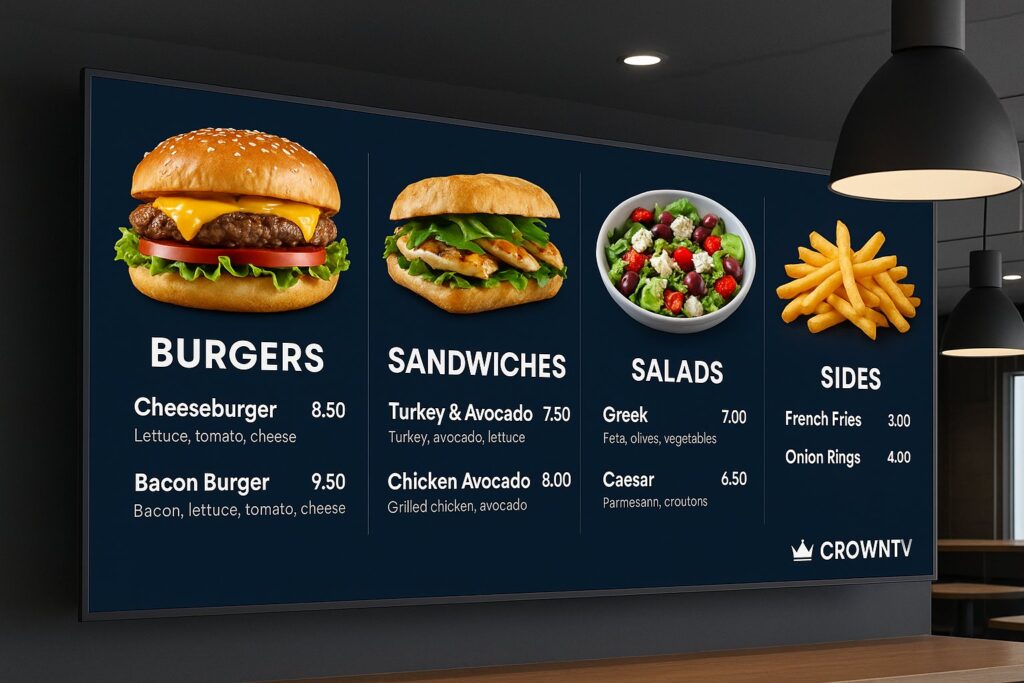
The days of printing new menus every time a price changes or a seasonal item rotates in are fading fast. A digital menu board replaces static signage with dynamic, screen-based displays that let restaurants, QSRs, and multi-location food businesses update content in real time, from pricing to promotions to calorie counts.
Whether it’s a single café or a 500-unit franchise, digital menu displays are now central to how modern food-service brands communicate with customers. They speed up ordering, reduce perceived wait times, and give operators granular control over what appears on screen and when.
This guide breaks down what a digital menu board actually is, why it outperforms traditional signage, the top solutions available in 2026, and what features matter most for multi-location deployments.
Digital Signage: What Is a Digital Menu Board?
A digital menu board is an electronic display, typically an LCD or LED commercial-grade screen, used to showcase menu items, prices, images, and promotions in a restaurant or food-service environment. Instead of printed posters behind the counter, operators use digital menu board software to design, schedule, and push content to one screen or thousands.
At its core, the setup involves three components:
- Display hardware – Commercial-grade screens built for extended use (often 16+ hours per day).
- Media player – A small device that connects to the screen and renders content.
- Cloud-based CMS – Software that lets managers create layouts, update pricing, and schedule content remotely.
For multi-location businesses, the cloud element is critical. A corporate team can push a new limited-time offer to every location simultaneously, or let individual store managers adjust items based on local inventory. That flexibility is what separates a restaurant digital menu board from a basic TV with a USB stick.
Regulatory compliance adds another layer. In the U.S., the FDA’s menu labeling rule requires chains with 20 or more locations to display calorie information. Digital menu displays handle this seamlessly, calorie counts update automatically alongside pricing, eliminating the risk of outdated printed materials.
Benefits of Digital Menu Boards Over Static Menus
Switching from printed signage to an electronic menu board isn’t just a cosmetic upgrade. The operational and revenue advantages compound quickly, especially at scale.
- Real-time pricing updates – Ingredient costs fluctuate. Digital boards let operators adjust prices across every location instantly, protecting margins without reprinting anything.
- Dayparting schedules – Breakfast, lunch, dinner, and late-night menus rotate automatically based on time of day. No staff intervention needed.
- Faster content deployment – New promotions, seasonal items, or calorie count compliance updates go live in minutes, not weeks.
- Increased upselling – Motion graphics and high-resolution food photography draw attention to high-margin items. Studies consistently show digital menus lift average check size by 3–5%.
- Reduced print costs – For a 100-location chain printing new menu boards quarterly, the savings alone can justify the switch within a year.
- Brand consistency – Corporate-approved templates ensure every franchise location presents the same look, fonts, and messaging.
- Environmental impact – Less paper, less waste. It’s a straightforward sustainability win.
For QSRs and fast-casual brands, the ability to run dayparting schedules is especially valuable. A breakfast-heavy concept like a juice bar chain, think Pressed or similar brands, can automatically transition from morning smoothie bowls to afternoon açaí specials without anyone touching a remote.
Top 8 Digital Menu Board Solutions for 2026
Choosing the right digital menu board for restaurants depends on deployment size, content complexity, and how much hands-on management the team wants to handle. Here are the top solutions heading into 2026:
| Rank | Solution | Best For | Key Strength |
|---|---|---|---|
| 1 | CrownTV | Multi-location & franchise deployments | Turnkey hardware + software + nationwide installation |
| 2 | Skykit | Enterprise digital signage | Device management and analytics |
| 3 | Menuboard Manager | Restaurant-specific workflows | Menu-centric templates |
| 4 | NoviSign | Small to mid-size restaurants | Affordable cloud-based CMS |
| 5 | Pickcel | Budget-conscious chains | Free tier with solid features |
| 6 | Yodeck | Simple, plug-and-play setups | Raspberry Pi-powered player |
| 7 | Rise Vision | Education and cafeteria environments | Free for schools |
| 8 | ScreenCloud | Teams already using Slack/Teams integrations | App-based content ecosystem |
1. CrownTV
CrownTV takes the top spot because it eliminates the biggest headache in digital signage: fragmented deployment. Most solutions sell software and leave businesses to source their own screens, hire installers, and troubleshoot compatibility. CrownTV handles all of it, commercial-grade displays, a compact media player, cloud-based dashboard, and licensed technicians for nationwide installation. For multi-location restaurant brands, that end-to-end approach saves months of coordination. The platform supports real-time pricing updates, calorie count compliance, and dayparting schedules out of the box.
2. Skykit
Skykit targets enterprise-scale deployments with strong device management and analytics. It works well for organizations that already have IT teams comfortable managing signage infrastructure.
3. Menuboard Manager
Purpose-built for restaurants, Menuboard Manager offers pre-designed menu templates and integrations with popular POS systems. It’s a solid mid-market pick.
4. NoviSign
NoviSign’s drag-and-drop editor makes it approachable for small restaurant operators who don’t want to learn complex software. Pricing is competitive for single or few-location setups.
5. Pickcel
Pickcel offers a generous free tier and scales reasonably for growing chains. Its app marketplace adds versatility beyond just menus.
6. Yodeck
Yodeck pairs affordable Raspberry Pi media players with a clean interface. It’s ideal for single-location cafés or food trucks that want digital menu displays without a big upfront investment.
7. Rise Vision
Primarily known in the education space, Rise Vision’s free option makes it attractive for school cafeterias and campus dining halls that need basic digital menu board software.
8. ScreenCloud
ScreenCloud shines when teams want to pull in content from existing tools, Google Sheets for pricing, Canva for design, or social feeds for engagement. It’s flexible but requires more DIY setup.
For businesses evaluating display hardware separately, Samsung’s commercial display lineup offers panels specifically engineered for signage environments, high brightness, slim bezels, and 24/7 reliability.
Digital Menu Board Features to Look For
Not every digital menu board solution is built the same. When evaluating options, particularly for multi-location or franchise use, these features separate capable platforms from basic slideshow tools:
- Cloud-based content management – The ability to update any screen, anywhere, from a single dashboard is non-negotiable for chains and franchises.
- Dayparting and scheduling – Menus should switch automatically by time of day. Breakfast items at 6 AM, lunch at 11, dinner at 4. No manual toggling.
- Real-time pricing control – When avocado prices spike or a promo kicks in, pricing should update across all locations instantly.
- Calorie and nutritional display – FDA compliance means calorie counts need to be accurate and current. The software should tie nutritional data directly to menu items.
- Template library – Pre-built, customizable layouts speed up content creation. Not every restaurant has a graphic designer on staff.
- POS integration – Syncing with point-of-sale systems keeps menu availability and pricing consistent between the ordering system and what’s on screen.
- Remote monitoring – Knowing which screens are online, what content is playing, and whether a player has gone offline matters at scale.
- Multi-zone layouts – Splitting a screen into zones, main menu on top, promotions on the bottom, a scrolling ticker for specials, maximizes the value of each display.
Restaurant digital menu board buyers should also consider hardware compatibility. Some software locks users into proprietary players, while others support a range of commercial displays and media devices.
How to Design an Effective Digital Menu Board
Great hardware and software mean little if the on-screen design confuses customers or buries the items a business wants to sell. Here are practical design principles for an effective digital menu display:
Keep It Scannable
Customers standing in line typically look at a menu board for 3–5 seconds before deciding. Use large fonts, clear category groupings, and enough white space so items don’t blur together. Avoid cramming 80 items onto one screen.
Prioritize High-Margin Items
Place the most profitable items in the top-left or center of the layout, the areas where eyes land first. Use subtle highlights, borders, or larger images to draw attention without making the design feel cluttered.
Use Motion Sparingly
Animated transitions and video loops grab attention, but overdoing motion makes the board harder to read. A gentle fade between dayparts or a brief animation on a featured combo works well. Full-screen video ads playing on loop? Less so.
Maintain Brand Consistency
Colors, fonts, and photography style should match the brand’s identity across all locations. Centralized templates in the digital menu board software prevent rogue franchise locations from going off-brand.
Display Calorie Counts Clearly
Beyond compliance, transparent calorie information builds trust. Place counts directly next to item names and prices in a consistent format so customers don’t have to hunt for them.
Test and Iterate
One of the biggest advantages of electronic menu boards over print is the ability to A/B test. Try different layouts, item placements, or promotional graphics and measure what drives higher sales.
CrownTV’s Digital Menu Board System
CrownTV’s approach to digital menu boards stands apart because it’s genuinely turnkey. Where most providers sell software and leave everything else to the buyer, CrownTV delivers the full stack:
- Commercial-grade displays sourced for brightness, durability, and slim-profile mounting.
- CrownTV media player – A compact, powerful device that connects to any commercial display and renders content smoothly.
- Cloud-based dashboard – Manage every screen across every location from one login. Push real-time pricing updates, swap seasonal menus, and set dayparting schedules in a few clicks.
- Nationwide installation – Licensed technicians handle mounting, wiring, and configuration on-site. No third-party coordination needed.
- Calorie count compliance – Built-in tools make it straightforward to display and update nutritional information alongside menu items, keeping multi-location brands aligned with FDA labeling requirements.
For franchise operators and multi-location restaurant brands, that single-vendor accountability eliminates finger-pointing between hardware suppliers, software providers, and AV installers. Everything is CrownTV’s responsibility, from the screen on the wall to the content playing on it.
The platform also supports integration with a wide ecosystem of apps and widgets, so businesses can layer in social media feeds, weather-triggered promotions, or live wait-time displays alongside their menus.
Brands like Pressed juice bar and other multi-location food concepts benefit from the centralized control that CrownTV provides, one dashboard managing hundreds of digital menu displays without requiring IT staff at every site.
FAQ: Digital Menu Boards
How much does a digital menu board cost?
Costs vary based on screen size, software licensing, and installation complexity. A single-screen setup can start around $500–$1,500 for hardware and first-year software. Multi-location deployments benefit from volume pricing, turnkey solutions like CrownTV bundle hardware, software, and installation for a more predictable per-location cost.
Can I update menu prices remotely?
Yes. Any modern digital menu board software includes cloud-based management, which means real-time pricing updates can be pushed from anywhere with an internet connection. This is especially critical for multi-location businesses managing fluctuating ingredient costs.
Do digital menu boards help with FDA calorie labeling compliance?
Absolutely. Restaurant chains with 20+ locations are required to display calorie information. A restaurant digital menu board makes compliance easier by tying calorie data directly to menu items so updates happen automatically when menus change.
What screen size works best for a restaurant menu board?
Most QSRs and fast-casual restaurants use 43″ to 55″ commercial displays. Drive-throughs often go larger, 65″ or 75″. The right size depends on viewing distance, mounting height, and how much content needs to appear on screen. Samsung commercial display options offer a range of sizes designed for signage environments.
How long do digital menu boards last?
Commercial-grade displays are built for 50,000+ hours of operation, roughly 8–10 years of daily use. Consumer TVs, by comparison, aren’t rated for the extended run times that restaurant environments demand.
Can I schedule different menus for different times of day?
Yes. Dayparting is a standard feature in most digital menu board platforms. Breakfast, lunch, dinner, and late-night menus can rotate automatically on a set schedule without any manual intervention.
Last Updated: March 2026
Frequently Asked Questions About Digital Menu Boards
What is a digital menu board and how does it work?
A digital menu board is an electronic display system that replaces printed signage with dynamic screens to showcase menu items, prices, and promotions. It consists of commercial-grade displays, a media player device, and cloud-based software that lets managers update content in real time across one or multiple locations.
How much do digital menu boards cost for restaurants?
Single-screen setups range from $500–$1,500 for hardware and first-year software. Multi-location deployments benefit from volume pricing and turnkey solutions that bundle hardware, software, and installation. Costs vary by screen size, complexity, and provider.
Can I update menu prices remotely on a digital menu board?
Yes. Cloud-based digital menu board software enables real-time pricing updates from anywhere with internet access. This is critical for multi-location businesses managing fluctuating ingredient costs and running promotions across all locations simultaneously.
Do digital menu boards help with FDA calorie labeling compliance?
Absolutely. Restaurant chains with 20+ locations must display calorie information. Digital menu boards simplify compliance by automatically updating calorie counts alongside menu items, reducing the risk of outdated printed materials and ensuring accuracy.
What are the main benefits of switching from printed menus to digital menu boards?
Benefits include real-time pricing updates, automatic dayparting schedules, faster content deployment, increased upselling (3–5% avg. check size lift), reduced print costs, brand consistency across locations, and environmental sustainability through less paper waste.
Can digital menu boards display different menus at different times of day?
Yes. Dayparting is a standard feature in modern digital menu board platforms. Breakfast, lunch, dinner, and late-night menus rotate automatically on a set schedule without manual intervention, perfect for QSRs and fast-casual concepts.
