

A digital signage media player is the engine behind every screen in a retail store, restaurant, hospital lobby, or corporate office. It’s the piece of hardware that takes content, videos, menus, dashboards, promotions, and pushes it to the display in real time. Choose the wrong one, and businesses deal with frozen screens, sluggish playback, and constant IT headaches. Choose the right one, and content runs seamlessly across hundreds of locations without a second thought.
For multi-location businesses evaluating their options, the landscape in 2026 offers more choices than ever: System-on-Chip displays, dedicated external players, and everything in between. This guide breaks down the best media player for digital signage deployments, compares SoC versus external hardware, and highlights the key specs that matter most for commercial environments. Whether the goal is powering a single lobby screen or managing 13,500+ displays nationwide, the right digital signage media player makes all the difference.
What Is a Digital Signage Media Player?
A digital signage media player is a dedicated hardware device that connects to a commercial display and delivers scheduled content, images, video, HTML widgets, live data feeds, according to instructions from a content management system (CMS). Think of it as the brain of the operation: the display is the face, the CMS is the command center, and the player is what actually executes the playback.
Unlike consumer streaming sticks or generic PCs, a commercial media player is purpose-built for continuous operation. It’s designed to run 24/7, handle 4K content without stuttering, and recover automatically from power outages or connectivity drops. That reliability matters when a restaurant chain has 200 digital menu boards that need to display accurate pricing at all times, or when a hospital network depends on wayfinding screens that can’t afford downtime.
At a basic level, digital signage player hardware falls into two categories:
- System-on-Chip (SoC): A processor built directly into the display itself, no external box needed.
- External media player: A standalone device (typically a small box) connected to the display via HDMI.
Both approaches have trade-offs, and the best choice depends on the deployment’s scale, content complexity, and budget.
SoC vs. External Media Players: Which Is Right for You?
This is one of the most common decisions businesses face when speccing out a signage deployment. Here’s how the two approaches stack up.
System-on-Chip (SoC) Players
SoC displays, offered by manufacturers like Samsung (Tizen), LG (webOS), and others, embed a basic media player directly into the screen’s hardware. There’s no extra box to mount, no additional power cable, and fewer points of failure in theory.
Best for: Simple content like static images, basic video loops, and single-zone layouts. SoC works well for small deployments where content complexity is low.
Limitations: Processing power is typically modest. SoC chipsets struggle with multi-zone layouts, interactive content, 4K video at high bitrates, and advanced scheduling logic. Firmware updates depend on the display manufacturer’s timeline, and if the SoC chip fails, the entire display often needs replacement.
External Media Players
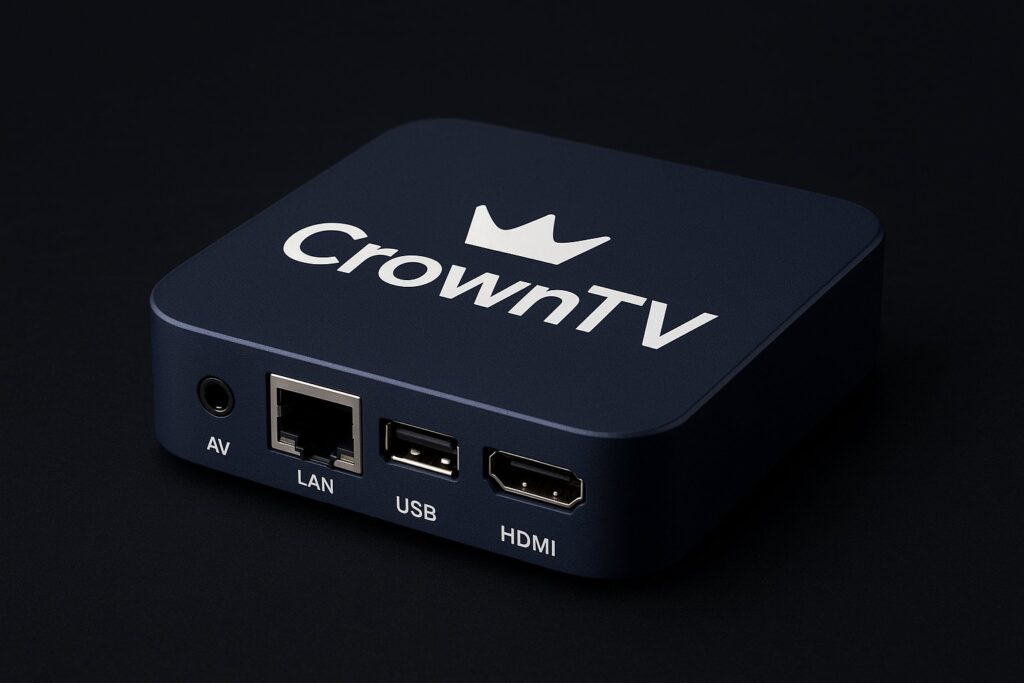
An external signage media player is a standalone device, ranging from compact boxes like CrownTV’s proprietary player to options like BrightSign or even Raspberry Pi setups. These connect to any commercial display via HDMI.
Best for: Multi-location deployments, complex content strategies, dual-display setups, and environments that demand rock-solid uptime.
Advantages: More processing headroom, independent hardware upgrades (swap the player without replacing the screen), broader CMS compatibility, and remote management capabilities.
| Feature | SoC (Built-In) | External Player |
|---|---|---|
| Setup complexity | Lower, no extra device | Moderate, requires mounting |
| Processing power | Limited | Higher, especially dedicated units |
| Content flexibility | Basic to moderate | Advanced (4K, multi-zone, interactive) |
| Hardware upgrades | Tied to display lifecycle | Independent, swap player anytime |
| Remote management | Varies by manufacturer | Typically robust with CMS pairing |
| Cost per screen | Lower upfront | Slightly higher, better long-term ROI |
For multi-location businesses running dynamic content across dozens or hundreds of screens, external players almost always win on flexibility and manageability.
Top 7 Digital Signage Media Players for 2026
Choosing the best media player signage teams can rely on means balancing performance, scalability, cost, and ecosystem compatibility. Here are seven standout options for commercial deployments this year.
1. CrownTV Media Player
CrownTV’s proprietary player is purpose-built for their turnkey digital signage ecosystem. It supports 4K output, dual-display connectivity, and automatic recovery after power loss, meaning screens come back online without manual intervention. With over 13,500 screens deployed across the U.S., it’s proven at scale. The player pairs seamlessly with CrownTV’s cloud-based dashboard, giving operators centralized control over every location from a single interface.
2. BrightSign HD1025
BrightSign remains a well-known name in digital signage player hardware. The HD1025 handles 4K HDR video and supports HTML5 content. It’s solid for standalone deployments, though managing large multi-location networks typically requires a separate CMS subscription.
3. BrightSign XD1035
A step up from the HD series, the XD1035 adds more processing power and supports interactive content via serial/GPIO and USB. It targets higher-complexity use cases like interactive kiosks and multi-zone layouts.
4. Chromebox (ASUS/Acer for Signage)
Chrome OS-based devices offer a familiar ecosystem and decent performance for cloud-based signage platforms. They work well for businesses already invested in Google’s infrastructure but can require more IT oversight for large deployments.
5. Intel NUC (Mini PC)
Intel’s NUC line provides Windows- or Linux-based mini PCs with strong processing capabilities. They’re versatile but tend to be overkill for straightforward signage needs, and they come with a higher price point and more maintenance overhead.
6. Raspberry Pi 5
The Pi remains popular for budget-conscious or experimental setups. At under $100, it’s tempting. But it lacks commercial-grade reliability features like auto-recovery, runs hot under sustained loads, and isn’t really designed for 24/7 commercial use. Fine for a single screen in a low-stakes environment: risky for a 50-location QSR chain.
7. LG webOS Built-In (SoC)
LG’s commercial displays with webOS offer a competent SoC option for simpler content. They eliminate the need for an external box on basic deployments. But as noted above, SoC players hit their ceiling quickly when content gets complex.
| Player | 4K Support | Dual Display | Auto-Recovery | Best For |
|---|---|---|---|---|
| CrownTV Player | ✅ | ✅ | ✅ | Multi-location, turnkey deployments |
| BrightSign HD1025 | ✅ | ❌ | ❌ | Standalone 4K signage |
| BrightSign XD1035 | ✅ | ❌ | ❌ | Interactive kiosks |
| Chromebox | ✅ | Limited | ❌ | Google-ecosystem businesses |
| Intel NUC | ✅ | ✅ | ❌ | High-performance custom setups |
| Raspberry Pi 5 | ✅ (limited) | ❌ | ❌ | Budget/prototype deployments |
| LG webOS SoC | ✅ | N/A | Partial | Simple content, small-scale |
Key Specs: CPU, RAM, Storage, Connectivity
Not all signage media players are created equal, and spec sheets matter more here than many buyers realize. Here’s what to evaluate when choosing a media player for digital signage.
CPU
The processor determines how smoothly content renders. For 4K video playback and multi-zone layouts, look for at least a quad-core ARM or x86 processor. SoC players typically run lower-power chips that handle basic content fine but struggle under heavy loads.
RAM
Minimum 2 GB for basic signage. For commercial environments running HTML5 widgets, live data feeds, or interactive touchscreen content, 4 GB or more is the safer bet. CrownTV’s player and higher-end BrightSign models meet this threshold comfortably.
Storage
Internal storage matters for offline playback, if the network goes down, the player should still display cached content. Look for 8 GB minimum, with 16–32 GB preferred for video-heavy deployments. Devices with expandable storage (microSD, USB) add flexibility.
Connectivity
- Wi-Fi (802.11ac or Wi-Fi 6): Essential for wireless deployments.
- Ethernet (Gigabit): Preferred for stable, high-bandwidth connections in permanent installations.
- HDMI 2.0+: Required for 4K output at 60fps.
- USB ports: Useful for local content loading and peripheral connections.
- Bluetooth: Increasingly relevant for beacon-triggered content in retail.
Businesses deploying across multiple locations should prioritize players with both Wi-Fi and Ethernet, plus remote management capabilities that allow IT teams to troubleshoot without dispatching a technician.
How CrownTV’s Media Player Delivers 24/7 Reliability
Downtime isn’t an option when screens serve as the primary communication channel for customers, patients, or employees. CrownTV designed its proprietary digital signage media player specifically for environments where reliability is non-negotiable.
4K Playback and Dual-Display Output
The player handles 4K resolution natively, ensuring crisp visuals on commercial-grade screens. Dual HDMI output means a single player can power two displays simultaneously, a meaningful cost savings when deploying across retail locations or corporate campuses.
Auto-Recovery
Power flickers. Internet drops. It happens. CrownTV’s player automatically reboots and resumes scheduled content after any interruption, no phone calls to IT, no manual reboots. For franchise operators managing dozens of locations, this feature alone can save hundreds of hours annually.
Proven at Scale: 13,500+ Screens Deployed
CrownTV’s hardware isn’t theoretical, it’s actively running on more than 13,500 screens across retail, QSR, healthcare, and corporate environments nationwide. That deployment scale provides real-world validation that matters far more than any spec sheet benchmark.
Integrated Ecosystem
The player works hand-in-hand with CrownTV’s cloud dashboard, enabling centralized content management, scheduling, and monitoring. Operators can push updates to every screen, or a single location, from one browser tab. Combined with CrownTV’s nationwide installation services using licensed technicians, the entire journey from hardware to live screen is handled under one roof.
This turnkey approach eliminates the patchwork of vendors, compatibility headaches, and finger-pointing that plagues DIY digital signage setups.
Installation and Setup Guide
Getting a digital signage media player from unboxed to operational doesn’t have to be complicated, but cutting corners during setup leads to problems down the road. Here’s a straightforward process.
Step 1: Plan Display Placement and Mounting
Before touching the player, confirm where each screen will go. Consider viewing angles, ambient lighting, power outlet proximity, and network access. Multi-location businesses should standardize placement guidelines across all sites for brand consistency.
Step 2: Connect the Media Player
Mount the player behind or near the display using a VESA mount bracket or secure shelf. Connect via HDMI (use HDMI 2.0 cables for 4K content). Plug in Ethernet for the most reliable connection, fall back to Wi-Fi only when hardwiring isn’t feasible.
Step 3: Register the Device with Your CMS
Power on the player and follow the CMS platform’s pairing instructions. With CrownTV’s system, this typically involves entering a device code into the cloud dashboard, which automatically provisions the player with the correct content playlist and schedule.
Step 4: Upload and Schedule Content
Use the CMS to assign content, videos, images, widgets, menu boards, to each screen or group of screens. Set schedules for dayparting (e.g., breakfast menus in the morning, lunch menus at noon) and configure any location-specific overrides.
Step 5: Test and Monitor
Verify playback on-site. Check for correct resolution output, audio levels (if applicable), and content rotation timing. Then set up remote monitoring alerts so the team gets notified if any player goes offline.
Pro tip: For businesses deploying across 10+ locations simultaneously, CrownTV offers professional installation services with licensed technicians who handle mounting, wiring, player setup, and testing, saving weeks of coordination.
FAQ: Digital Signage Media Players
What is the best media player for digital signage in 2026?
It depends on the deployment’s scale and complexity. For multi-location businesses needing turnkey reliability, CrownTV’s proprietary player stands out with 4K support, dual-display output, auto-recovery, and a proven track record across 13,500+ screens. BrightSign is a solid alternative for standalone setups, while Raspberry Pi works for low-budget prototyping.
Can I use a consumer streaming device like a Fire Stick for signage?
Technically, yes, but it’s not recommended for commercial use. Consumer devices lack auto-recovery, overheat during 24/7 operation, and don’t support centralized remote management. A purpose-built commercial media player is worth the investment for any business-critical deployment.
How many screens can one media player support?
Most commercial signage media players support one display. CrownTV’s player supports dual-display output, powering two screens from a single device. For larger video walls, specialized controllers or daisy-chaining multiple players is the standard approach.
Do I need an internet connection for a digital signage player?
Not constantly. Most quality players cache content locally, so they’ll continue displaying the last-loaded playlist even during an internet outage. But, an active connection is necessary for real-time content updates, remote management, and scheduling changes.
SoC or external player, which costs less long-term?
SoC displays have a lower upfront cost since there’s no separate device to purchase. But external players offer a better long-term ROI because they can be upgraded independently of the display, support more complex content, and provide greater flexibility as signage needs evolve.
Last Updated: March 2026
Frequently Asked Questions About Digital Signage Media Players
What is a digital signage media player and how does it work?
A digital signage media player is dedicated hardware that connects to a commercial display and delivers scheduled content, videos, images, and live data feeds from a content management system (CMS). It’s the brain of the operation—the display is the face, the CMS is the command center, and the player executes the playback.
Should I choose a System-on-Chip (SoC) or an external digital signage media player?
Choose SoC for simple, single-screen deployments with basic content. Choose external players for multi-location businesses, complex content strategies, 4K video, and interactive layouts. External players offer more processing power, independent upgrades, and better long-term ROI despite higher upfront costs.
What are the key specs to look for in a digital signage media player?
Look for a quad-core processor, 4+ GB RAM, 16–32 GB storage for video-heavy deployments, dual connectivity (Ethernet and Wi-Fi), and HDMI 2.0+ for 4K output. Auto-recovery features and remote management capabilities are essential for reliable multi-location deployments.
Can I use a consumer streaming device like a Fire Stick or Roku for commercial digital signage?
No. Consumer devices lack auto-recovery, overheat during 24/7 operation, and don’t support centralized remote management. Purpose-built commercial media players offer reliability, scheduled recovery from outages, and the uptime your business needs for customer-facing screens.
How does a digital signage media player continue displaying content without internet?
Quality commercial media players cache content locally, allowing them to display the last-loaded playlist during internet outages. However, an active connection is necessary for real-time content updates, remote management, and scheduling changes from your CMS.
What is the difference between BrightSign and CrownTV digital signage media players?
BrightSign is a solid standalone option supporting 4K and HTML5 but requires a separate CMS subscription for large networks. CrownTV’s proprietary player is turnkey with integrated cloud management, auto-recovery, dual-display support, and proven reliability across 13,500+ deployed screens nationwide.
